MyTV+
Updated
Current Version
3.15.1
Offered By

Stop worrying about high battery drain when using MyTV+ on your phone. Free yourself from the tiny screen and enjoy the app on a much larger display. From now on, get a full-screen experience of your app with the convenience of a keyboard and mouse. MEmu offers you all the surprising features you’d expect: quick installation and easy setup, intuitive controls, and no more worries about battery life, mobile data, or unexpected calls. The all-new MEmu 9 is the choice for using MyTV+ on your computer. With the MEmu multi-instance manager, you can run two or more accounts at the same time. Most importantly, our exclusive emulation engine unlocks your PC’s full potential, delivering smooth and enjoyable performance.
Show more
Enjoy superb experience of using MyTV+ on PC with MEMU App Player. It's a powerful free Android emulator which provides you with thousands of android apps for their desktop version. Enjoy connecting with friends and polishing your work with higher efficiency! MyTV+ brings live channels and a large library of movies and series to your phone with a simple layout built for quick access.
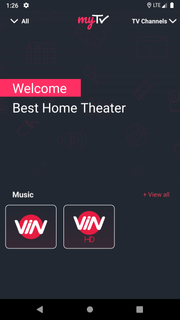
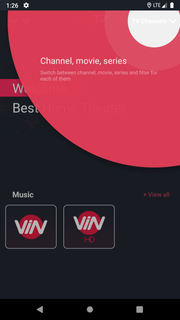
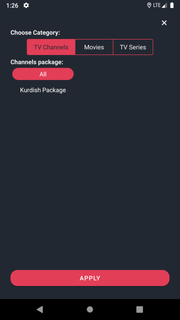
MyTV+ brings live channels and a large library of movies and series to your phone with a simple layout built for quick access. The experience focuses on easy navigation and daily content refresh so new and popular titles are always close at hand. It supports mobile viewing across networks inside Iraq and adapts to different connection speeds for stable playback. The service is available on Android as an official APK, and it also supports other devices for flexible viewing at home or on the go.Key features300+ live channels across genresMyTV+ organizes channels by Entertainment, Sports, News, Music, Movies, and more, so you can jump straight to what you want. The lineup mixes local and international options for a balanced grid. This structure helps you browse quickly without digging through long lists.Large VOD library with daily updatesNew movies and series are added to MyTV+ every day. You can return often and always find recently added titles alongside familiar favorites. This rhythm supports casual discovery as well as focused watching.4K capable content for supported titlesMyTV+ offers high-resolution playback on titles that support 4K. You can select the best available quality based on your device and connection. This gives you control over data use while keeping video sharp when bandwidth allows.Offline downloads for on the goThis popular TV app lets you save selected videos to your device to watch without internet. This is useful for travel, commutes, or times with limited connectivity. You decide what to download and remove items when you need space.Quick access with smart searchMyTV+ keeps navigation straightforward so you reach content fast. The smart search surfaces channels, movies, and series by title, genre, or language. This reduces time spent browsing and increases time spent watching.Works on any network inside Iraq and across devicesThe MyTV+ app is designed to work across networks inside Iraq, which makes viewing practical at home and outdoors. It supports Android via the official MyTV+ APK, and it also extends to other platforms and living room setups.MyTV+ Box for your living roomThe MyTV+ Box complements the mobile app as a TV-friendly device for the home. It offers a one-time payment with no monthly or annual subscriptions, 4K capability, and access to 300+ channels. Delivery is free from the brand, which makes it a straightforward companion to phone viewing.Regional availability for MyTV+MyTV+ operates across networks inside Iraq, so you can watch at home, at work, or while traveling within the country. This sets clear expectations for users who move between carriers or fixed connections. For support and service announcements, check the MyTV+ official site.How to use MyTV+Follow this quick guide to start watching with the MyTV+ APK. The steps focus on installation, finding content, and setting up quality and downloads for daily use.Download MyTV+ APK on APKPure, install it, and grant the basic permissions requested by the app.Open MyTV+ and follow the on-screen prompts to complete the initial setup and reach the home screen.After that, pick a category like Live TV or Movies to see channels and on-demand titles organized by genre and language.Use search to find a specific channel or series, add items to favorites, and tap Download on supported videos to save for offline viewing.Then set your preferred video quality in the player, including 4K on supported titles, and start watching over any network inside Iraq.Download and watch nowMyTV+ brings live channels and regularly updated movies and series to your phone with fast navigation and flexible quality controls. Download MyTV+ APK latest version on APKPure and enjoy millions of popular movies and series on your mobile phone.FAQsIs every title available in high quality on MyTV+?No, MyTV+ offers high-quality playback only on supported titles. You can select the highest available quality per video based on device and bandwidth.Does MyTV+ support multiple languages for movies and series?Yes, MyTV+ includes on-demand movies and series in multiple languages. You can browse by category or use the search feature to locate language-specific content.
Show more

1. Download MEmu installer and finish the setup

2. Start MEmu then open Google Play on the desktop

3. Search MyTV+ in Google Play
Install
4. Download and Install MyTV+
5. On install completion click the icon to start

6. Enjoy using MyTV+ on PC with MEmu
MEmu Play is the best Android emulator, and 100 million users already enjoy its superb Android app experience. Powered by advanced virtualization technology, it lets you enjoy thousands of Android apps smoothly on your PC—including the most graphics-intensive ones.
Bigger screen with better graphics; Long duration, without limitation of battery or mobile data.
Full Keymapping support for precise control of keyboard and mouse or gamepad.
Multiple game accounts or tasks on single PC at one time with Multi-Instance manager.
Use MyTV+ on PC by following steps: