AnyList - Grocery Shopping List & Recipe Manager
Updated
Current Version
1.8.2
Offered By

Stop worrying about high battery drain when using AnyList - Grocery Shopping List & Recipe Manager on your phone. Free yourself from the tiny screen and enjoy the app on a much larger display. From now on, get a full-screen experience of your app with the convenience of a keyboard and mouse. MEmu offers you all the surprising features you’d expect: quick installation and easy setup, intuitive controls, and no more worries about battery life, mobile data, or unexpected calls. The all-new MEmu 9 is the choice for using AnyList - Grocery Shopping List & Recipe Manager on your computer. With the MEmu multi-instance manager, you can run two or more accounts at the same time. Most importantly, our exclusive emulation engine unlocks your PC’s full potential, delivering smooth and enjoyable performance.
Show more
Enjoy superb experience of using AnyList - Grocery Shopping List & Recipe Manager on PC with MEMU App Player. It's a powerful free Android emulator which provides you with thousands of android apps for their desktop version. Enjoy connecting with friends and polishing your work with higher efficiency! AnyList is the best way to create grocery shopping lists and collect and organize your recipes.
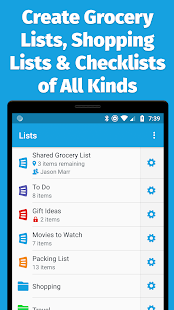
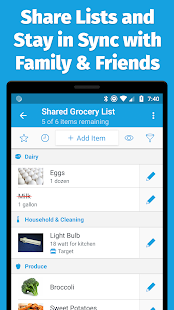
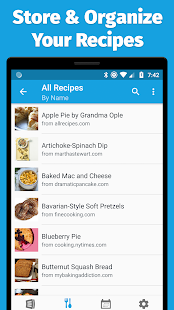
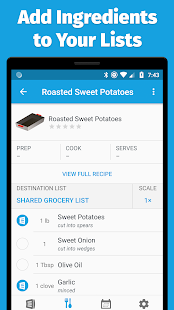
AnyList is the best way to create grocery shopping lists and collect and organize your recipes. Easily share a list with your spouse or roommates, for free. Changes show up instantly on everyone’s device.
“AnyList makes shared grocery lists simple and intuitive.” —Lifehacker
“AnyList sets the standard for grocery shopping list apps.” —AppStorm
“I don’t recommend going to the grocery store without it.” —Today’s iPhone
==== FEATURES ====
== LISTS ==
• Quickly add and cross off items. Autocomplete suggests common items as you type.
• Add notes to list items to indicate package size, brand, coupons, etc.
• Create multiple lists to organize items by store or occasion.
• Grocery items are automatically separated into categories.
• Create your own custom categories.
• Reorder categories to match the layout of your local store.
• Save items as favorites, then browse your favorites and add them to your current shopping list.
• View recent items from your past shopping trips, then add them back to your current list.
• Easily share lists. Just enter the email address of your spouse or roommate and your list is shared. List changes instantly show up on everyone’s device.
• Lists can be shared with as many people as you’d like.
• Everyone creates their own AnyList account, so you can share some lists, while keeping others private.
• Optional push notifications let you know when a shared list has been modified.
• Sort list items alphabetically or manually.
== RECIPES ==
• Enter your own recipes, or copy and paste them from an email or other source.
• Add ingredients from your recipes to your shopping lists with a single tap.
• Organize recipes into collections by type or occasion. Each recipe can appear in multiple collections.
• Search your recipes by name or ingredients.
• Share your recipe collection with a trusted partner. Any changes to recipes will be instantly visible to both of you.
== SYNC / BACKUP ==
• Sync all of your lists and recipes across all of your devices. Sign in to your AnyList account on your devices, and any change made on one will instantly sync to the other.
• All of your lists and recipes are securely backed up in the cloud as part of your AnyList account. If you get a new device, just sign in to your AnyList account to retrieve your data.
== ANYLIST COMPLETE (PREMIUM FEATURES) ==
All of the features above are available for free. We also offer an optional in-app purchase called AnyList Complete that unlocks the full power of the app with these great features:
• AnyList for the Web: Use AnyList on any Mac or PC with a modern web browser.
• Recipe Web Import. Search for recipes on the web, and import them directly into AnyList. Works with popular recipe websites and blogs.
• Meal Planning Calendar. Plan your meals with month and list views. Easily add some or all of the ingredients for upcoming recipes to your shopping list.
• List Item Photos. Add a photo to list items. For shared lists, photos can be viewed by everyone sharing the list.
• Recipe Photos. Add a photo to your recipes, instead of being limited to icons.
• List Passcode Lock. Protect your lists from casual snooping with a passcode lock.
==== CONTACT US ====
We’d love to hear from you: team@anylist.com
AnyList includes icons from icons8.com.
Show more

1. Download MEmu installer and finish the setup

2. Start MEmu then open Google Play on the desktop

3. Search AnyList - Grocery Shopping List & Recipe Manager in Google Play
Install
4. Download and Install AnyList - Grocery Shopping List & Recipe Manager
5. On install completion click the icon to start

6. Enjoy using AnyList - Grocery Shopping List & Recipe Manager on PC with MEmu
MEmu Play is the best Android emulator, and 100 million users already enjoy its superb Android app experience. Powered by advanced virtualization technology, it lets you enjoy thousands of Android apps smoothly on your PC—including the most graphics-intensive ones.
Bigger screen with better graphics; Long duration, without limitation of battery or mobile data.
Full Keymapping support for precise control of keyboard and mouse or gamepad.
Multiple game accounts or tasks on single PC at one time with Multi-Instance manager.
Use AnyList - Grocery Shopping List & Recipe Manager on PC by following steps: