TimeCue – Reminders & Alerts
Updated
Current Version
1.00.5
Offered By

Stop worrying about high battery drain when using TimeCue – Reminders & Alerts on your phone. Free yourself from the tiny screen and enjoy the app on a much larger display. From now on, get a full-screen experience of your app with the convenience of a keyboard and mouse. MEmu offers you all the surprising features you’d expect: quick installation and easy setup, intuitive controls, and no more worries about battery life, mobile data, or unexpected calls. The all-new MEmu 9 is the choice for using TimeCue – Reminders & Alerts on your computer. With the MEmu multi-instance manager, you can run two or more accounts at the same time. Most importantly, our exclusive emulation engine unlocks your PC’s full potential, delivering smooth and enjoyable performance.
Show more
Enjoy superb experience of using TimeCue – Reminders & Alerts on PC with MEMU App Player. It's a powerful free Android emulator which provides you with thousands of android apps for their desktop version. Enjoy connecting with friends and polishing your work with higher efficiency! TimeCue – Reminders & Alerts.
TimeCue – Reminders & Alerts
Life gets busy.
Between work responsibilities, family commitments, appointments, bills, personal goals, and everyday tasks, it's easy to lose track of what truly matters.
TimeCue helps you organize your day, remember important moments, and focus on the things that deserve your attention.
Instead of keeping everything in your mind, let TimeCue become your simple and reliable companion for managing tasks, reminders, routines, and goals.
Whether you're planning your week, building better habits, or simply trying to stay organized, TimeCue helps make every day feel more manageable.
Capture life's important moments
Great ideas and important tasks often appear when you least expect them.
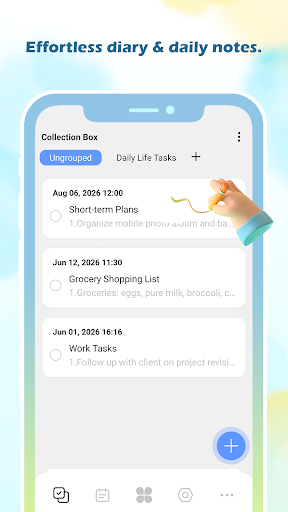
With TimeCue, you can quickly create tasks, write notes, and set reminders before something important gets forgotten.
From grocery lists and household tasks to work deadlines and personal goals, everything stays organized and ready whenever you need it.
Focus on what truly matters
Being busy doesn't always mean being productive.
TimeCue's built-in Eisenhower Matrix helps you separate urgent tasks from important ones, so you can make clearer decisions about where to spend your time.
Stop reacting to endless small tasks and start focusing on the things that create real progress.
When your priorities are clear, your day becomes easier to manage.
Never rely on memory alone
Your mind is for creating ideas, not storing every reminder.
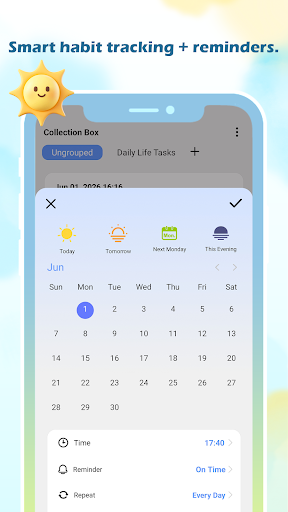
Set reminders for appointments, birthdays, payments, medications, routines, and anything else you don't want to miss.
Create daily, weekly, monthly, or custom recurring reminders, and let TimeCue quietly help you stay on track.
Protect important reminders
Some reminders are too important to be accidentally interrupted.
Reminder Protection is an optional feature that helps protect an active task reminder from accidental interruption during a shutdown attempt.
When enabled for a task reminder, TimeCue uses Android Accessibility Service to detect when the system power menu is opened and return you to the active reminder screen.
This feature is optional and is designed specifically to help keep an active reminder available until you dismiss or complete it.
Understand your day at a glance
A clear view of your schedule makes life feel less overwhelming.
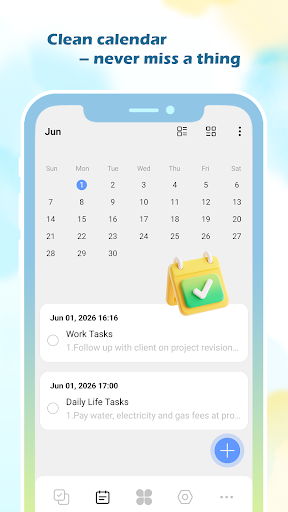
The intuitive calendar helps you see upcoming tasks and reminders, plan ahead, and prepare for what's next.
Whether it's today, this week, or the month ahead, TimeCue keeps your plans within reach.
Build habits that last
Small actions create meaningful changes.
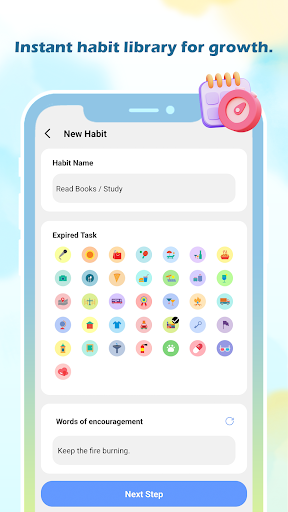
Track the routines you want to maintain, whether it's exercising, reading, drinking water, meditation, or personal goals.
TimeCue helps you stay consistent by making progress visible, one day at a time.
Make time for focused work
Productivity isn't about doing everything at once.
Sometimes the best results come from giving one important task your full attention.
The built-in Focus Timer helps you create distraction-free sessions for work, study, reading, or personal projects.
Designed around your life
Everyone has a different way of staying organized.
Create personalized lists, set priorities, review completed tasks, and use convenient home screen widgets to keep important information close.
TimeCue adapts to your lifestyle, helping you organize your day without adding unnecessary complexity.
Simple. Private. Reliable.
A productivity app should make life easier, not more complicated.
TimeCue is designed with a clean interface and practical features that help you stay organized without unnecessary distractions.
No complicated setup.
No overwhelming options.
Just a simple and reliable way to manage your time.
A better-organized day often starts with a simple reminder.
Download TimeCue today and make every reminder count.
Show more

1. Download MEmu installer and finish the setup

2. Start MEmu then open Google Play on the desktop

3. Search TimeCue – Reminders & Alerts in Google Play
Install
4. Download and Install TimeCue – Reminders & Alerts
5. On install completion click the icon to start

6. Enjoy using TimeCue – Reminders & Alerts on PC with MEmu
MEmu Play is the best Android emulator, and 100 million users already enjoy its superb Android app experience. Powered by advanced virtualization technology, it lets you enjoy thousands of Android apps smoothly on your PC—including the most graphics-intensive ones.
Bigger screen with better graphics; Long duration, without limitation of battery or mobile data.
Full Keymapping support for precise control of keyboard and mouse or gamepad.
Multiple game accounts or tasks on single PC at one time with Multi-Instance manager.
Use TimeCue – Reminders & Alerts on PC by following steps: