
音声読み上げ 動画編集アプリ - Vmovie
Updated
Current Version
1.1
Offered By

Stop worrying about high battery drain when using 音声読み上げ 動画編集アプリ - Vmovie on your phone. Free yourself from the tiny screen and enjoy the app on a much larger display. From now on, get a full-screen experience of your app with the convenience of a keyboard and mouse. MEmu offers you all the surprising features you’d expect: quick installation and easy setup, intuitive controls, and no more worries about battery life, mobile data, or unexpected calls. The all-new MEmu 9 is the choice for using 音声読み上げ 動画編集アプリ - Vmovie on your computer. With the MEmu multi-instance manager, you can run two or more accounts at the same time. Most importantly, our exclusive emulation engine unlocks your PC’s full potential, delivering smooth and enjoyable performance.
Show more
Enjoy superb experience of using 音声読み上げ 動画編集アプリ - Vmovie on PC with MEMU App Player. It's a powerful free Android emulator which provides you with thousands of android apps for their desktop version. Enjoy connecting with friends and polishing your work with higher efficiency! Vmovieは動画へVOICEVOXを使用した合成音声ナレーションとテロップを同時に追加できる動画編集ツールです。


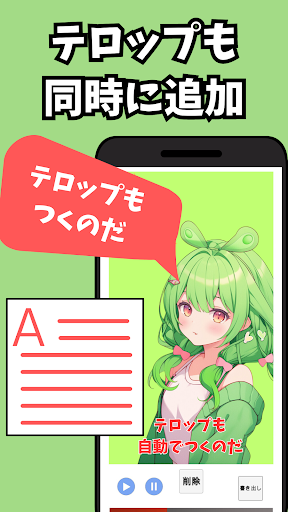

Vmovieは動画へVOICEVOXを使用した合成音声ナレーションとテロップを同時に追加できる動画編集ツールです。豊富な種類の合成音声の中から好きなナレーションを追加し簡単に魅力的な動画を作成することができます!
-特徴-
●合成音声機能
テキストからVOICEVOXキャラの合成音声を生成し、動画へ追加!
●テロップ
合成音声の追加と同時にテロップも追加!テロップの位置はドラッグで直感的に変えることができます!
●簡単操作
テキストを入力し、ナレーションとテロップを挿入したい場所でボタンを押すだけ
-使い方-
●写真アプリから動画を読み込んでください。(ナレーションを追加したい動画は写真アプリから閲覧できるようにしておいてください)
●動画の読み込みが完了したら入力欄にテキストを入力しナレーションを入れたいタイミングで追加ボタンを押してください。テロップとナレーションが同時に追加されます。
●ナレーションキャラクターの変更は画面右下のメニューボタンから可能です。
●テロップのサイズや色の変更は画面右下のメニューボタンから可能です。
●プロジェクトを途中保存したい場合は保存ボタンを押してください。また、保存したプロジェクトを読み込む場合はトップ画面のプロジェクトを読み込むボタンを押してください。※現在保存できるプロジェクトは1つです。
●完成したプロジェクトを書き出すには書き出しボタンを押してください。書き出し後写真アプリに保存されます。
※書き出し中は画面に触れず、音量を下げないでください。
本アプリはVOICEVOXを使用しております。
本アプリで作成した音声や動画を利用する場合、VOICEVOXの利用規約に従ってください。
https://voicevox.hiroshiba.jp/
Show more

1. Download MEmu installer and finish the setup

2. Start MEmu then open Google Play on the desktop

3. Search 音声読み上げ 動画編集アプリ - Vmovie in Google Play
Install
4. Download and Install 音声読み上げ 動画編集アプリ - Vmovie
5. On install completion click the icon to start

6. Enjoy using 音声読み上げ 動画編集アプリ - Vmovie on PC with MEmu
MEmu Play is the best Android emulator, and 100 million users already enjoy its superb Android app experience. Powered by advanced virtualization technology, it lets you enjoy thousands of Android apps smoothly on your PC—including the most graphics-intensive ones.
Bigger screen with better graphics; Long duration, without limitation of battery or mobile data.
Full Keymapping support for precise control of keyboard and mouse or gamepad.
Multiple game accounts or tasks on single PC at one time with Multi-Instance manager.
Use 音声読み上げ 動画編集アプリ - Vmovie on PC by following steps:































