Cool Reader
Updated
Current Version
3.2.55-1
Offered By

Stop worrying about high battery drain when using Cool Reader on your phone. Free yourself from the tiny screen and enjoy the app on a much larger display. From now on, get a full-screen experience of your app with the convenience of a keyboard and mouse. MEmu offers you all the surprising features you’d expect: quick installation and easy setup, intuitive controls, and no more worries about battery life, mobile data, or unexpected calls. The all-new MEmu 9 is the choice for using Cool Reader on your computer. With the MEmu multi-instance manager, you can run two or more accounts at the same time. Most importantly, our exclusive emulation engine unlocks your PC’s full potential, delivering smooth and enjoyable performance.
Show more
Enjoy superb experience of using Cool Reader on PC with MEMU App Player. It's a powerful free Android emulator which provides you with thousands of android apps for their desktop version. Enjoy connecting with friends and polishing your work with higher efficiency! eBook reader.
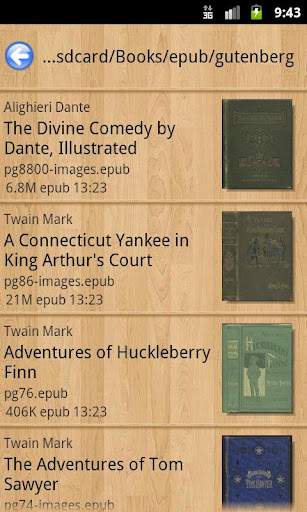
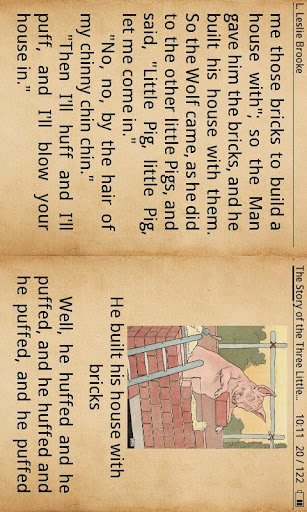

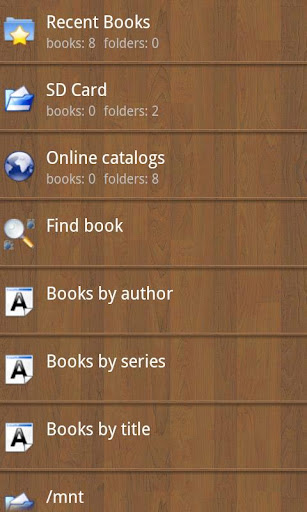
eBook reader. Supports epub (non-DRM), fb2, doc, txt, rtf, html, chm, tcr, pdb, prc, mobi (non-DRM), pml formats.
Pages or scroll view. Page flipping animation.
Table of contents, bookmarks, text search.
Bookmarks on text fragments (comments or corrections) - useful for proof reading.
Export of bookmarks to text file.
Built-in file browser, quick recent books access.
Online catalogs (OPDS) support.
LitRes online book store support.
Text to Speech (TTS) support.
Hyphenation dictionaries;
Most complete FB2 format support: styles, tables, footnotes.
Additional fonts support (place .ttf to /sdcard/fonts/)
Support for Chinese, Japanese, Korean languages; autodetection of TXT file encoding (GBK, Shift_JIS, BIG5, EUC_KR).
Day and night profiles (two sets of colors, background, backlight levels).
Brightness adjustments by flick on left edge of screen.
Background texture (stretched or tiled) or solid color.
Paperbook-like page turning animation or "sliding page" animation.
Dictionary support (ColorDict, GoldenDict, Fora Dictionary, Aard Dictionary).
Customizable tap zone and key actions.
Autoscroll (automatic page flipping) - start using menu/goto/autoscroll or assign action Autoscroll on key or tap zone; Change speed using volume keys or bottom-right and bottom-left tap zones; stop - tap any other tap zone or key.
Can read books from zip archives.
Automatic reformatting of .txt files (autodetect headings etc.)
Styles can be customised in wide range using external CSS.
Select text using double tap (optional).
Place additional textures to /sdcard/.cr3/textures/ -- to be used as tiled page backgrounds.
Place additional textures to /sdcard/.cr3/backgrounds/ -- to be used as stretched page backgrounds.
(/cr3/ directory can also be used instead of /.cr3/, and internal SD or internal storage instead of /sdcard/)
CoolReader requires following permissions:
WAKE_LOCK - to control screen backlight
WRITE_EXTERNAL_STORAGE - to access SD card
INTERNET - to use online catalogs
CoolReader is free, open source (GPL), multiplatform project.
Project homepage on SourceForge is http://sourceforge.net/projects/crengine/
To donate this project, you can buy Cool Reader Gold ($10), Silver ($3) or Bronze ($1) Donation package from Market
In case of issues after update (e.g. crashes while reading) try to remove directory SD/.cr3/cache and book database files SD/.cr3/*.sqlite
Windows version can be downloaded here:
http://sourceforge.net/projects/crengine/files/CoolReader3/cr3-newui-opengl/cr3-win32-qt-opengl-3.3.48.zip/download
As well, consider using "Cool Reader GL" - cross-platform Cool Reader version with UI rewritten in C++, with hardware acceleration based on OpenGL. Optimized for new devices with big high resolution screens. Both versions can be installed together.
Project homepage: https://github.com/buggins/coolreader
Show more

1. Download MEmu installer and finish the setup

2. Start MEmu then open Google Play on the desktop

3. Search Cool Reader in Google Play
Install
4. Download and Install Cool Reader
5. On install completion click the icon to start

6. Enjoy using Cool Reader on PC with MEmu
MEmu Play is the best Android emulator, and 100 million users already enjoy its superb Android app experience. Powered by advanced virtualization technology, it lets you enjoy thousands of Android apps smoothly on your PC—including the most graphics-intensive ones.
Bigger screen with better graphics; Long duration, without limitation of battery or mobile data.
Full Keymapping support for precise control of keyboard and mouse or gamepad.
Multiple game accounts or tasks on single PC at one time with Multi-Instance manager.
Use Cool Reader on PC by following steps: