
DailyReel:Movie Guide & Editor
Updated
Current Version
1.0.4
Offered By

Stop worrying about high battery drain when using DailyReel:Movie Guide & Editor on your phone. Free yourself from the tiny screen and enjoy the app on a much larger display. From now on, get a full-screen experience of your app with the convenience of a keyboard and mouse. MEmu offers you all the surprising features you’d expect: quick installation and easy setup, intuitive controls, and no more worries about battery life, mobile data, or unexpected calls. The all-new MEmu 9 is the choice for using DailyReel:Movie Guide & Editor on your computer. With the MEmu multi-instance manager, you can run two or more accounts at the same time. Most importantly, our exclusive emulation engine unlocks your PC’s full potential, delivering smooth and enjoyable performance.
Show more
Enjoy superb experience of using DailyReel:Movie Guide & Editor on PC with MEMU App Player. It's a powerful free Android emulator which provides you with thousands of android apps for their desktop version. Enjoy connecting with friends and polishing your work with higher efficiency! DailyReel: Your Video Workspace & Movie Discovery Companion.
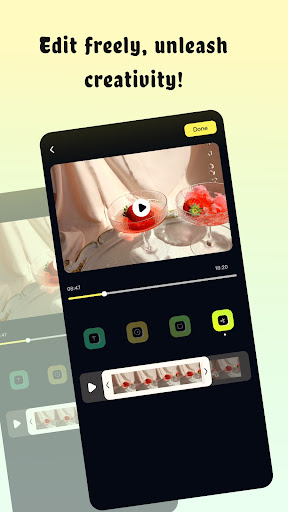
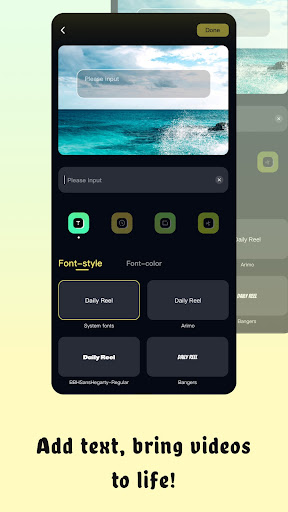

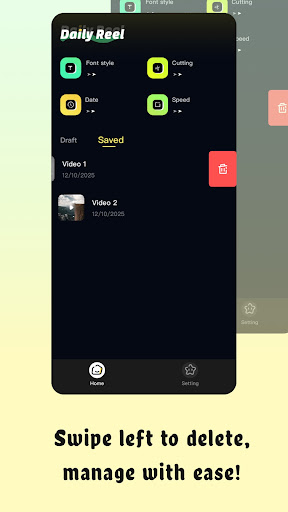
DailyReel: Your Video Workspace & Movie Discovery Companion
DailyReel is the ultimate app for everyday creators and movie enthusiasts. Whether you are editing daily clips, crafting movie commentary videos, or simply looking for your next favorite film, DailyReel brings video editing and cinema discovery together in one clean, intuitive workspace.
Movie Discovery for Inspiration
Need ideas for your next video or planning a weekend film night? Explore our lightweight movie guide! Browse trending movies, TV shows, official trailers, cast and crew info, reviews, and ratings. Build your personal watchlists and dive into cinema topics to fuel your creative inspiration for reaction and commentary clips.
Edit Videos Easily
Choose a video from the clean home page and start editing in seconds. DailyReel offers a clear workflow for reels, travel vlogs, family memories, and movie review clips without any complicated steps.
Add Text, Captions & Subtitles
Make your story clearer. Add text notes, titles, and subtitles to help viewers follow spoken content—perfect for tutorials, talking videos, and film reaction content, especially when watching on mute.
⏱ Cinematic Speed Control
Adjust video speed to match your vibe. Speed up clips for fast recaps and fun transitions, or slow down footage for dramatic focus, emotional scenes, and cinematic highlights.
Crop & Reframe
Focus on what matters. Use the crop function to remove distractions, reframe your subject, and improve composition for your shorts and social media content.
Date Watermarks & Workspace
Add date watermarks to give context to your travel diaries and memory clips. All your finished works are safely stored in "Saved Videos," while "Edited Drafts" keeps your unfinished projects ready for whenever inspiration strikes back.
Download DailyReel now—your all-in-one companion for movie discovery, subtitle making, and daily video creation!
Show more

1. Download MEmu installer and finish the setup

2. Start MEmu then open Google Play on the desktop

3. Search DailyReel:Movie Guide & Editor in Google Play
Install
4. Download and Install DailyReel:Movie Guide & Editor
5. On install completion click the icon to start

6. Enjoy using DailyReel:Movie Guide & Editor on PC with MEmu
MEmu Play is the best Android emulator, and 100 million users already enjoy its superb Android app experience. Powered by advanced virtualization technology, it lets you enjoy thousands of Android apps smoothly on your PC—including the most graphics-intensive ones.
Bigger screen with better graphics; Long duration, without limitation of battery or mobile data.
Full Keymapping support for precise control of keyboard and mouse or gamepad.
Multiple game accounts or tasks on single PC at one time with Multi-Instance manager.
Use DailyReel:Movie Guide & Editor on PC by following steps: