SPORTSCHAU
Updated
Current Version
3.3.2
Offered By

Stop worrying about high battery drain when using SPORTSCHAU on your phone. Free yourself from the tiny screen and enjoy the app on a much larger display. From now on, get a full-screen experience of your app with the convenience of a keyboard and mouse. MEmu offers you all the surprising features you’d expect: quick installation and easy setup, intuitive controls, and no more worries about battery life, mobile data, or unexpected calls. The all-new MEmu 9 is the choice for using SPORTSCHAU on your computer. With the MEmu multi-instance manager, you can run two or more accounts at the same time. Most importantly, our exclusive emulation engine unlocks your PC’s full potential, delivering smooth and enjoyable performance.
Show more
Enjoy superb experience of using SPORTSCHAU on PC with MEMU App Player. It's a powerful free Android emulator which provides you with thousands of android apps for their desktop version. Enjoy connecting with friends and polishing your work with higher efficiency! Die neue Sportschau-App liefert dir die wichtigsten Nachrichten und Hintergründe aus der Welt des Sports.
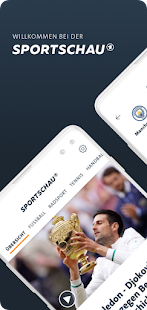
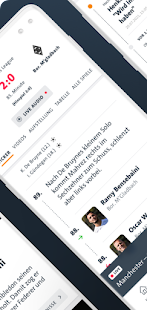
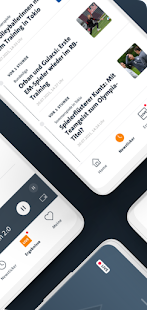
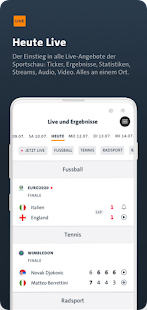
Die neue Sportschau-App liefert dir die wichtigsten Nachrichten und Hintergründe aus der Welt des Sports. Mit unseren Livetickern, Live-Audio-Streams und Video-Streams verpasst du außerdem nichts mehr - kein Tor der Bundesliga, kein Überholmanöver in der Formel 1 und keinen Breakball beim Tennis.
Im Bereich “Live & Ergebnisse” siehst du direkt, was heute wichtig wird: Welche Matches gab es schon? Wer spielt am Abend? Und was läuft gerade live?
Fußball, Tennis, Formel 1, Basketball, Handball, Eishockey, Radsport, Wintersport und vieles mehr - alle Live-Ticker, Streams und Ergebnisse an einem Ort.
Bist du unterwegs und dein Verein in der Bundesliga spielt gerade? Dann höre dir das Spiel in voller Länge und ohne Unterbrechungen in der Audio-Reportage an. Wir übertragen jedes Spiel aus der 1. und der 2. Bundesliga von der ersten bis zur letzten Minute. Den Stream, den zugehörigen Liveticker und viele Statistiken rund ums Spiel findest du jetzt neu an einer Stelle - klicke dafür einfach auf die Partie im Live-Bereich.
Unter “Meine Sportschau” kannst du dir deinen persönlichen Bereich bauen. Stelle deine Lieblingsvereine, Lieblingswettbewerbe und -sportarten zusammen. Alle Infos und Ergebnisse zu deinen Favoriten sind dann nur noch einen Klick entfernt.
Du willst außerdem keine Nachricht und kein Ergebnis deines Lieblingsclubs verpassen? Dann abonniere hier die Push-Mitteilungen und wir benachrichtigen dich, wenn es Neuigkeiten gibt.
Du kannst dort auch den Top-Nachrichten-Push auswählen, um alle Breaking News und besondere Geschichten und Recherchen aus der Sportschau-Redaktion auf dein Smartphone zu bekommen. Oder du wählst den Push für einen bestimmten Wettbewerb oder Verein aus - ganz, wie es dir gefällt.
Du hast wenig Zeit und willst einen schnellen Überblick über die aktuellen Nachrichten aus dem Sport bekommen? Dann scrolle durch unseren Newsticker, hier findest du immer die aktuellsten Berichte aus allen Sportarten.
Im “Home”-Bereich gibt es wie gewohnt alle wichtigen Infos und Hintergründe, ausgesucht von der Sportschau-Redaktion. Auf der Übersicht gibt es den Gesamt-Überblick über alle Sportarten, swipe nach rechts, um dich gezielt über einzelne Sportarten zu informieren.
Die Sportschau-App der ARD und alle Inhalte gibt es natürlich kostenlos.
Für den Abruf der Livestreams und der Videos aus Mobilfunknetzen empfehlen wir eine Flatrate, da sonst Verbindungskosten anfallen können.
Wir freuen uns über Feedback, Anmerkungen und Bewertungen!
Show more

1. Download MEmu installer and finish the setup

2. Start MEmu then open Google Play on the desktop

3. Search SPORTSCHAU in Google Play
Install
4. Download and Install SPORTSCHAU
5. On install completion click the icon to start

6. Enjoy using SPORTSCHAU on PC with MEmu
MEmu Play is the best Android emulator, and 100 million users already enjoy its superb Android app experience. Powered by advanced virtualization technology, it lets you enjoy thousands of Android apps smoothly on your PC—including the most graphics-intensive ones.
Bigger screen with better graphics; Long duration, without limitation of battery or mobile data.
Full Keymapping support for precise control of keyboard and mouse or gamepad.
Multiple game accounts or tasks on single PC at one time with Multi-Instance manager.
Use SPORTSCHAU on PC by following steps: