
Rossmann - Coupons & Angebote
Updated
Current Version
5.11.1
Offered By

Stop worrying about high battery drain when using Rossmann - Coupons & Angebote on your phone. Free yourself from the tiny screen and enjoy the app on a much larger display. From now on, get a full-screen experience of your app with the convenience of a keyboard and mouse. MEmu offers you all the surprising features you’d expect: quick installation and easy setup, intuitive controls, and no more worries about battery life, mobile data, or unexpected calls. The all-new MEmu 9 is the choice for using Rossmann - Coupons & Angebote on your computer. With the MEmu multi-instance manager, you can run two or more accounts at the same time. Most importantly, our exclusive emulation engine unlocks your PC’s full potential, delivering smooth and enjoyable performance.
Show more
Enjoy superb experience of using Rossmann - Coupons & Angebote on PC with MEMU App Player. It's a powerful free Android emulator which provides you with thousands of android apps for their desktop version. Enjoy connecting with friends and polishing your work with higher efficiency! Our welcome gift for you: Install now and immediately receive a coupon for a 10% discount!
Our welcome gift for you: Install now and immediately receive a coupon for a 10% discount!
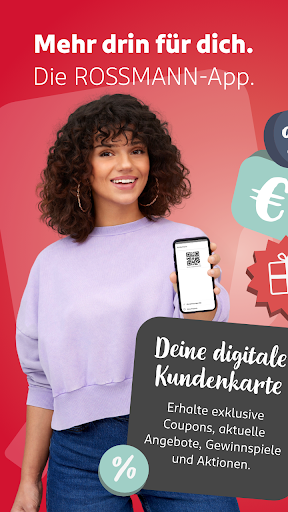
The digital customer card from Rossmann.
Enjoy all the benefits of a customer card in digital form with the ROSSMANN app. That means download once and save forever! Numerous coupons and current offers are available to you in the app at any time.
The most important functions at a glance:
Start saving
No registration is required to use the ROSSMANN app. However, if you are already registered with one of our various Rossmann services (e.g. Rossmann online shop, Rossmann FOTOWELT or Rossmann babywelt), you can also log in to the app with the same account.
However, registered users can receive more advantages and functions compared to anonymous users.
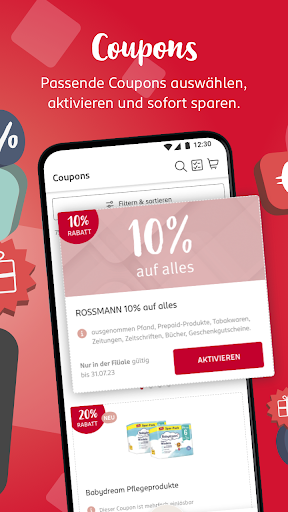
Numerous digital coupons
The ROSSMANN app contains a large selection of attractive digital coupons. You are spoiled for choice - whether before shopping or in one of our branches.
Saving made easy – all with the digital customer card:
1. Activate the desired coupons
2. Show your digital customer card at the checkout so that it can be captured using a hand scanner.
3. You will automatically receive your discount through all activated coupons that match your purchase.
4. Enjoy the savings!
So that you have all the coupons in your digital customer card at hand, you can also scan any paper coupon that is valid at Rossmann. The paper coupons are therefore digitized and you can add and redeem them for your next purchase.
Personalized homepage – everything important at a glance
See your top coupons directly and get inspired by other great promotions
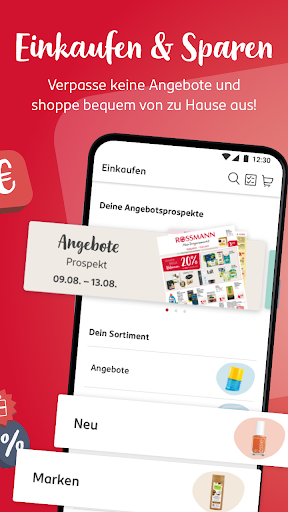
Shop and save – now from the comfort of your own home
Don't miss any offers and shop comfortably from home! Many of your coupons can also be redeemed for online shopping.
Offline? No problem!
An active internet connection is not required to redeem the coupon.
Current offers
Find out about our current offers - whenever and wherever you want. Browse through our brochure or put an offer on your shopping list so you don't forget it.
Your shopping list
Use the shopping list to prepare your purchase and accompany it to the store. By displaying the products and coupons in the shopping list, you can no longer forget anything.
Your virtual customer card
You can view your activated coupons in your customer card at any time - everything in one place and ready to hand. The QR code to be scanned, which is required to redeem the coupons at the checkout, can also be found here. To redeem your activated coupons, all you have to do is show your digital customer card at the checkout. The cashier will scan the code from your smartphone and any added coupons will be redeemed and the discounts applied.
For bargain hunters
Registered users can receive regional benefits and are taken into account for special coupon promotions, depending on their personal information. Simply enter your zip code and your preferred main branch.
Would you like to know how many coupons you have already redeemed and how much you have saved? Registered users can find this information in the profile area.
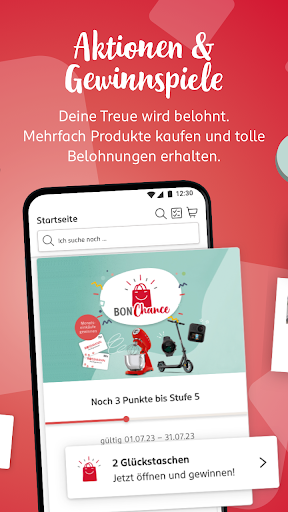
Every purchase is worth it!
Registered app users can take part in promotions such as the BON Chance. Collect and win!
Your opinion is important to us!
Are you missing a feature, have suggestions or have a problem using the app? Then simply contact us so that we can make your purchase at Rossmann a better experience.
Use the feedback option within the app or write to us at android@rossmann.de.
Show more

1. Download MEmu installer and finish the setup

2. Start MEmu then open Google Play on the desktop

3. Search Rossmann - Coupons & Angebote in Google Play
Install
4. Download and Install Rossmann - Coupons & Angebote
5. On install completion click the icon to start

6. Enjoy using Rossmann - Coupons & Angebote on PC with MEmu
MEmu Play is the best Android emulator, and 100 million users already enjoy its superb Android app experience. Powered by advanced virtualization technology, it lets you enjoy thousands of Android apps smoothly on your PC—including the most graphics-intensive ones.
Bigger screen with better graphics; Long duration, without limitation of battery or mobile data.
Full Keymapping support for precise control of keyboard and mouse or gamepad.
Multiple game accounts or tasks on single PC at one time with Multi-Instance manager.
Use Rossmann - Coupons & Angebote on PC by following steps: