
DramaWave - Dramas & Reels
Updated
Current Version
2.0.21
Offered By

Stop worrying about high battery drain when using DramaWave - Dramas & Reels on your phone. Free yourself from the tiny screen and enjoy the app on a much larger display. From now on, get a full-screen experience of your app with the convenience of a keyboard and mouse. MEmu offers you all the surprising features you’d expect: quick installation and easy setup, intuitive controls, and no more worries about battery life, mobile data, or unexpected calls. The all-new MEmu 9 is the choice for using DramaWave - Dramas & Reels on your computer. With the MEmu multi-instance manager, you can run two or more accounts at the same time. Most importantly, our exclusive emulation engine unlocks your PC’s full potential, delivering smooth and enjoyable performance.
Show more
Enjoy superb experience of using DramaWave - Dramas & Reels on PC with MEMU App Player. It's a powerful free Android emulator which provides you with thousands of android apps for their desktop version. Enjoy connecting with friends and polishing your work with higher efficiency! Welcome to DramaWave, a next-gen HD streaming platform offering exclusive vertical TV videos, series, and movies.
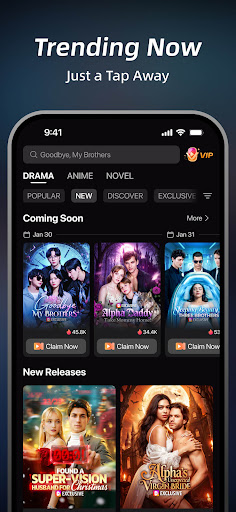
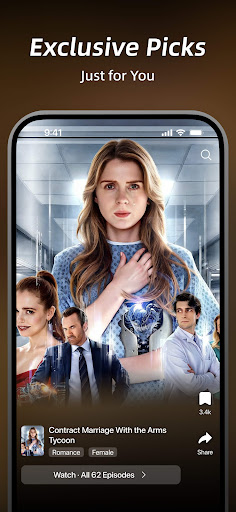

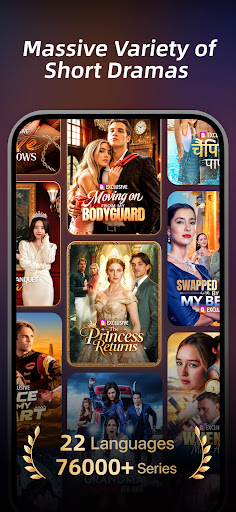
Welcome to DramaWave, a next-gen HD streaming platform offering exclusive vertical TV videos, series, and movies. Dive into 30,000+ Dramas Across 23 Languages — With Exclusive Hits You Can't Find Anywhere Else!
Why Choose DramaWave?
1. On-Screen Comments
Supports real-time on-screen comments during playback, allowing you to share reactions and engage with others while watching.
2. Offline Viewing
You can download episodes and watch them offline anytime and anywhere — even without an internet connection.
3. Vertical Full-Screen Feed
Deliver immersive entertainment experiences. Personalized drama content via precise algorithms helps you quickly spot your favorite drama videos.
4. Quick and Gripping Dramas
Dive into drama-packed stories that deliver emotions and thrills in minutes — perfect for quick escapes or binge-worthy sessions.
5. Crystal-Clear Streaming
Immerse yourself in stunning 1080P resolution, ensuring every scene is vibrant and lifelike.
6. Fresh Originals, Weekly Updates
Stay entertained with exclusive new dramas added regularly. There's always something exciting waiting for you in the world of drama-centered entertainment.
7. Stream Anytime, Anywhere
Enjoy seamless streaming with rich visuals and sound, wherever life takes you.
8. Global Accessibility
Watch with multi-language subtitles, including English, Spanish, French, German, Japanese, and Korean, bringing drama to everyone.
Unleash the Drama
Discover the next generation of storytelling with DramaWave. It's drama made easy, exciting, and accessible — right at your fingertips!
Subscription Details
Unlock exclusive content with our subscription plan. Subscriptions renew automatically but can be managed or canceled anytime in your account settings.
Contact Us
Website: mydramawave.com
Email: dramawaveteam@gmail.com
Download DramaWave now and experience drama like never before!
Show more

1. Download MEmu installer and finish the setup

2. Start MEmu then open Google Play on the desktop

3. Search DramaWave - Dramas & Reels in Google Play
Install
4. Download and Install DramaWave - Dramas & Reels
5. On install completion click the icon to start

6. Enjoy using DramaWave - Dramas & Reels on PC with MEmu
MEmu Play is the best Android emulator, and 100 million users already enjoy its superb Android app experience. Powered by advanced virtualization technology, it lets you enjoy thousands of Android apps smoothly on your PC—including the most graphics-intensive ones.
Bigger screen with better graphics; Long duration, without limitation of battery or mobile data.
Full Keymapping support for precise control of keyboard and mouse or gamepad.
Multiple game accounts or tasks on single PC at one time with Multi-Instance manager.
Use DramaWave - Dramas & Reels on PC by following steps: