
Dulci: AI Interactive Story
Updated
Current Version
1.0.7
Offered By

Stop worrying about high battery drain when using Dulci: AI Interactive Story on your phone. Free yourself from the tiny screen and enjoy the app on a much larger display. From now on, get a full-screen experience of your app with the convenience of a keyboard and mouse. MEmu offers you all the surprising features you’d expect: quick installation and easy setup, intuitive controls, and no more worries about battery life, mobile data, or unexpected calls. The all-new MEmu 9 is the choice for using Dulci: AI Interactive Story on your computer. With the MEmu multi-instance manager, you can run two or more accounts at the same time. Most importantly, our exclusive emulation engine unlocks your PC’s full potential, delivering smooth and enjoyable performance.
Show more
Enjoy superb experience of using Dulci: AI Interactive Story on PC with MEMU App Player. It's a powerful free Android emulator which provides you with thousands of android apps for their desktop version. Enjoy connecting with friends and polishing your work with higher efficiency! Dulci is an interactive story app where you and a cast of original characters write the story together.


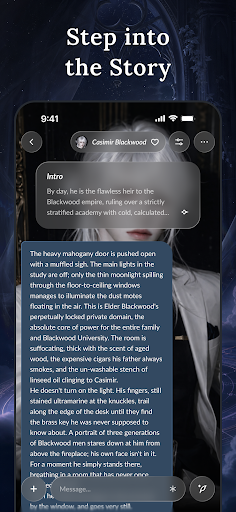
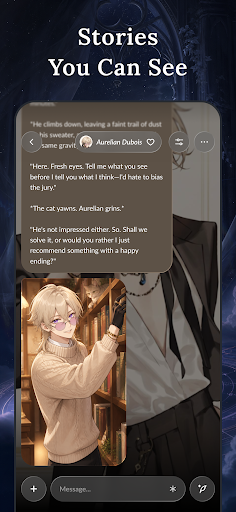
Dulci is an interactive story app where you and a cast of original characters write the story together.
Open a story from the library — fantasy, mystery, gothic, adventure, drama or slice of life — or start one of your own. Write your lines, make your choices, and watch each scene unfold around them.
■ Features
• Stories that keep their thread
Characters keep track of names, events and decisions from earlier chapters, so every story picks up exactly where you left it.
• You set the direction
Choose a story mode, set the tone, and continue or rewrite any passage until the scene reads the way you want.
• Scene illustrations
Turn a key scene into an illustration and keep it in your story gallery.
• Your own characters and worlds
Give a character a name, a personality, an appearance and a backstory, set the opening scene, and begin the first chapter in minutes.
• A calm, cinematic reader
A clean, atmospheric interface made for reading and writing a few chapters at a time.
■ Made For
• Readers who want to take part in the story, not just follow it
• Writers looking for a fresh way to draft scenes and test ideas
• Anyone who enjoys inventing characters and building worlds
• Fans of fantasy, mystery and drama fiction
■ Gems and Dulci PRO
Dulci is free to download. Story replies and scene illustrations use gems, and free gems can be claimed every day through the daily check-in. Optional gem packs and a Dulci PRO subscription (monthly or yearly) are available as in-app purchases. Subscriptions renew automatically unless cancelled before the next renewal date. You can manage or cancel your subscription at any time in Google Play under Payments & subscriptions > Subscriptions.
■ Content and Safety
Dulci is intended for users aged 18 and over. Story text, character replies and illustrations are generated by AI; all characters and stories are fictional, and generated content may sometimes be inaccurate. All content on Dulci must follow our Community Guidelines and is screened automatically. Any character, story or reply can be reported from inside the app, and our moderation team reviews reports. How your account and story data are handled is described in our Privacy Policy.
■ Support Documents
• Support: https://ls.dulci.art/support
• Privacy Policy: https://ls.dulci.art/privacy
• Terms of Use: https://ls.dulci.art/terms
Show more

1. Download MEmu installer and finish the setup

2. Start MEmu then open Google Play on the desktop

3. Search Dulci: AI Interactive Story in Google Play
Install
4. Download and Install Dulci: AI Interactive Story
5. On install completion click the icon to start

6. Enjoy using Dulci: AI Interactive Story on PC with MEmu
MEmu Play is the best Android emulator, and 100 million users already enjoy its superb Android app experience. Powered by advanced virtualization technology, it lets you enjoy thousands of Android apps smoothly on your PC—including the most graphics-intensive ones.
Bigger screen with better graphics; Long duration, without limitation of battery or mobile data.
Full Keymapping support for precise control of keyboard and mouse or gamepad.
Multiple game accounts or tasks on single PC at one time with Multi-Instance manager.
Use Dulci: AI Interactive Story on PC by following steps: