Emochi: Chat With Character
Updated
Current Version
1.10.18
Offered By

Stop worrying about high battery drain when using Emochi: Chat With Character on your phone. Free yourself from the tiny screen and enjoy the app on a much larger display. From now on, get a full-screen experience of your app with the convenience of a keyboard and mouse. MEmu offers you all the surprising features you’d expect: quick installation and easy setup, intuitive controls, and no more worries about battery life, mobile data, or unexpected calls. The all-new MEmu 9 is the choice for using Emochi: Chat With Character on your computer. With the MEmu multi-instance manager, you can run two or more accounts at the same time. Most importantly, our exclusive emulation engine unlocks your PC’s full potential, delivering smooth and enjoyable performance.
Show more
Enjoy superb experience of using Emochi: Chat With Character on PC with MEMU App Player. It's a powerful free Android emulator which provides you with thousands of android apps for their desktop version. Enjoy connecting with friends and polishing your work with higher efficiency! Step into a Unique AI Chat Adventure – Anime, Manga, & More!


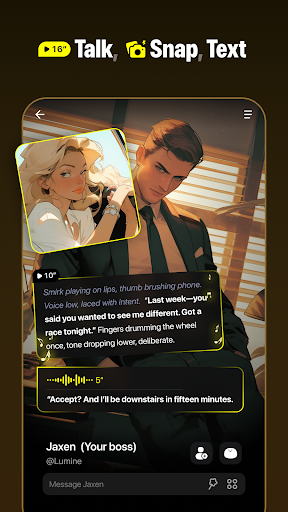
Step into a Unique AI Chat Adventure – Anime, Manga, & More!
Discover a world of creative AI chat characters! Emochi lets you chat about your favorite topics—anime, manga, games, and more—while creating and customizing unique AI characters. Build compelling personas, explore fascinating backstories, and capture unforgettable moments with visually stunning AI-generated imagery.
Key Features:
- Endless Conversation Possibilities: Dive into in-depth discussions on anime plot twists, debate character arcs, or explore your favorite fantasy worlds. Chat with AI characters that are funny, thoughtful, or adventurous—tailored to your preferences.
- Create Unique AI Personas: Design custom AI characters with distinct traits and personalities. Bring to life a cheerful anime fan, a knowledgeable game strategist, or an imaginative roleplay guide.
- Immersive Character Backstories: Uncover rich backstories for your AI characters through engaging conversations and videos. Learn their dreams, adventures, and hidden secrets.
- Visual Storytelling: Capture and share images inspired by your chat adventures. Revisit key moments from roleplay or anime discussions through stunning visuals.
- Anime-Inspired AI Chat Animation: Experience lifelike chat interactions in a dynamic, anime-inspired world. Watch your conversations come alive!
- Interactive Roleplay and Adventures: Engage in roleplay scenarios, solve challenges, or explore interactive storylines crafted by AI. Unleash your creativity in a world of endless possibilities.
Who Emochi Is Perfect For:
- Anime, Manga, & Game Enthusiasts: Chat about favorite series, design AI characters inspired by iconic characters, and explore new fandoms with like-minded AI friends.
- Creative Thinkers: Craft your own roleplay adventures and dive into unique stories with customizable AI personas.
- Imaginative Storytellers: Build and explore compelling narratives with AI characters who respond in unpredictable and exciting ways.
- Technology Lovers: Discover the potential of AI-powered conversations, creativity, and roleplay in a user-friendly app.
Get Support:
Join our vibrant Discord community for updates and discussions: https://discord.gg/FbSdE2EnJe
Show more

1. Download MEmu installer and finish the setup

2. Start MEmu then open Google Play on the desktop

3. Search Emochi: Chat With Character in Google Play
Install
4. Download and Install Emochi: Chat With Character
5. On install completion click the icon to start

6. Enjoy using Emochi: Chat With Character on PC with MEmu
MEmu Play is the best Android emulator, and 100 million users already enjoy its superb Android app experience. Powered by advanced virtualization technology, it lets you enjoy thousands of Android apps smoothly on your PC—including the most graphics-intensive ones.
Bigger screen with better graphics; Long duration, without limitation of battery or mobile data.
Full Keymapping support for precise control of keyboard and mouse or gamepad.
Multiple game accounts or tasks on single PC at one time with Multi-Instance manager.
Use Emochi: Chat With Character on PC by following steps: