Sergas Móbil
Updated
Current Version
D
Offered By

Stop worrying about high battery drain when using Sergas Móbil on your phone. Free yourself from the tiny screen and enjoy the app on a much larger display. From now on, get a full-screen experience of your app with the convenience of a keyboard and mouse. MEmu offers you all the surprising features you’d expect: quick installation and easy setup, intuitive controls, and no more worries about battery life, mobile data, or unexpected calls. The all-new MEmu 9 is the choice for using Sergas Móbil on your computer. With the MEmu multi-instance manager, you can run two or more accounts at the same time. Most importantly, our exclusive emulation engine unlocks your PC’s full potential, delivering smooth and enjoyable performance.
Show more
Enjoy superb experience of using Sergas Móbil on PC with MEMU App Player. It's a powerful free Android emulator which provides you with thousands of android apps for their desktop version. Enjoy connecting with friends and polishing your work with higher efficiency! Sergas Móbil is an application of the Galician Health Service (Sergas) that aims to bring the catalog of apps and e-services closer to all citizens, in a transversal, inclusive and effective way.
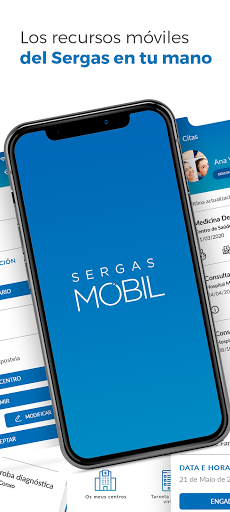
Sergas Móbil is an application of the Galician Health Service (Sergas) that aims to bring the catalog of apps and e-services closer to all citizens, in a transversal, inclusive and effective way.
The application has the following services:
— Patient management. Management of multiple patients by entering personal data only once.
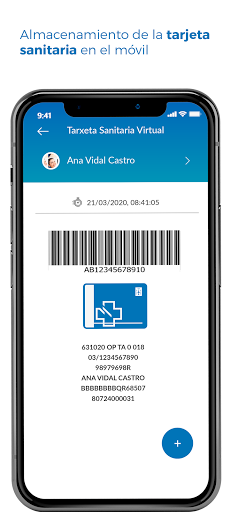
— Virtual health card. Storage of the health card on the mobile.
— Calls to 061. Call from the app communicating GPS coordinates.
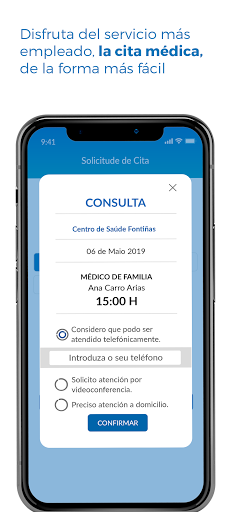
— Primary care appointment. Management of primary care appointments via mobile.
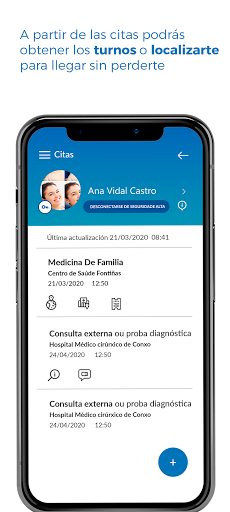
— Consultation of appointments and obtaining shifts. Consultation of all primary and specialized appointments, and obtaining appointments.
— Video consultation. Personalized attention without going downtown.
— My centers. Search for centers and also with geolocation.
— Access between the different applications. Integrated access to É-Saúde (personalized health services and content) and other Sergas applications.
- Last News. Check the latest news published by Sergas.
- Social networks. Access to the different channels that Sergas has on social networks.
- Messages. Consultation of notifications of a general nature sent by the Sergas to communicate news, notices, etc.
— Access to the European Union COVID Digital Certificate (for vaccination, recovery and testing)
— Available in Galician and Castilian (Spanish)
For its operation it needs the following permissions:
— Geolocation: The application uses location services to allow you to make an appointment when you arrive at the center, for the augmented reality option to position yourself inside the centers and to send your location to the emergency service when you make a call from the section "Call 061"
— Wi-Fi networks: The application uses Wi-Fi to locate you inside the centers and thus be able to guide you through them
— Bluetooth: The application uses bluetooth to locate you inside the centers and thus be able to guide you through them
— Microphone: The application needs permission to use the microphone to conduct video consultations with your doctor
— Storage: The application requires access to the gallery so that photos can be selected to associate with patients. It also requires the write permission for downloading documents
— Calendar: The app needs to use the calendar to add appointments to your calendar
— Camera: The application needs camera permission to carry out video consultations with your doctor and to register patients by scanning the health card
— Telephone: The application needs this permission to call 061 directly. If this permission is not activated, instead of calling automatically, only the number will be dialed on the telephone dial and you will have to make the call
— NFC: The application needs this permission to be able to read the DNIe certificates to access with high security
More extensive information on the application can be found at the link
https://www.sergas.gal/A-nosa-organizacion/Aplicacion-mobil-Sergas-Mobil?idioma=es.
Privacy Policy
https://www.sergas.gal/A-nosa-organizacion/Sergas-Mobil-politica-de-privacidade?idioma=es
Show more

1. Download MEmu installer and finish the setup

2. Start MEmu then open Google Play on the desktop

3. Search Sergas Móbil in Google Play
Install
4. Download and Install Sergas Móbil
5. On install completion click the icon to start

6. Enjoy using Sergas Móbil on PC with MEmu
MEmu Play is the best Android emulator, and 100 million users already enjoy its superb Android app experience. Powered by advanced virtualization technology, it lets you enjoy thousands of Android apps smoothly on your PC—including the most graphics-intensive ones.
Bigger screen with better graphics; Long duration, without limitation of battery or mobile data.
Full Keymapping support for precise control of keyboard and mouse or gamepad.
Multiple game accounts or tasks on single PC at one time with Multi-Instance manager.
Use Sergas Móbil on PC by following steps: