
ExitLag: Lower your Ping
Updated
Current Version
3.6.1
Offered By

Stop worrying about high battery drain when using ExitLag: Lower your Ping on your phone. Free yourself from the tiny screen and enjoy the app on a much larger display. From now on, get a full-screen experience of your app with the convenience of a keyboard and mouse. MEmu offers you all the surprising features you’d expect: quick installation and easy setup, intuitive controls, and no more worries about battery life, mobile data, or unexpected calls. The all-new MEmu 9 is the choice for using ExitLag: Lower your Ping on your computer. With the MEmu multi-instance manager, you can run two or more accounts at the same time. Most importantly, our exclusive emulation engine unlocks your PC’s full potential, delivering smooth and enjoyable performance.
Show more
Enjoy superb experience of using ExitLag: Lower your Ping on PC with MEMU App Player. It's a powerful free Android emulator which provides you with thousands of android apps for their desktop version. Enjoy connecting with friends and polishing your work with higher efficiency! Tired of losing matches because of lag?
Tired of losing matches because of lag? ExitLag is your solution.
ExitLag eliminates the connection problems that cost you victories. Stop losing fights to lag spikes, disconnections, and high ping. With ExitLag's cutting-edge optimization technology, your connection stays stable and responsive during the moments that matter most so you can finally compete at your true skill level.
Try it free for 3 days. No commitment required.
Perfect network performance. That's our only job.
ExitLag specializes in one thing: optimizing your connection for competitive gaming. Our AI-powered multi-path technology continuously finds and maintains the fastest, most stable routes to game servers, so you can focus entirely on your gameplay without worrying about connection issues.
Why players choose ExitLag:
Stop losing to lag spikes and disconnections
ExitLag's proprietary multi-path technology keeps your connection stable during crucial moments. No more random freezes during team fights, no more getting kicked from ranked matches.
React faster with lower ping
High ping means you're always a step behind your opponents. ExitLag reduces latency so your actions register instantly.
Seamless performance anywhere
Whether you're on home Wi-Fi, mobile data, or switching between networks, ExitLag adapts to maintain optimal performance.
Problems ExitLag solves:
Random lag spikes during gameplay
Frequent disconnections from game servers
High packet loss causing stuttering
Poor routing to distant servers
Gameplay freezes during competitive plays
Simple to use, powerful for those who want more:
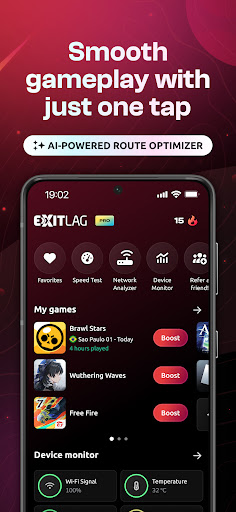
One-Tap Optimization: Just select your game and tap connect. No technical knowledge required.
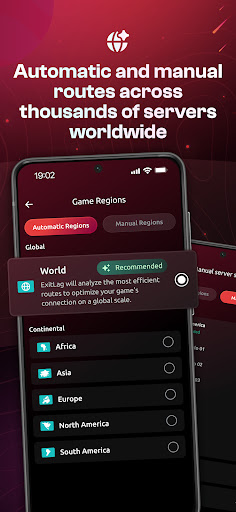
Advanced Control: Manually select from over 1,000 server locations worldwide and monitor detailed connection metrics in real-time.
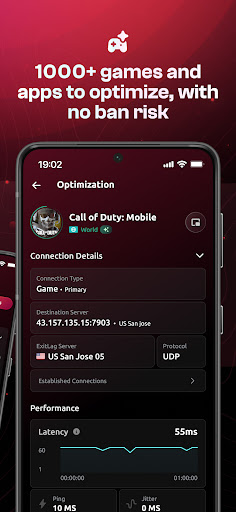
Real-Time Monitoring: Track your connection latency live and access comprehensive reports.
In-Game Overlay: Check your optimized game ping directly through our game overlay feature.
In-Game Stats: Monitor battery, memory, Wi-Fi signal, and temperature without leaving your game.
Global Server Network: Connect to more than 1,000 optimized servers around the world.
24/7 Expert Support: Our dedicated support team is here to help anytime.
1000+ games supported: Works with Brawl Stars, Mobile Legends, Free Fire, CODM, PUBGM, BGMI, and more. Didn't find your game? Ask our team.
Ready to stop losing to connection problems? Download ExitLag today and start winning more.
To make this happen, we ask for VPN service permission and all desired game traffic will be routed to our private and optimized network.
https://www.exitlag.com/privacy-policy-mobile.html
https://www.exitlag.com/terms-of-service
Show more

1. Download MEmu installer and finish the setup

2. Start MEmu then open Google Play on the desktop

3. Search ExitLag: Lower your Ping in Google Play
Install
4. Download and Install ExitLag: Lower your Ping
5. On install completion click the icon to start

6. Enjoy using ExitLag: Lower your Ping on PC with MEmu
MEmu Play is the best Android emulator, and 100 million users already enjoy its superb Android app experience. Powered by advanced virtualization technology, it lets you enjoy thousands of Android apps smoothly on your PC—including the most graphics-intensive ones.
Bigger screen with better graphics; Long duration, without limitation of battery or mobile data.
Full Keymapping support for precise control of keyboard and mouse or gamepad.
Multiple game accounts or tasks on single PC at one time with Multi-Instance manager.
Use ExitLag: Lower your Ping on PC by following steps: