Fishing Points - Fishing App
Updated
Current Version
4.3.9
Offered By

Stop worrying about high battery drain when using Fishing Points - Fishing App on your phone. Free yourself from the tiny screen and enjoy the app on a much larger display. From now on, get a full-screen experience of your app with the convenience of a keyboard and mouse. MEmu offers you all the surprising features you’d expect: quick installation and easy setup, intuitive controls, and no more worries about battery life, mobile data, or unexpected calls. The all-new MEmu 9 is the choice for using Fishing Points - Fishing App on your computer. With the MEmu multi-instance manager, you can run two or more accounts at the same time. Most importantly, our exclusive emulation engine unlocks your PC’s full potential, delivering smooth and enjoyable performance.
Show more
Enjoy superb experience of using Fishing Points - Fishing App on PC with MEMU App Player. It's a powerful free Android emulator which provides you with thousands of android apps for their desktop version. Enjoy connecting with friends and polishing your work with higher efficiency! Download all-in-one fishing app already connecting more than 10 million anglers worldwide.
Download all-in-one fishing app already connecting more than 10 million anglers worldwide. Fishing Points is the fishing forecast app choice for you to discover new fishing spots and catch more fish! Suitable for both salt and freshwater anglers on open seas, lakes or rivers.
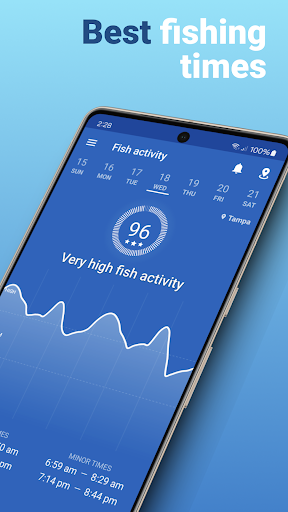
Explore our detailed fishing forecasts to discover the best fishing times for your location. Understand how fish brain works by analyzing fishing tides, moon phases, marine forecasts, solunar and weather forecasts. We show current conditions and forecasts for temperature, rain probability, rain intensity, wind speed, gusts, wind directions and air pressure all in one app.
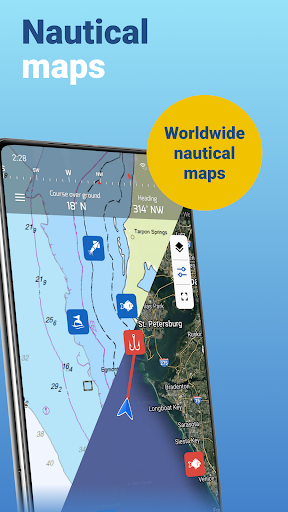
To know where to find fish, explore four different fishing map types, save and discover strong fishing spots, favorite locations, trotlines and trolling paths. Explore the most detailed satellite fishing maps, access worldwide nautical charts or use offline mode with marine nautical maps for boating (NOAA). Revisit your past angler experiences in your fully private personal catch logbook, check bag limits or other fishing rules and learn what worked to make the most of your next fishing trip!
FEEDING TIMES FORECAST
- Hourly feeding times with strong major and minor time intervals
- Daily fish activity
- Best fishing times calendar for bass and other popular species
- Customizable smart notifications on days with feeding times
FIND YOUR LOCATIONS
- Save fishing spots, locations, hotspots and waypoints
- Record trolling paths and trotlines
- Save your favorite locations with more than 40 icons and 10 colors
- Find saved locations with GPS
- The only fishing app with worldwide access to nautical maps
- Offline mode with nautical charts provided by NOAA
- Get information and quickly locate more than 50.000 boat ramps worldwide
- Compass
- Measure distances
FISHING WEATHER
- Accurate current fishing weather conditions with hourly forecast for humidity, precipitation probability, UV index
- Wind forecast including wind speed, gusts and direction
- Current fishing barometer with hourly air pressure forecast
- Severe live weather alerts
- Rain radar
RIVER DATA
- Current water levels & flows for 35k+ river stations
TIDES FOR FISHING
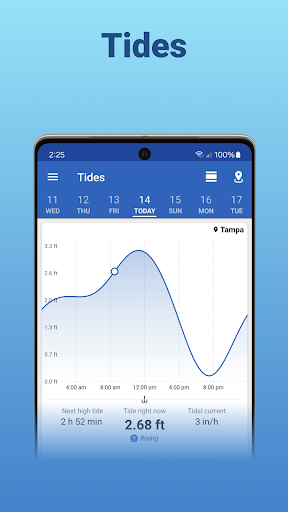
- Hourly tides for fishing charts with information on the next high and low tides
- Tide prediction charts with detailed tidal current
- Tides overview forecasts with daily highest and lowest tides
MARINE FORECAST
- Hourly waves forecast (waves, swell, wind waves)
- Sea temperature (SST)
- Sea and ocean currents data
SOLUNAR DATA
- Sunrise and sunset times
- Sun positions
- Moonrise and moonset times
- Moon positions
- Moon phases
SYNC DATA
- Access your saved data across all your computer and mobile devices.
- Use Webapp to plan and analyze fishing trips on your computer. Try Webapp on https://web.fishingpoints.app
FISH RULES AND FISH SPECIES
- Information on fish species including bass, trout, snapper, snook, drum, grouper, catfish etc.
- Fish rules and regulations on bag limits and open seasons for selected US States (Florida, Texas, Georgia, North Carolina and Louisiana)
CATCH LOG
- Create a fishing log and save the details of every catch (photos, weight, length)
- Weather, solunar and tide information are added automatically to your catches
SHARE
- Import kmz or gpx files from GPS devices or other apps
- Share your locations with friends
- Share catch photos with your fellow anglers
In case of questions, comments or suggestions, please send us a note to support@fishingpoints.app. Happy fishing!
Privacy policy: https://fishingpoints.app/privacy
Terms of Use: https://fishingpoints.app/terms
Show more

1. Download MEmu installer and finish the setup

2. Start MEmu then open Google Play on the desktop

3. Search Fishing Points - Fishing App in Google Play
Install
4. Download and Install Fishing Points - Fishing App
5. On install completion click the icon to start

6. Enjoy using Fishing Points - Fishing App on PC with MEmu
MEmu Play is the best Android emulator, and 100 million users already enjoy its superb Android app experience. Powered by advanced virtualization technology, it lets you enjoy thousands of Android apps smoothly on your PC—including the most graphics-intensive ones.
Bigger screen with better graphics; Long duration, without limitation of battery or mobile data.
Full Keymapping support for precise control of keyboard and mouse or gamepad.
Multiple game accounts or tasks on single PC at one time with Multi-Instance manager.
Use Fishing Points - Fishing App on PC by following steps: