GrabMerchant
Updated
Current Version
J
Offered By

Stop worrying about high battery drain when using GrabMerchant on your phone. Free yourself from the tiny screen and enjoy the app on a much larger display. From now on, get a full-screen experience of your app with the convenience of a keyboard and mouse. MEmu offers you all the surprising features you’d expect: quick installation and easy setup, intuitive controls, and no more worries about battery life, mobile data, or unexpected calls. The all-new MEmu 9 is the choice for using GrabMerchant on your computer. With the MEmu multi-instance manager, you can run two or more accounts at the same time. Most importantly, our exclusive emulation engine unlocks your PC’s full potential, delivering smooth and enjoyable performance.
Show more
Enjoy superb experience of using GrabMerchant on PC with MEMU App Player. It's a powerful free Android emulator which provides you with thousands of android apps for their desktop version. Enjoy connecting with friends and polishing your work with higher efficiency! Enjoy a better way of doing business.
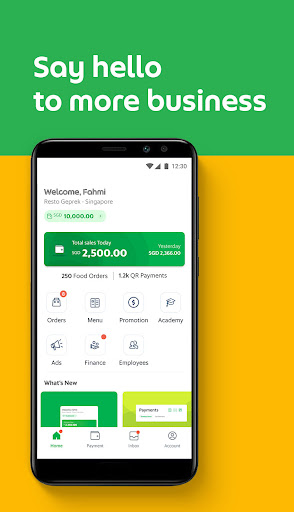
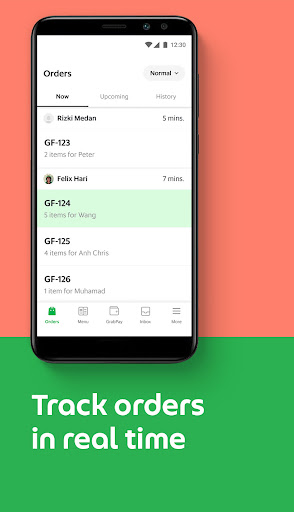
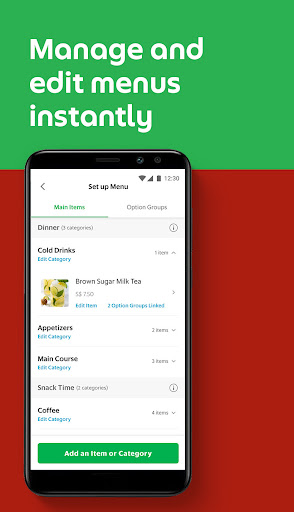
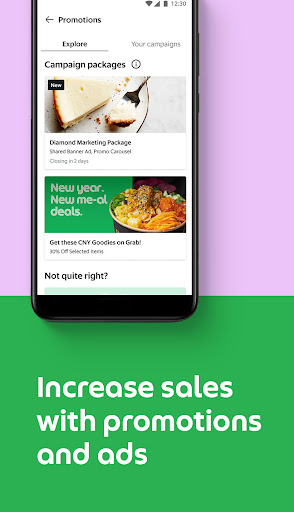
Enjoy a better way of doing business.
Download the app and sign up as a Grab merchant-partner today.
Two simple steps to become a Grab merchant-partner:
1. Sign up your business first with our sales team.
GrabFood/GrabMart sign up: https://www.grab.com/merchant/food/
GrabPay sign up: https://www.grab.com/merchant/pay/
------------------------------------------------------------------------------
2. After signing up, download this app to enjoy a better way of doing business.
If you want to create more opportunities for business growth, this mobile app will support you. It offers delivery and a secure cashless payment option to millions of consumers. Now who doesn’t want that?
Being a Grab merchant-partner means enjoying more options
Expand your business beyond the breakfast-lunch-dinner crowd or your in-store customers. GrabFood allows you to deliver meals when hunger strikes at any time of the day. GrabMart helps you reach out to more customers and make grocery deliveries straight to their homes.
The GrabMerchant app makes your online business more seamless
If you’re running a food delivery service or even a grocery store, this app manages your processes efficiently – so you can focus on what you do best.
Manage orders easily
Check all the orders coming into your restaurant or store and track the ones that are being fulfilled, straight from your device.
Grow your sales online
Offer discounts to convert them into loyal customers. Advertise within the app to get more orders.
Get better insights
A good seller makes better business decisions, supported by data and store performance. See what’s working right for you, so you can focus your efforts to make more sales.
Learn with GrabAcademy
Running a restaurant or a shop isn’t easy. So we’re making it easier for you with lessons on how to improve your performance.
Enable secure payments
Going cashless helps both you and your customers. No matter what you’re selling on the app, you can now track and trace where your money comes and goes, while giving your customers the flexibility to pay faster and safer.
Manage your storefront
Create, upload and update your menu or catalogue to stand out from the crowd.
Manage employees access
Create designated profiles for different members of your team.
Some features are only available in selected markets.
To learn more about the information used in our mobile app, including our interest-based advertising and cross-device tracking, or to exercise certain opt-out choices you may have, please refer to our Privacy Policy.
Privacy Policy : www.grab.com/privacy
Open Source Software Attributions: www.grb.to/oss-attributions
Show more

1. Download MEmu installer and finish the setup

2. Start MEmu then open Google Play on the desktop

3. Search GrabMerchant in Google Play
Install
4. Download and Install GrabMerchant
5. On install completion click the icon to start

6. Enjoy using GrabMerchant on PC with MEmu
MEmu Play is the best Android emulator, and 100 million users already enjoy its superb Android app experience. Powered by advanced virtualization technology, it lets you enjoy thousands of Android apps smoothly on your PC—including the most graphics-intensive ones.
Bigger screen with better graphics; Long duration, without limitation of battery or mobile data.
Full Keymapping support for precise control of keyboard and mouse or gamepad.
Multiple game accounts or tasks on single PC at one time with Multi-Instance manager.
Use GrabMerchant on PC by following steps: