Healthify: AI Diet & Fitness
Updated
Current Version
v26.1
Offered By

Stop worrying about high battery drain when using Healthify: AI Diet & Fitness on your phone. Free yourself from the tiny screen and enjoy the app on a much larger display. From now on, get a full-screen experience of your app with the convenience of a keyboard and mouse. MEmu offers you all the surprising features you’d expect: quick installation and easy setup, intuitive controls, and no more worries about battery life, mobile data, or unexpected calls. The all-new MEmu 9 is the choice for using Healthify: AI Diet & Fitness on your computer. With the MEmu multi-instance manager, you can run two or more accounts at the same time. Most importantly, our exclusive emulation engine unlocks your PC’s full potential, delivering smooth and enjoyable performance.
Show more
Enjoy superb experience of using Healthify: AI Diet & Fitness on PC with MEMU App Player. It's a powerful free Android emulator which provides you with thousands of android apps for their desktop version. Enjoy connecting with friends and polishing your work with higher efficiency! Transform Your Health Journey with Healthify: The Ultimate AI-Powered Wellness Companion.
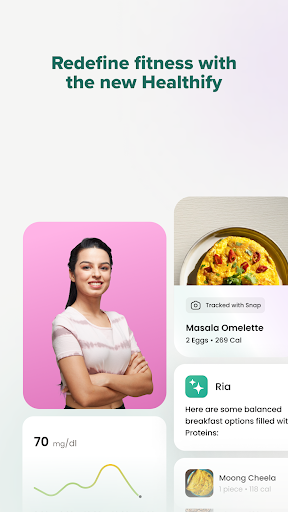
Transform Your Health Journey with Healthify: The Ultimate AI-Powered Wellness Companion
Join over 40 million users who have embarked on their path to a healthier self with Healthify, the leading health and nutrition app designed to revolutionize your wellness journey. With Healthify, your journey towards a healthier lifestyle is powered by advanced AI technology, offering personalized health insights and seamless meal tracking at your fingertips. Experience the future of fitness with Ria, our AI nutritionist, and Snap, our innovative calorie-tracking tool, and take the first step towards a healthier you today.
Why Choose Healthify?
Healthify is more than just a fitness app; it's a comprehensive wellness platform integrating sophisticated AI technology to provide personalized health and wellness guidance. Whether you aim to improve your diet, enhance your physical activity, or simply maintain a healthy lifestyle, Healthify is here to support you every step of the way.
Innovative Features Designed for Your Health:
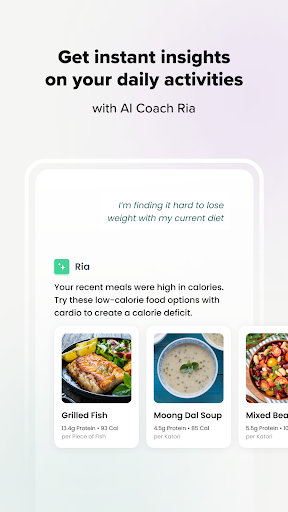
Meet Ria – Your Personal AI Nutritionist: With Ria, get tailored nutrition advice and insights whenever needed. Leveraging the latest in AI technology, Ria offers 24/7 support, answering your health and fitness questions with personalized recommendations to guide you on your wellness journey.
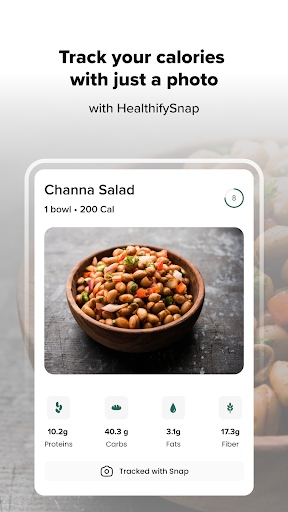
Snap – Effortless Meal Tracking: Say goodbye to tedious manual logging. With Snap, just take a photo of your meal, and our AI will analyze the calories and nutrients for you. Meal tracking has never been easier, allowing you to stay on top of your diet with the snap of a picture.
Comprehensive Health Tracking: Easily monitor your daily activities, including steps, hydration, sleep, and workouts, with Healthify. Our app seamlessly integrates with popular health platforms like Samsung Health, Google Fit, HealthConnect, Garmin, and Fitbit, providing a holistic view of your fitness progress.
Extensive Food Database: Navigate through our vast database of over 100,000 foods, offering comprehensive calorie and nutrition tracking for a wide range of cuisines. Meal planning is now more accessible and enjoyable, helping you make informed dietary choices.
Daily Challenges to Keep You Motivated: Engage in daily challenges designed to boost your commitment to health, wellness, and active living. With Healthify, find new ways to stay motivated and achieve your fitness goals.
Smart Scale Integration for In-depth Insights: Connect with smart scales to track your progress accurately, receiving detailed health data and insights that help you understand your journey better.
Join a Supportive Community: Be part of a vibrant community of individuals on similar health and wellness journeys. Share your experiences, seek advice, and stay motivated with the support of the Healthify community.
Download Healthify Today and Start Your Personalized Wellness Journey
With Healthify, achieving your health and fitness goals has never been easier. Powered by cutting-edge technology and AI, Healthify offers a unique, personalized approach to wellness that adapts to your lifestyle. Download Healthify now and take the first step towards a healthier, happier you.
Show more

1. Download MEmu installer and finish the setup

2. Start MEmu then open Google Play on the desktop

3. Search Healthify: AI Diet & Fitness in Google Play
Install
4. Download and Install Healthify: AI Diet & Fitness
5. On install completion click the icon to start

6. Enjoy using Healthify: AI Diet & Fitness on PC with MEmu
MEmu Play is the best Android emulator, and 100 million users already enjoy its superb Android app experience. Powered by advanced virtualization technology, it lets you enjoy thousands of Android apps smoothly on your PC—including the most graphics-intensive ones.
Bigger screen with better graphics; Long duration, without limitation of battery or mobile data.
Full Keymapping support for precise control of keyboard and mouse or gamepad.
Multiple game accounts or tasks on single PC at one time with Multi-Instance manager.
Use Healthify: AI Diet & Fitness on PC by following steps: