
INPS Mobile
Updated
Current Version
J
Offered By

Stop worrying about high battery drain when using INPS Mobile on your phone. Free yourself from the tiny screen and enjoy the app on a much larger display. From now on, get a full-screen experience of your app with the convenience of a keyboard and mouse. MEmu offers you all the surprising features you’d expect: quick installation and easy setup, intuitive controls, and no more worries about battery life, mobile data, or unexpected calls. The all-new MEmu 9 is the choice for using INPS Mobile on your computer. With the MEmu multi-instance manager, you can run two or more accounts at the same time. Most importantly, our exclusive emulation engine unlocks your PC’s full potential, delivering smooth and enjoyable performance.
Show more
Enjoy superb experience of using INPS Mobile on PC with MEMU App Player. It's a powerful free Android emulator which provides you with thousands of android apps for their desktop version. Enjoy connecting with friends and polishing your work with higher efficiency! INPS Mobile allows you to interact with some online services on the website www.
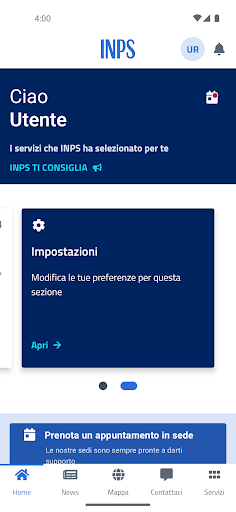
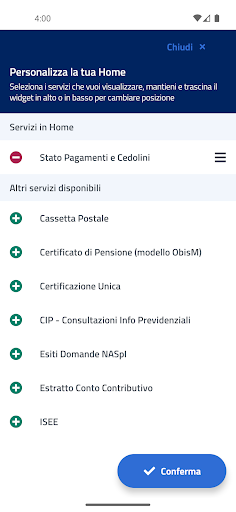
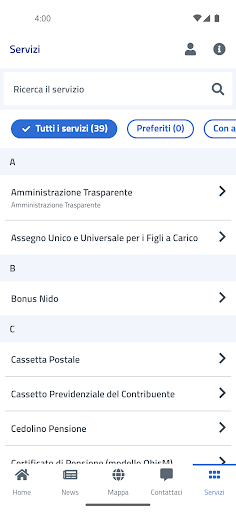
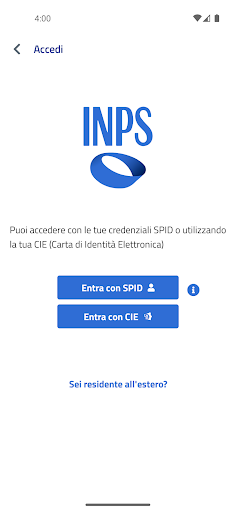
INPS Mobile allows you to interact with some online services on the website www.inps.it. INPS is always closer to you with different communication methods.
Services with authentication: Contribution Account Statement; Mailbox; Domestic Work Employer Account Statement; Status of Public Employees Management practices; Payment of redemptions, reunions and annuities; Domestic Workers Payment; Company Social Security Drawer; Consultation of ANF Applications for Domestic Workers; Result of Pension Applications; Consultation of ANF Applications Separate Management; Pension payslip; Application Status; Payment Status and Payslips; INPS Responds; Pension Certificate (ObisM model); Single Certification; Transferable quota; Red East consultation; Notification Management; Results of Agricultural Unemployment Questions; My Pension (Forecast for workers); Nest Bonus; NASpI Question Results; Birth Award; CIP - Social Security Information Consultation; Consultation of ANF Applications for Direct Payments for Companies; Citizenship Income/Pension Consultation; ISEE simulator for citizenship income/pension; Verbal Verification of Civil Disability; Management 730/4; ISEE consultation; Single and universal allowance for dependent children; Domestic Work; Durc Online
Services without authentication: Domestic Work Contribution Calculation Simulation; INPS Responds; Head Office Counters, Transparent Administration
The display of services has been reorganized allowing the user different types of access, including the possibility of browsing based on the type of user or topic.
The main view allows you to view the latest news, access the Institute's social networks, save your favorite services, allowing direct navigation to specific services.
The user can view the complete list of available services even without entering the credentials required for some of the services available in the INPS mobile app.
Must log in with PIN/SPID/CIE only when choosing to use a service with authentication.
This version uses a new user interface, designed specifically for the use of the new features.
The navigation system is of the 'Tab Bar' type and updated to app usability standards.
Further news:
- a tutorial has been integrated that guides the user in using the new graphical interface upon first access
- the services have been categorized by theme, by type of user
- the possibility of viewing the Institute's social channels has been added
- you can view news and press releases
- the ability to authenticate with SPID has been added
- it is possible to create a list of favorite services;
- it is possible to search for services by name;
- it is possible to report technical problems.
INPS mobile is an official app of the National Institute of Social Security, the Italian government's social security body, developed for all types of INPS users (workers, families, pensioners, unemployed/unemployed and suspended workers), which gives access to numerous consultation and documentation sending services.
This app is intended for all Italian citizens (residents in Italy and elsewhere) to be able to use the Institute's services on the move.
Accessibility statement: https://form.agid.gov.it/view/8410b560-7cbf-11ef-a539-31fd2d4dc2c5
Show more

1. Download MEmu installer and finish the setup

2. Start MEmu then open Google Play on the desktop

3. Search INPS Mobile in Google Play
Install
4. Download and Install INPS Mobile
5. On install completion click the icon to start

6. Enjoy using INPS Mobile on PC with MEmu
MEmu Play is the best Android emulator, and 100 million users already enjoy its superb Android app experience. Powered by advanced virtualization technology, it lets you enjoy thousands of Android apps smoothly on your PC—including the most graphics-intensive ones.
Bigger screen with better graphics; Long duration, without limitation of battery or mobile data.
Full Keymapping support for precise control of keyboard and mouse or gamepad.
Multiple game accounts or tasks on single PC at one time with Multi-Instance manager.
Use INPS Mobile on PC by following steps:






























