Intro Maker, Outro Maker
Updated
Current Version
81.0
Offered By

Stop worrying about high battery drain when using Intro Maker, Outro Maker on your phone. Free yourself from the tiny screen and enjoy the app on a much larger display. From now on, get a full-screen experience of your app with the convenience of a keyboard and mouse. MEmu offers you all the surprising features you’d expect: quick installation and easy setup, intuitive controls, and no more worries about battery life, mobile data, or unexpected calls. The all-new MEmu 9 is the choice for using Intro Maker, Outro Maker on your computer. With the MEmu multi-instance manager, you can run two or more accounts at the same time. Most importantly, our exclusive emulation engine unlocks your PC’s full potential, delivering smooth and enjoyable performance.
Show more
Enjoy superb experience of using Intro Maker, Outro Maker on PC with MEMU App Player. It's a powerful free Android emulator which provides you with thousands of android apps for their desktop version. Enjoy connecting with friends and polishing your work with higher efficiency! Create a stunning video intro with music with the intro maker app.
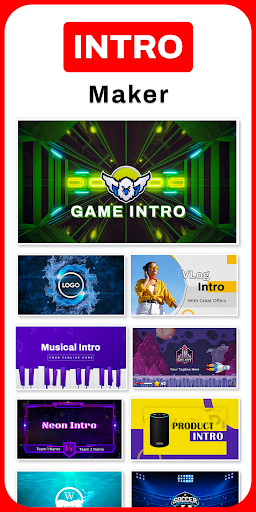
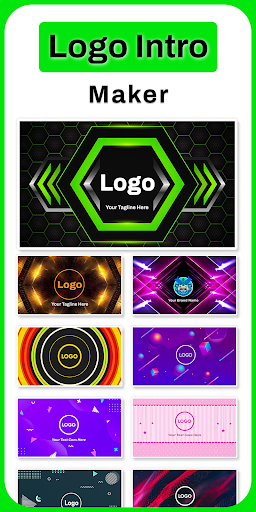
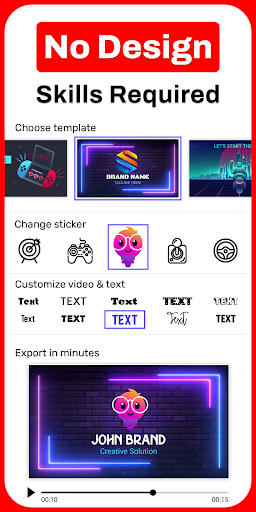
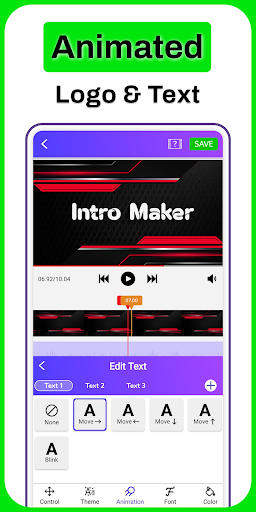
Create a stunning video intro with music with the intro maker app. 1000+ intro templates. Quick & Easy.
Intro Maker With Music:
Create intros with synchronized music to their videos. 1Intro app combines video editing features with extensive audio integration, making producing engaging and polished video introductions easy.
Logo Intro Maker
Create logo animations easily. These animated logos are essential for enhancing brand identity, increasing engagement, and making a strong impression on viewers.
Outro Maker:
Outros, which appear at the end of videos, are crucial for reinforcing branding, prompting viewer engagement, and providing closure to the content.
Gaming Intro Maker:
Our intro videos help establish a unique brand identity, set the tone for gaming content, and capture the audience's attention from the start.
Vlog Intro Maker:
1Intro app is designed to help vloggers create captivating and professional-quality introductory segments for their videos. These intros are essential for establishing a vlogger's brand, setting the tone for the content, and engaging the audience right from the start.
3D Intro Maker:
1Intro app is a versatile tool designed for creating engaging and professional-quality videos. These videos are often used at the beginning of videos, presentations, or promotional materials to capture the audience's attention and establish a strong brand presence.
Movie Intro Maker:
1Intro app is a specialized tool designed to help filmmakers, video editors, and content creators produce professional-quality movie intros and opening sequences. These intros set the tone for films, establishing mood and branding while capturing the audience's attention right from the start.
News Intro Maker:
Create professional-quality introductory segments for news broadcasts, online news channels, and social media news updates. These intros help establish the credibility and branding of a news outlet, providing an engaging and authoritative start to news segments.
Key Features
- User-Friendly Interface
- Customizable Intro Templates
- Dynamic Animations and Effects
- Text and Logo Integration
- Audio Integration
- Export Options
Applications
- Business Branding
- For Video Creators: you can enhance their videos with custom logo animations, helping to build a recognizable brand and retain viewer attention.
- Social Media Influencers: Influencers can produce polished logo animations for their social media content, ensuring their videos stand out and leave a lasting impression.
- Freelance Designers: Freelancers can use the app to create high-quality logo animations for their clients, expanding their service offerings and attracting more business.
Benefits
- Professional Quality
- Time-Efficient
- Cost-Effective
Ready to start your creative journey with the intro maker app today?
1Intro: Subscription Details:
Payment will be charged to your Google Play Account upon confirmation of purchase. Your subscription will auto-renew unless turned off within your Google Play Account at least 24 hours before the current billing period ends.
We value your feedback.
Please rate our intro maker, and outro maker app and share your thoughts to help us enhance your experience.
Show more

1. Download MEmu installer and finish the setup

2. Start MEmu then open Google Play on the desktop

3. Search Intro Maker, Outro Maker in Google Play
Install
4. Download and Install Intro Maker, Outro Maker
5. On install completion click the icon to start

6. Enjoy using Intro Maker, Outro Maker on PC with MEmu
MEmu Play is the best Android emulator, and 100 million users already enjoy its superb Android app experience. Powered by advanced virtualization technology, it lets you enjoy thousands of Android apps smoothly on your PC—including the most graphics-intensive ones.
Bigger screen with better graphics; Long duration, without limitation of battery or mobile data.
Full Keymapping support for precise control of keyboard and mouse or gamepad.
Multiple game accounts or tasks on single PC at one time with Multi-Instance manager.
Use Intro Maker, Outro Maker on PC by following steps: