티켓베이-티켓거래 앱, 양도, 중고, 남는티켓 거래
Updated
Current Version
2.3.18
Offered By

Stop worrying about high battery drain when using 티켓베이-티켓거래 앱, 양도, 중고, 남는티켓 거래 on your phone. Free yourself from the tiny screen and enjoy the app on a much larger display. From now on, get a full-screen experience of your app with the convenience of a keyboard and mouse. MEmu offers you all the surprising features you’d expect: quick installation and easy setup, intuitive controls, and no more worries about battery life, mobile data, or unexpected calls. The all-new MEmu 9 is the choice for using 티켓베이-티켓거래 앱, 양도, 중고, 남는티켓 거래 on your computer. With the MEmu multi-instance manager, you can run two or more accounts at the same time. Most importantly, our exclusive emulation engine unlocks your PC’s full potential, delivering smooth and enjoyable performance.
Show more
Enjoy superb experience of using 티켓베이-티켓거래 앱, 양도, 중고, 남는티켓 거래 on PC with MEMU App Player. It's a powerful free Android emulator which provides you with thousands of android apps for their desktop version. Enjoy connecting with friends and polishing your work with higher efficiency! Great tickets, great experiences, TICKETBAY.
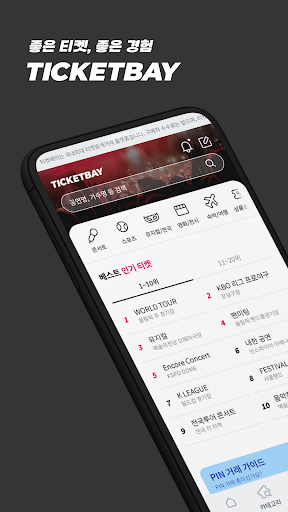
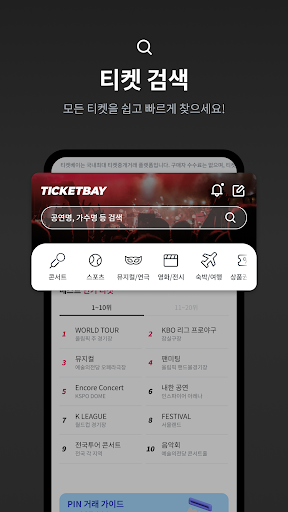
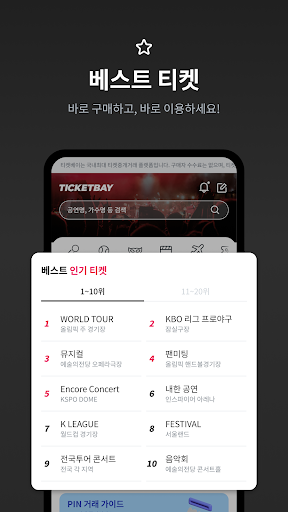
Great tickets, great experiences, TICKETBAY. Trade great tickets easily and safely at Ticketbay.
Since launching Korea's first secondary ticket trading service in 2015, we have focused on making trading easy and safe. We will continue to build a virtuous cycle of a clean ticket trading culture!
About Ticketbay
To foster a fair trading environment, Ticketbay restricts bulk purchasing and ticket sales using macros and similar tools.
Safe and Fast Ticketbay
· Payment Storage
: Ticketbay securely holds the sales proceeds until the buyer confirms the purchase.
· 100% Refund Guarantee
: 100% refund to the buyer if the ticket schedule is officially canceled.
· Safe Entry Service
: 100% refund from Ticketbay if entry is denied at the venue.
(Paid service; selectable when purchasing within Ticketbay)
· Purchase Damage Compensation
: Fees incurred due to the seller's unilateral cancellation are paid to the buyer as damage compensation.
Ticketbay: Easier Product Search
· Search for desired products in 1 second
· View desired products by comparing seating charts
· Purchase better seats at a lower price by comparing products
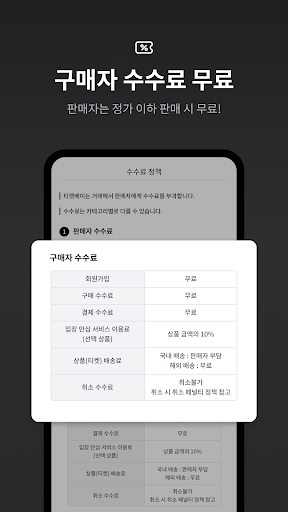
Commission-Free Ticketbay
· No purchase commission
· No sales commission when listing products below the list price
· No sales commission when reselling products purchased on Ticketbay
[Access Permission Guide]
1. Essential Access Permissions
- None
2. Optional Access Permissions
- Notifications: Required for service usage guides and transaction status notifications. - Camera: Required for taking photos for image attachment purposes and for uploading images.
- Storage (Photos/Media/Files): Used to upload image files from storage space for attaching images during customer inquiries or product registration.
※ You can still use the service even if you do not agree to the optional access permissions above.
3. How to Revoke Access Permissions
- Android 6.0 or higher: Settings -> Application Manager -> Select App -> Permissions
-> Access permissions can be revoked
- Android 6.0 or lower: Access permissions cannot be revoked; revocation is only possible by deleting the app.
- If you are using a device running Android 6.0 or lower, you cannot use the access permission settings natively supported by Android. Therefore, please upgrade your device to Android 6.0 or higher before reconfiguring access permissions.
(Since access permissions agreed to prior to the upgrade remain the same after the upgrade, please delete and reinstall the app to reset permissions.)
Show more

1. Download MEmu installer and finish the setup

2. Start MEmu then open Google Play on the desktop

3. Search 티켓베이-티켓거래 앱, 양도, 중고, 남는티켓 거래 in Google Play
Install
4. Download and Install 티켓베이-티켓거래 앱, 양도, 중고, 남는티켓 거래
5. On install completion click the icon to start

6. Enjoy using 티켓베이-티켓거래 앱, 양도, 중고, 남는티켓 거래 on PC with MEmu
MEmu Play is the best Android emulator, and 100 million users already enjoy its superb Android app experience. Powered by advanced virtualization technology, it lets you enjoy thousands of Android apps smoothly on your PC—including the most graphics-intensive ones.
Bigger screen with better graphics; Long duration, without limitation of battery or mobile data.
Full Keymapping support for precise control of keyboard and mouse or gamepad.
Multiple game accounts or tasks on single PC at one time with Multi-Instance manager.
Use 티켓베이-티켓거래 앱, 양도, 중고, 남는티켓 거래 on PC by following steps: