Kucing Real Estate
Updated
Current Version
2.0.0
Offered By

Stop worrying about high battery drain when using Kucing Real Estate on your phone. Free yourself from the tiny screen and enjoy the app on a much larger display. From now on, get a full-screen experience of your app with the convenience of a keyboard and mouse. MEmu offers you all the surprising features you’d expect: quick installation and easy setup, intuitive controls, and no more worries about battery life, mobile data, or unexpected calls. The all-new MEmu 9 is the choice for using Kucing Real Estate on your computer. With the MEmu multi-instance manager, you can run two or more accounts at the same time. Most importantly, our exclusive emulation engine unlocks your PC’s full potential, delivering smooth and enjoyable performance.
Show more
Enjoy superb experience of using Kucing Real Estate on PC with MEMU App Player. It's a powerful free Android emulator which provides you with thousands of android apps for their desktop version. Enjoy connecting with friends and polishing your work with higher efficiency! Kucing – Your Copilot for Property Transactions in Singapore.

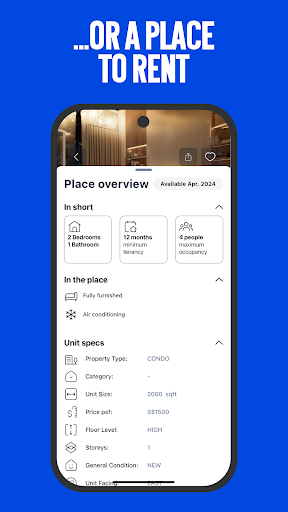
Kucing – Your Copilot for Property Transactions in Singapore
Kucing is more than just a property app; it’s your copilot for transforming the way you buy, sell, and rent homes. Whether you’re a homeowner looking to sell or a home seeker finding your dream property, Kucing simplifies the entire process with its user-friendly features and vibrant community. As pioneers in Singapore’s proptech space, we’re here to turn your real estate dreams into reality.
Why Choose Kucing?
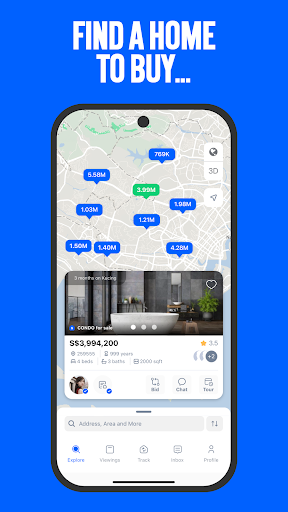
• Free Listings: List your property in just a few taps, reaching potential buyers or tenants with ease.
• Powerful CRM: Manage all your property interactions in one place—track offers, organise visits, and stay on top of deals.
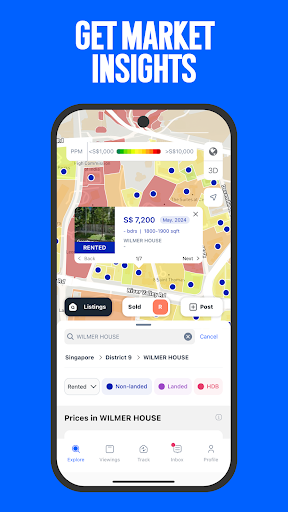
• Cutting-Edge Data Visualisation: Gain valuable insights with our real-time heatmap, giving you access to past transactions and market trends.
• Immersive 3D Property Exploration: Virtually tour properties with fully immersive 3D views of Singapore’s districts, streets, and buildings.
• Intelligent Booking Assistant: Schedule viewings effortlessly based on owner availability, all from within the app.
• Secure Connections: Enjoy peace of mind with Singpass-verified homeowners and home seekers, ensuring a trusted and secure environment.
• Real-Time Bidding: Engage in live, transparent bidding with just a tap, making and tracking offers in real-time.
• Expert Guidance: Access free guides on private properties and HDB, plus ready-to-use templates for tenancy agreements and legal support.
A Vibrant Community Awaits
At Kucing, we’re building a thriving community of homeowners and home seekers who collaborate to make smarter real estate decisions. By going beyond just square footage and prices, we’re helping you connect with the right people and properties that match your needs.
Transform Your Property Journey Today
Download Kucing now and unlock a seamless, stress-free property journey. From free listings to advanced tools like our CRM, heatmaps, and booking assistant, Kucing has everything you need to make your real estate experience rewarding. Take control of your property journey and discover new opportunities in Singapore’s real estate market today!
Show more

1. Download MEmu installer and finish the setup

2. Start MEmu then open Google Play on the desktop

3. Search Kucing Real Estate in Google Play
Install
4. Download and Install Kucing Real Estate
5. On install completion click the icon to start

6. Enjoy using Kucing Real Estate on PC with MEmu
MEmu Play is the best Android emulator, and 100 million users already enjoy its superb Android app experience. Powered by advanced virtualization technology, it lets you enjoy thousands of Android apps smoothly on your PC—including the most graphics-intensive ones.
Bigger screen with better graphics; Long duration, without limitation of battery or mobile data.
Full Keymapping support for precise control of keyboard and mouse or gamepad.
Multiple game accounts or tasks on single PC at one time with Multi-Instance manager.
Use Kucing Real Estate on PC by following steps: