
Lefri9i App
Updated
Current Version
1.1.0
Offered By

Stop worrying about high battery drain when using Lefri9i App on your phone. Free yourself from the tiny screen and enjoy the app on a much larger display. From now on, get a full-screen experience of your app with the convenience of a keyboard and mouse. MEmu offers you all the surprising features you’d expect: quick installation and easy setup, intuitive controls, and no more worries about battery life, mobile data, or unexpected calls. The all-new MEmu 9 is the choice for using Lefri9i App on your computer. With the MEmu multi-instance manager, you can run two or more accounts at the same time. Most importantly, our exclusive emulation engine unlocks your PC’s full potential, delivering smooth and enjoyable performance.
Show more
Enjoy superb experience of using Lefri9i App on PC with MEMU App Player. It's a powerful free Android emulator which provides you with thousands of android apps for their desktop version. Enjoy connecting with friends and polishing your work with higher efficiency! Lefri9i App.
Lefri9i App
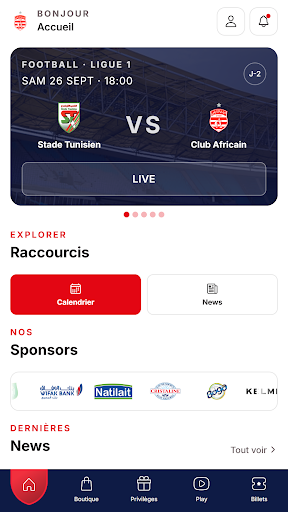
Lefri9i App est l’application des supporters du Club Africain. Billetterie, boutique officielle, privilèges partenaires, vidéos et actualités du club : tout le CA dans ta poche.
ACCUEIL
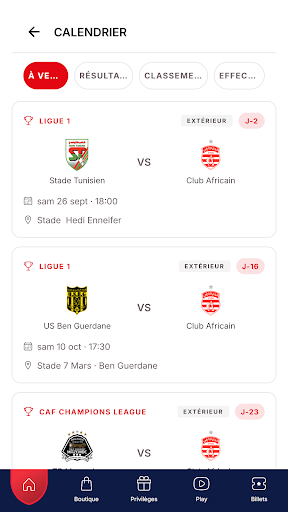
• Le prochain match avec son compte à rebours, le calendrier et l’effectif.
• Les actualités du club et les partenaires officiels.
• Le match en direct : buts, cartons et temps forts minute par minute.
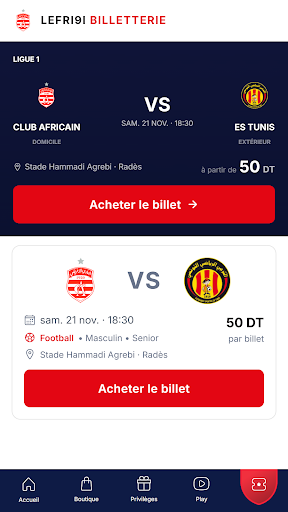
BILLETTERIE
• Achète tes billets de match directement depuis l’app.
• Choisis ta tribune, reçois ton e-billet et présente-le à l’entrée du stade.
• Suis tes commandes et retrouve tous tes billets dans « Mes billets ».
• Pas de match en vente ? Suis la rencontre en direct avec All4One.
BOUTIQUE OFFICIELLE
• Maillots, équipements et produits officiels du Club Africain.
• Panier, paiement sécurisé, adresses de livraison et suivi des commandes.
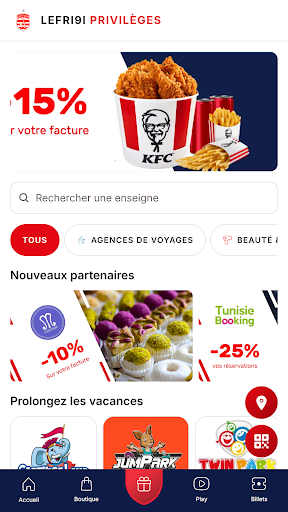
PRIVILÈGES
• Des réductions et avantages chez les enseignes partenaires du club.
• Les partenaires près de toi grâce à la géolocalisation.
• Ton pass à présenter en boutique pour profiter des offres.
LEFRI9I PLAY
• Vidéos, reels et stories du club et de ses créateurs.
• Commente, aime et partage les contenus avec la communauté.
E-PASSEPORT
• Deviens membre Fan ou Sponsor et débloque les avantages du club..
• Activation par carte, par portefeuille ou par code de paiement.
PORTEFEUILLE
• Recharge ton portefeuille et paie tes achats en quelques secondes.
MON COMPTE
• Connexion par e-mail, Google ou Apple.
• Notifications pour les matchs, les billets et les nouveautés.
• Disponible en français, en arabe et en anglais.
Club Africain, depuis 1920. Lefri9i App, l’app des Clubistes.
Show more

1. Download MEmu installer and finish the setup

2. Start MEmu then open Google Play on the desktop

3. Search Lefri9i App in Google Play
Install
4. Download and Install Lefri9i App
5. On install completion click the icon to start

6. Enjoy using Lefri9i App on PC with MEmu
MEmu Play is the best Android emulator, and 100 million users already enjoy its superb Android app experience. Powered by advanced virtualization technology, it lets you enjoy thousands of Android apps smoothly on your PC—including the most graphics-intensive ones.
Bigger screen with better graphics; Long duration, without limitation of battery or mobile data.
Full Keymapping support for precise control of keyboard and mouse or gamepad.
Multiple game accounts or tasks on single PC at one time with Multi-Instance manager.
Use Lefri9i App on PC by following steps: