Lingopie: Language Learning PC

Download Lingopie: Language Learning on PC

Lingopie: Language Learning PC

Lingopie: Language Learning

  • Updated

  • Current Version

    9.8.32

  • Offered By

    Lingopie: Language Learning PC

Features of Lingopie: Language Learning on PC

Stop worrying about high battery drain when using Lingopie: Language Learning on your phone. Free yourself from the tiny screen and enjoy the app on a much larger display. From now on, get a full-screen experience of your app with the convenience of a keyboard and mouse. MEmu offers you all the surprising features you’d expect: quick installation and easy setup, intuitive controls, and no more worries about battery life, mobile data, or unexpected calls. The all-new MEmu 9 is the choice for using Lingopie: Language Learning on your computer. With the MEmu multi-instance manager, you can run two or more accounts at the same time. Most importantly, our exclusive emulation engine unlocks your PC’s full potential, delivering smooth and enjoyable performance.

Show more

Screenshots & Video of Lingopie: Language Learning PC

Enjoy superb experience of using Lingopie: Language Learning on PC with MEMU App Player. It's a powerful free Android emulator which provides you with thousands of android apps for their desktop version. Enjoy connecting with friends and polishing your work with higher efficiency! Lingopie is the easiest, most entertaining way to learn a new language.
APP Info

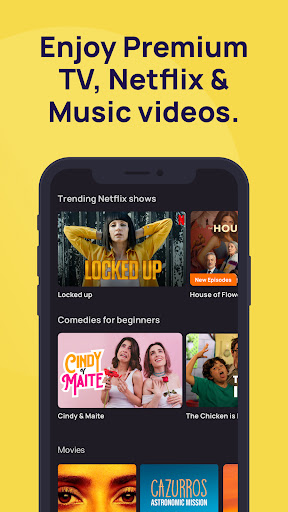
Lingopie is the easiest, most entertaining way to learn a new language. Learn a new language today by binging over 3,000+ hours of films,TV shows (including NETFLIX hits!), podcasts and music videos combined with Lingopie's interactive learning tools. Genres ranging from comedy, thrillers, action to musicals, and kids' shows.

Discover the Lingopie-powered subtitles for NETFLIX shows!

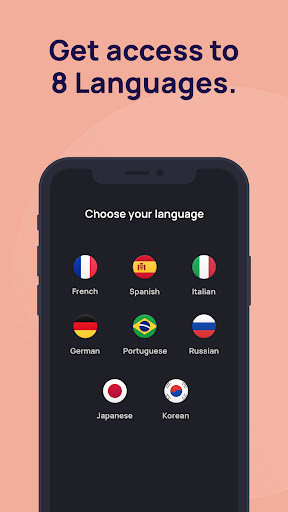
Learn Spanish, French, German, Italian, Russian, Portuguese, Japanese, Korean or Chinese without boring classes and with 100% entertainment.


4.8/5 on Trustpilot is proving that users love our product and entertaining education works! Our methodology incorporates all acknowledged fundamental language learning techniques.

Dive in, fall in love with the top-quality content and the easiest language learning experience you've ever had!


Learn how people really speak, with the right mannerisms, accents and more!


We’ve invested everything in creating unique features that bring TV & film to life as language-learning tools.


How does the Lingopie app work?


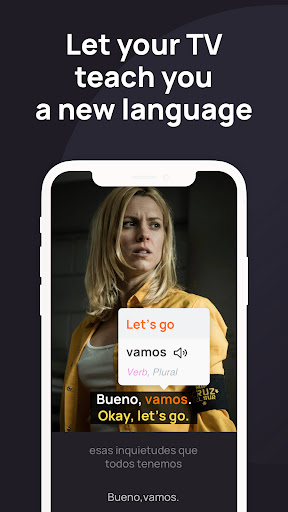
Once you’ve picked a TV series or movie to learn with (don’t worry, you can change the channel any time), your streamed show will display subtitles in the original language (e.g., Spanish) along with the English ones.
Every word, phrase or slang is clickable to give you an instant translation in real-time, helping you learn.

After you watch an episode you can easily review all your new vocabulary & grammar rules with our built-in flashcards and word lists.

Lingopie is great for all levels, from beginner to advanced, with great content and language learning tools appropriate for everyone.

Here’s what you can do with Lingopie:


⭐Customize your own flash cards based on scenes
⭐Change the video playback speed
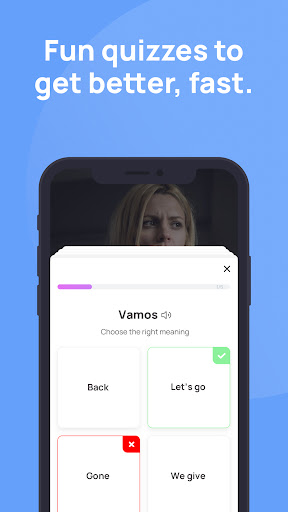
⭐Get quizzed on what you’ve seen
⭐Learn accents, mannerisms and other unspoken elements that really get you into a new culture and language
⭐So much more than just vocabulary and memorization - and much more fun!

Why Lingopie?


People spend a lot of money and time trying to learn foreign languages, and most give up. They are taught grammar and parts of speech, and in the end, they're not confident enough to speak and break through the "language barrier."

What sets Lingopie apart is the unique approach to language learning. We believe (and have the science to back it) that acquiring a new language in a stress-free environment, like outside of a classroom, is much more efficient and, most of all, fun!

And with our thousands of hours of premium, global entertainment, we’re turning a nagging chore into an enjoyable ride to a new skill.

So what are you waiting for? Download the Lingopie app today and get:

⭐Access to hundreds of TV shows from around the world, across multiple languages and dialects
⭐Enjoyable exercises to memorize words and boost your vocabulary based on the content
⭐Hours of first-hand accent training and pronunciation practice
⭐Freemium account is available

Join our growing community of language lovers like you on these social networks:

Facebook: https://www.facebook.com/lingopietv/
YouTube: https://www.youtube.com/c/LingopieLanguageLearningWithTVShowsMusic
Instagram: https://www.instagram.com/lingopietv/
Twitter: https://twitter.com/Lingopietv


Privacy Policy: https://lingopie.com/privacy-policy
Terms of Use: https://lingopie.com/terms-of-service

Show more

How to Download Lingopie: Language Learning on PC

  • Lingopie: Language Learning PC

    1. Download MEmu installer and finish the setup

  • Lingopie: Language Learning PC

    2. Start MEmu then open Google Play on the desktop

  • Lingopie: Language Learning PC

    3. Search Lingopie: Language Learning in Google Play

  • Lingopie: Language Learning PC Install

    4. Download and Install Lingopie: Language Learning

  • Lingopie: Language Learning PC

    5. On install completion click the icon to start

  • Lingopie: Language Learning PC
    Lingopie: Language Learning PC Lingopie: Language Learning PC

    6. Enjoy using Lingopie: Language Learning on PC with MEmu

Why Use MEmu for Lingopie: Language Learning

MEmu Play is the best Android emulator, and 100 million users already enjoy its superb Android app experience. Powered by advanced virtualization technology, it lets you enjoy thousands of Android apps smoothly on your PC—including the most graphics-intensive ones.

  • Bigger screen with better graphics; Long duration, without limitation of battery or mobile data.

  • Full Keymapping support for precise control of keyboard and mouse or gamepad.

  • Multiple game accounts or tasks on single PC at one time with Multi-Instance manager.

Ready to Use?

Lingopie: Language Learning - FAQs

  • How to use Lingopie: Language Learning on PC?

    Use Lingopie: Language Learning on PC by following steps:

    • Download MEmu, then install and launch it
    • Login to Google Play Store, install the app
    • Enjoy using the app on PC with MEmu
  • What are the minimum system requirements to run Lingopie: Language Learning on PC?
    • Intel or AMD Processor
    • Microsoft Windows 7 and above
    • 2GB of memory
    • 5GB of free disk space
    • Hardware Virtualization Technology
Lingopie: Language Learning PC