
MariBank PH (SeaBank)
Updated
Current Version
3.29.0
Offered By

Stop worrying about high battery drain when using MariBank PH (SeaBank) on your phone. Free yourself from the tiny screen and enjoy the app on a much larger display. From now on, get a full-screen experience of your app with the convenience of a keyboard and mouse. MEmu offers you all the surprising features you’d expect: quick installation and easy setup, intuitive controls, and no more worries about battery life, mobile data, or unexpected calls. The all-new MEmu 9 is the choice for using MariBank PH (SeaBank) on your computer. With the MEmu multi-instance manager, you can run two or more accounts at the same time. Most importantly, our exclusive emulation engine unlocks your PC’s full potential, delivering smooth and enjoyable performance.
Show more
Enjoy superb experience of using MariBank PH (SeaBank) on PC with MEMU App Player. It's a powerful free Android emulator which provides you with thousands of android apps for their desktop version. Enjoy connecting with friends and polishing your work with higher efficiency! Ranked as the No.

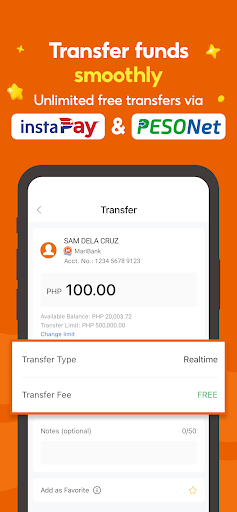
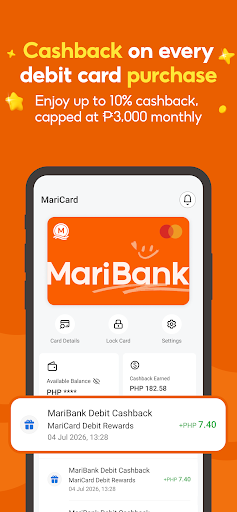
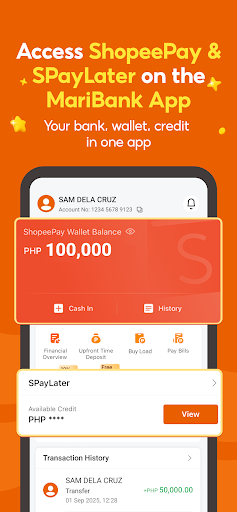
Ranked as the No. 1 Bank in the Philippines in Forbes’ World’s Best Banks 2026, MariBank PH (formerly SeaBank PH) is now a BSP-licensed digital bank offering simple, reliable, and rewarding ways to save, pay, and earn every day—proudly part of the Sea Group, the same group behind Shopee.
Open an account in 5 minutes and enjoy daily interest earnings, unlimited free transfers, and cashback rewards that make everyday spending more rewarding. Join Millions of Filipinos saving smarter with the No. 1 Bank, MariBank!
EVERYDAY BANKING MADE SIMPLE: HIGH INTEREST EARNINGS & FREE TRANSFERS
• Earn up to 3.75% p.a. on your savings, credited DAILY.
• Unlimited FREE transfers via InstaPay and PESONet.
• No maintaining balance, no lock-in period, and no account fees.
ENJOY CASHBACK AND EVERYDAY REWARDS
• Enjoy up to 10% cashback with your MariBank Card: 10% on train rides, 5% on ride-hailing apps, 3% on gas, 3% at select supermarkets, and 1% on all other local spend!
• Get ₱5.00 cashback on each merchant QRPh transaction.
• Get up to 5% off on Load & Mobile Data promos when you buy via the MariBank app.
• Get up to ₱50 cashback monthly when you pay bills via the MariBank app.
EVERYDAY PAYMENTS, NOW CONNECTED: LINK SHOPEEPAY AND SPAYLATER
• Link your ShopeePay and SPayLater accounts to the MariBank app in minutes.
• Scan to pay with MariBank, ShopeePay, (or SPayLater for select users) and earn cashback.
• Transfer funds between ShopeePay and MariBank more easily & repay your SPayLater loans with fewer steps.
• Pay less with available Vouchers in your QR purchases when you link your ShopeePay and SPayLater accounts!
GROW YOUR SAVINGS WITH UPFRONT TIME DEPOSIT
• Interest earned instantly upon successful placement.
• Get 3.75% p.a. on a minimum of ₱100 in a 1-month or 3-month deposit.
• Choose auto-rollover to renew automatically when your time deposit matures.
SHOP ANYWHERE WITH CONFIDENCE
• Get a MariBank Card and enjoy 0% Foreign Transaction Fees when you use your card to shop in-store abroad.
• Enjoy FREE ATM withdrawals abroad and cash out at ATMs nationwide.
• Feel secure with the numberless MariBank Card, with transaction controls and limits easily and instantly configurable in the MariBank app.
• Use your Mari Credit Card on Shopee Checkout and enjoy 2% coins cashback & 0% interest.
• Link your MariBank Card to Google Pay for fast, secure, cardless payments while keeping your favorite cashback perks.
FLEXIBLE LOAN OPTIONS
• Selected users may access Mari Loan with competitive interest rates of as low as 0.95% per month and flexible repayment terms.
SECURE, REGULATED, AND PROTECTED
• Your account is secured with multi-factor authentication and encryption.
• MariBank Philippines, Inc. is regulated by the BSP.
• Deposits are insured by PDIC up to ₱1 Million per depositor.
MariBank PH is part of Sea Limited (NYSE: SE) — the global consumer internet company behind Shopee and Garena.
FOLLOW US TO STAY UPDATED WITH OUR PROMOS & SERVICE ANNOUNCEMENTS
• Facebook: facebook.com/MariBankPH/
• Instagram: instagram.com/maribank.ph
• Tiktok: tiktok.com/@maribank.ph
Show more

1. Download MEmu installer and finish the setup

2. Start MEmu then open Google Play on the desktop

3. Search MariBank PH (SeaBank) in Google Play
Install
4. Download and Install MariBank PH (SeaBank)
5. On install completion click the icon to start

6. Enjoy using MariBank PH (SeaBank) on PC with MEmu
MEmu Play is the best Android emulator, and 100 million users already enjoy its superb Android app experience. Powered by advanced virtualization technology, it lets you enjoy thousands of Android apps smoothly on your PC—including the most graphics-intensive ones.
Bigger screen with better graphics; Long duration, without limitation of battery or mobile data.
Full Keymapping support for precise control of keyboard and mouse or gamepad.
Multiple game accounts or tasks on single PC at one time with Multi-Instance manager.
Use MariBank PH (SeaBank) on PC by following steps:
































