
Lite+
Updated
Current Version
2.0.4
Offered By

Stop worrying about high battery drain when using Lite+ on your phone. Free yourself from the tiny screen and enjoy the app on a much larger display. From now on, get a full-screen experience of your app with the convenience of a keyboard and mouse. MEmu offers you all the surprising features you’d expect: quick installation and easy setup, intuitive controls, and no more worries about battery life, mobile data, or unexpected calls. The all-new MEmu 9 is the choice for using Lite+ on your computer. With the MEmu multi-instance manager, you can run two or more accounts at the same time. Most importantly, our exclusive emulation engine unlocks your PC’s full potential, delivering smooth and enjoyable performance.
Show more
Enjoy superb experience of using Lite+ on PC with MEMU App Player. It's a powerful free Android emulator which provides you with thousands of android apps for their desktop version. Enjoy connecting with friends and polishing your work with higher efficiency! Lite+ аппликейшн нь финтек технологи болон хиймэл оюун ухааны технологид суурилсан бичил зээлийн үйлчилгээг танд хүргэх үйлчилгээ юм.
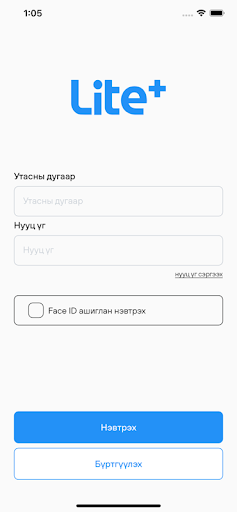
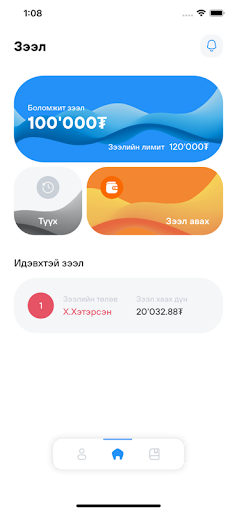
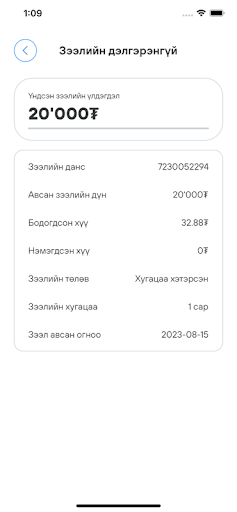
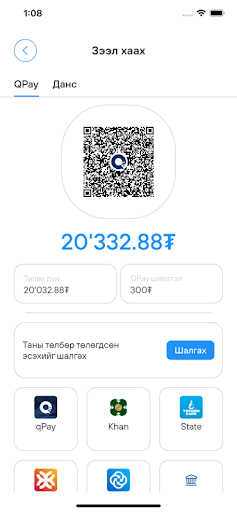
Lite+ аппликейшн нь финтек технологи болон хиймэл оюун ухааны технологид суурилсан бичил зээлийн үйлчилгээг танд хүргэх үйлчилгээ юм. Та манай апликейшнийг татан авч өөрийн мэдээллийг оруулснаар таны зээлийн эрхийн хэмжээ тогтох ба олон удаагийн давтамжтай үйлчилгээ авахад зээлийн эрх нэмэгдэх зэрэг олон давуу талуудтай. Таны мэдээллийг бид задруулахгүй чанд хадгалах тул та өөрийн мэдээллийг үнэн зөв оруулах үүрэгтэй. Мөн энэхүү үйлчилгээг авахад танд зөвхөн гар утас байхад л хангалттай ба барьцаа хөрөнгө шаардахгүй. Интернэтэд холбогдсон л бол 24 цагийн аль ч цагт зээлийн хүсэлтээ явуулан зээл авах боломжтой.Бид хэрэглэгчийн камераны зөвшөөрлийг хэрэглэгч Profile зураг оруулах үед, өөрийгөө батлах баримт бичгээ илгээхэд ашиглах зорилгоор авдаг болно.
Бүтээгдэхүүний нөхцөл:
Зээлийн хэмжээ: 80,000₮ - 120,000₮
Зээлийн жилийн хүү: 0.17% - 5% - 15% (өдрийн хүү, сарын хүү, жилийн дээд хүү)
Зээлийн өртөг: нийт хугацааны турш 20% (зээлийн нийт өртөг багтсан)
Шимтгэл болон сунгалт: 1000₮ - 6000₮
Зээл эргэн төлөх хугацаа: 61 - 90 хоног хүртэл
Тооцоолол:
Харилцагч 100,000₮ зээл авсан үед:
Үйлчилгээний шимтгэл - 5,000₮
1 сарын зээлийн хүү : 5%
90 хоногийн дараа зээлийн эргэн төлөлт хийх үед: 115,000 төгрөг төлнө.
Энэ төлбөр дээр үйлчилгээний шимтгэл 5,000₮ нэмэгдэж харилцагч 120,000₮ гурван сарын дараа эргэн төлнө.
Зээлийн хүүг сар бүр, үндсэн төлбөрийг хугацааны эцэст төлнө.
Хамгийн таатай нөхцөлөөр санхүүгийн хэрэгцээгээ Lite+ апп-аар шийдээрэй.
Facebook page: Lite+ зээлийн апп
Instagram: Lite_plus_official
Лаят Вишн ХХК
Show more

1. Download MEmu installer and finish the setup

2. Start MEmu then open Google Play on the desktop

3. Search Lite+ in Google Play
Install
4. Download and Install Lite+
5. On install completion click the icon to start

6. Enjoy using Lite+ on PC with MEmu
MEmu Play is the best Android emulator, and 100 million users already enjoy its superb Android app experience. Powered by advanced virtualization technology, it lets you enjoy thousands of Android apps smoothly on your PC—including the most graphics-intensive ones.
Bigger screen with better graphics; Long duration, without limitation of battery or mobile data.
Full Keymapping support for precise control of keyboard and mouse or gamepad.
Multiple game accounts or tasks on single PC at one time with Multi-Instance manager.
Use Lite+ on PC by following steps:
































