
Waking Up with Sam Harris - Mindfulness Meditation
Updated
Current Version
1.6.61
Offered By

Stop worrying about high battery drain when using Waking Up with Sam Harris - Mindfulness Meditation on your phone. Free yourself from the tiny screen and enjoy the app on a much larger display. From now on, get a full-screen experience of your app with the convenience of a keyboard and mouse. MEmu offers you all the surprising features you’d expect: quick installation and easy setup, intuitive controls, and no more worries about battery life, mobile data, or unexpected calls. The all-new MEmu 9 is the choice for using Waking Up with Sam Harris - Mindfulness Meditation on your computer. With the MEmu multi-instance manager, you can run two or more accounts at the same time. Most importantly, our exclusive emulation engine unlocks your PC’s full potential, delivering smooth and enjoyable performance.
Show more
Enjoy superb experience of using Waking Up with Sam Harris - Mindfulness Meditation on PC with MEMU App Player. It's a powerful free Android emulator which provides you with thousands of android apps for their desktop version. Enjoy connecting with friends and polishing your work with higher efficiency! Combining guided meditation and mindfulness techniques with practical wisdom, Waking Up is a guide to understanding the mind.
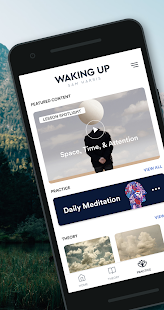

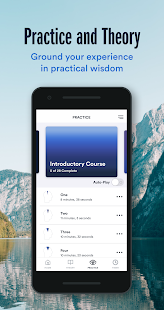
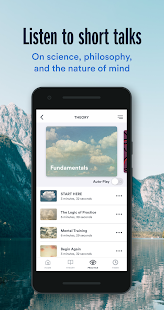
Combining guided meditation and mindfulness techniques with practical wisdom, Waking Up is a guide to understanding the mind. Follow one of our meditation courses and track your mindfulness habits with new sessions, updated daily. Go beyond calming or relaxing, discover your mind and meditate with guided sessions and mindfulness techniques with Sam Harris, a neuroscientist, philosopher, and best-selling author. Explore the theory behind meditation, from gaining awareness of oneself to understanding the source of feelings like anxiety or stress. Through our meditation guide, discover philosophy and neuroscience in short audio lessons with Sam Harris, other teachers and scholars. Topics include: mental health, gratitude, anxiety, neuroscience, awareness, meditation techniques, free will, and much more.
3 reasons to download Waking Up:
1. Unique meditation sessions: Through a variety of mindfulness techniques, Waking Up weaves a meditation guide to help you build a mindfulness habit, meditate and go beyond the standard understanding of meditation.
2. Rational theory: Ground your experience of meditation in practical wisdom, gratitude, awareness, and a rational understanding of the world. Learn the neuroscience behind anxiety, mental health, and mindfulness meditation techniques.
3. Fair pricing: As with all of Sam Harris’s digital content, if you would like to meditate with the Waking Up app but truly cannot afford it, please email us at support@wakingup.com so that we can give you a free account.
By following our 28 day meditation guide, you’ll discover the benefits daily meditation brings to your own mental health, from awareness of anxiety to the focus of your attention in any given moment.
DOWNLOAD WAKING UP AND ENJOY ALL THE FOLLOWING FEATURES:
- Guided meditation: Meditation sessions for beginners, intermediate or advanced users, to track their sessions and meditate in the morning, afternoon or at night.
- Introductory course: Discover the basic principles of mindful meditation, as well as more advanced practices you can eventually reach.
- Daily meditation sessions: Once you’ve completed the introductory course, our growing catalog of daily meditations sessions will help you continue on your practice.
- Lessons & Conversations: Listen to talks on awareness, meditation, mental health, and other relevant philosophy and science.
- Talks and guided meditation sessions from other talented teachers.
ABOUT SAM HARRIS
Sam Harris is the author of five New York Times best sellers, including Waking Up: A Guide to Spirituality Without Religion. His writing and public lectures cover a range of topics – neuroscience, meditation, moral philosophy, religion, rationality – but generally focus on how cultivating an understanding of ourselves, and the world around us, can change our view of how we should live our lives. Sam has practiced meditation for over 30 years, studying with Tibetan, Indian, Burmese, and Western meditation teachers around the world. He received a degree in philosophy from Stanford University and a Ph.D. in neuroscience from UCLA.
PRICING INFO
This pricing is for our customers in the United States. Pricing in other countries may vary. Your subscription to Waking Up will automatically renew, unless you disable auto-renew at least 24 hours before the current period ends. Manage your subscription from your Google Play account settings. Payment will be charged to your Google Play account. Read more about our terms of service here: https://wakingup.com/terms-of-service/ and our privacy policy here: https://wakingup.com/privacy-policy/.
Show more

1. Download MEmu installer and finish the setup

2. Start MEmu then open Google Play on the desktop

3. Search Waking Up with Sam Harris - Mindfulness Meditation in Google Play
Install
4. Download and Install Waking Up with Sam Harris - Mindfulness Meditation
5. On install completion click the icon to start

6. Enjoy using Waking Up with Sam Harris - Mindfulness Meditation on PC with MEmu
MEmu Play is the best Android emulator, and 100 million users already enjoy its superb Android app experience. Powered by advanced virtualization technology, it lets you enjoy thousands of Android apps smoothly on your PC—including the most graphics-intensive ones.
Bigger screen with better graphics; Long duration, without limitation of battery or mobile data.
Full Keymapping support for precise control of keyboard and mouse or gamepad.
Multiple game accounts or tasks on single PC at one time with Multi-Instance manager.
Use Waking Up with Sam Harris - Mindfulness Meditation on PC by following steps: