
Player X
Updated
Current Version
0.1
Offered By

Stop worrying about high battery drain when using Player X on your phone. Free yourself from the tiny screen and enjoy the app on a much larger display. From now on, get a full-screen experience of your app with the convenience of a keyboard and mouse. MEmu offers you all the surprising features you’d expect: quick installation and easy setup, intuitive controls, and no more worries about battery life, mobile data, or unexpected calls. The all-new MEmu 9 is the choice for using Player X on your computer. With the MEmu multi-instance manager, you can run two or more accounts at the same time. Most importantly, our exclusive emulation engine unlocks your PC’s full potential, delivering smooth and enjoyable performance.
Show more
Enjoy superb experience of using Player X on PC with MEMU App Player. It's a powerful free Android emulator which provides you with thousands of android apps for their desktop version. Enjoy connecting with friends and polishing your work with higher efficiency! Experience the ultimate in video playback with PLAYER X, where cutting-edge technology meets seamless user experience.
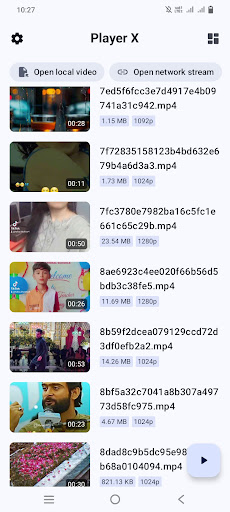

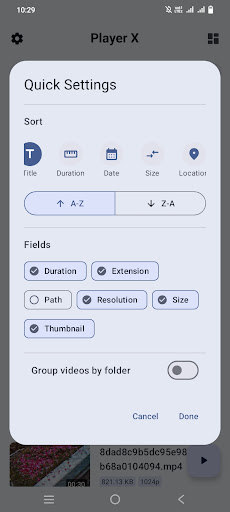
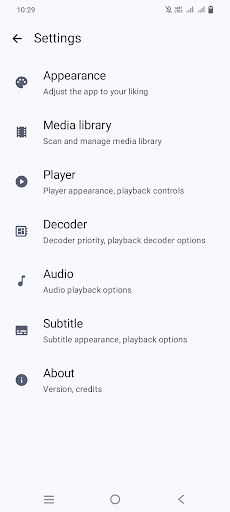
Experience the ultimate in video playback with PLAYER X, where cutting-edge technology meets seamless user experience. Whether you're streaming online or enjoying content offline, our app provides unparalleled features designed for discerning users like you.
All Pro Features Unlocked:
Enjoy all premium features without any limitations. From advanced playback controls to customizable settings, take full control over your viewing experience.
Offline Playback:
No internet? No problem. Player X allows you to watch your favorite videos anytime, anywhere, without requiring an internet connection.
Supports Almost All Formats:
Say goodbye to format compatibility issues. Our app supports a wide range of video formats, ensuring you can play virtually any video file effortlessly.
Privacy First:
Rest assured, your privacy is our priority. PLAYER X collects no user data, ensuring a secure and private video playback experience.
Hardware Acceleration:
Harness the power of your device's hardware with built-in hardware acceleration. Enjoy smooth and lag-free playback even for high-resolution videos.
No Annoying Ads:
Tired of interruptions? So are we. PLAYER X is completely ad-free, allowing you to immerse yourself in your videos without distractions.
Easy to Use, Powerful Features:
Navigate seamlessly through your video library with our intuitive interface. Discover advanced features such as subtitle support, audio track selection, and more, all designed to enhance your viewing pleasure.
Feedback and Support:
We value your feedback! Reach out to our dedicated support team for any questions or suggestions. Your satisfaction is our commitment.
Download PLAYER X today and elevate your video watching experience to new heights. Whether you're a casual viewer or a media enthusiast, PLAYER X is your ultimate companion for enjoying videos effortlessly, securely, and without compromise.
## Key Features
- Smooth 8k and 4k playback experience
- Native Android app with simple and easy-to-use interface
- Without any ads or excessive permissions
- Software decoders for H.264 and HEVC
- Audio/Subtitle track selection
- Vertical swipe to change brightness (left) / volume (right)
- Horizontal swipe to seek through video
- Media picker with folder and file view
- Play videos from URL
- Play videos from storage access framework (Android Document picker)
- Control playback speed
- External Subtitle support
- Zoom gesture
- Picture-in-picture mode
- Open source, every user can get source code to learn and modify
## Supported formats
- **Video**: H.263, H.264 AVC (Baseline Profile; Main Profile on Android 6+), H.265 HEVC, MPEG-4 SP, VP8, VP9, AV1
- Support depends on Android device
- **Audio**: Vorbis, Opus, FLAC, ALAC, PCM/WAVE (μ-law, A-law), MP1, MP2, MP3, AMR (NB, WB), AAC (LC, ELD, HE; xHE on Android 9+), AC-3, E-AC-3, DTS,DTS-HD, True HD
- Support provided by ExoPlayer FFmpeg extension
- **Subtitles**: SRT, SSA, ASS, TTML, VTT, DVB
- SSA/ASS has limited styling support
Show more

1. Download MEmu installer and finish the setup

2. Start MEmu then open Google Play on the desktop

3. Search Player X in Google Play
Install
4. Download and Install Player X
5. On install completion click the icon to start

6. Enjoy using Player X on PC with MEmu
MEmu Play is the best Android emulator, and 100 million users already enjoy its superb Android app experience. Powered by advanced virtualization technology, it lets you enjoy thousands of Android apps smoothly on your PC—including the most graphics-intensive ones.
Bigger screen with better graphics; Long duration, without limitation of battery or mobile data.
Full Keymapping support for precise control of keyboard and mouse or gamepad.
Multiple game accounts or tasks on single PC at one time with Multi-Instance manager.
Use Player X on PC by following steps:































