ReFrame: Dual Shot 4K Camera
Updated
Current Version
1.0.18
Offered By

Stop worrying about high battery drain when using ReFrame: Dual Shot 4K Camera on your phone. Free yourself from the tiny screen and enjoy the app on a much larger display. From now on, get a full-screen experience of your app with the convenience of a keyboard and mouse. MEmu offers you all the surprising features you’d expect: quick installation and easy setup, intuitive controls, and no more worries about battery life, mobile data, or unexpected calls. The all-new MEmu 9 is the choice for using ReFrame: Dual Shot 4K Camera on your computer. With the MEmu multi-instance manager, you can run two or more accounts at the same time. Most importantly, our exclusive emulation engine unlocks your PC’s full potential, delivering smooth and enjoyable performance.
Show more
Enjoy superb experience of using ReFrame: Dual Shot 4K Camera on PC with MEMU App Player. It's a powerful free Android emulator which provides you with thousands of android apps for their desktop version. Enjoy connecting with friends and polishing your work with higher efficiency! This is formatted with good spacing and bullet points so it is easy to read on mobile devices, while highlighting the unique dual-recording technology.
This is formatted with good spacing and bullet points so it is easy to read on mobile devices, while highlighting the unique dual-recording technology.
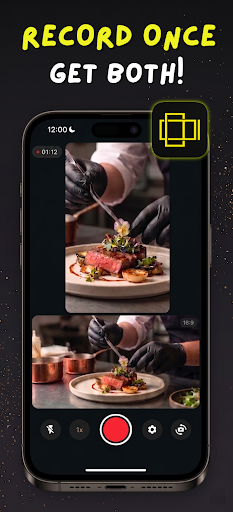
Why choose between recording for TikTok or recording for YouTube? With Reframe, you never have to choose again.
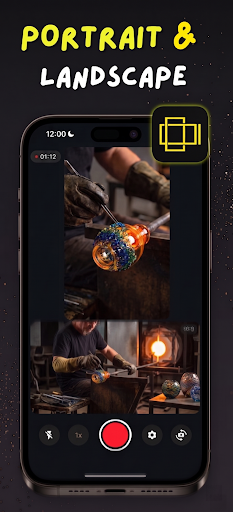
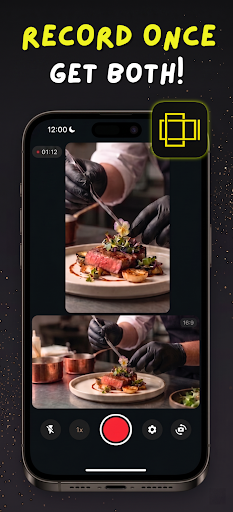
Reframe is a revolutionary camera app designed specifically for content creators, vloggers, and social media managers. Our advanced camera engine allows you to record stunning high-quality video in both 9:16 (vertical) and 16:9 (horizontal) simultaneously from a single camera lens.
Gone are the days of having to film a scene twice, or awkwardly cropping a horizontal video and losing all your video quality just to post it on Reels or Shorts. Record your content once, and Reframe instantly saves two perfectly framed, native-resolution videos straight to your gallery.
Key Features:
True Dual-Aspect Recording Shoot vertical and horizontal videos at the exact same time. The live preview screen shows you exactly what both frames look like in real-time, ensuring your subject is always perfectly centered for both YouTube and TikTok formats.
Maximum Hardware Quality Built with a custom OpenGL recording engine, Reframe physically bypasses standard preview limitations. It hooks directly into your phone's hardware encoder to provide crystal clear, native video quality with absolutely zero distortion or post-crop quality loss.
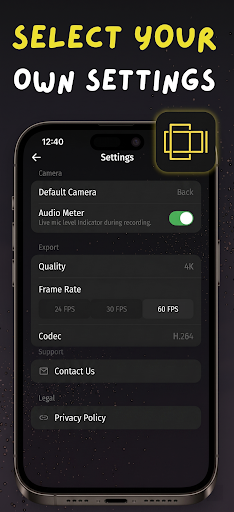
Full Quality Control Whether you are shooting a cinematic vlog or a quick short, take full control of your camera: • Support for 720p, 1080p, and glorious 4K resolution. • Choose between 24 FPS (cinematic), 30 FPS (standard), or 60 FPS (ultra-smooth action). • Select between H.264 (maximum compatibility) or H.265 / HEVC (smaller file sizes, higher efficiency) codecs. • Variable Bitrate (VBR) ensures scenes with high motion get the exact data they need to stay crisp.
Incredibly Efficient Because Reframe uses advanced dual-viewport rendering from a single camera stream, it won't overheat your phone like running two separate camera processes would.
Audio Monitoring & Utilities Watch your audio levels in real-time with the built-in active audio meter to guarantee your voice is being captured perfectly. Turn on grid lines to apply the rule of thirds and frame your shots like a professional.
⭐ Reframe PRO (Optional Upgrade) Creators who want the absolute best experience can upgrade to Reframe Pro to permanently remove the minimal app watermark from exported videos and enjoy a fully ad-free workspace. Choose between affordable Weekly or Yearly plans to fit your content schedule!
Reframe is the ultimate time-saver. Stop recording twice. Stop cropping. Start Reframing.
Download Reframe today and cut your content creation time in half!
Show more

1. Download MEmu installer and finish the setup

2. Start MEmu then open Google Play on the desktop

3. Search ReFrame: Dual Shot 4K Camera in Google Play
Install
4. Download and Install ReFrame: Dual Shot 4K Camera
5. On install completion click the icon to start

6. Enjoy using ReFrame: Dual Shot 4K Camera on PC with MEmu
MEmu Play is the best Android emulator, and 100 million users already enjoy its superb Android app experience. Powered by advanced virtualization technology, it lets you enjoy thousands of Android apps smoothly on your PC—including the most graphics-intensive ones.
Bigger screen with better graphics; Long duration, without limitation of battery or mobile data.
Full Keymapping support for precise control of keyboard and mouse or gamepad.
Multiple game accounts or tasks on single PC at one time with Multi-Instance manager.
Use ReFrame: Dual Shot 4K Camera on PC by following steps: