Royal Enfield App
Updated
Current Version
10.1.4(13)
Offered By

Stop worrying about high battery drain when using Royal Enfield App on your phone. Free yourself from the tiny screen and enjoy the app on a much larger display. From now on, get a full-screen experience of your app with the convenience of a keyboard and mouse. MEmu offers you all the surprising features you’d expect: quick installation and easy setup, intuitive controls, and no more worries about battery life, mobile data, or unexpected calls. The all-new MEmu 9 is the choice for using Royal Enfield App on your computer. With the MEmu multi-instance manager, you can run two or more accounts at the same time. Most importantly, our exclusive emulation engine unlocks your PC’s full potential, delivering smooth and enjoyable performance.
Show more
Enjoy superb experience of using Royal Enfield App on PC with MEMU App Player. It's a powerful free Android emulator which provides you with thousands of android apps for their desktop version. Enjoy connecting with friends and polishing your work with higher efficiency! The all-new Royal Enfield Motorcycle App has an even more seamless user experience & intuitive interface.
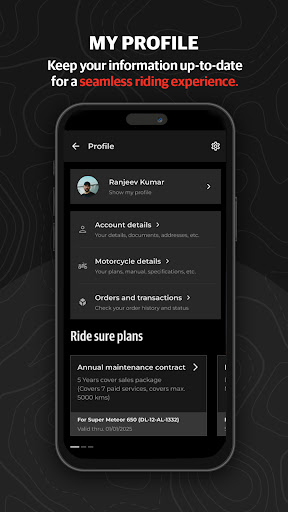
The all-new Royal Enfield Motorcycle App has an even more seamless user experience & intuitive interface. You can now access a world of innovative features - map navigation, personalized feed, real-time tracking, motorcycle spare parts & riding gear.
Map Navigation for Royal Enfield Motorcycle
Make your rides smoother with Tripper Navigation, designed for the Royal Enfield Meteor, Super Meteor, and the Himalayan. Simply connect your phone & add your destination to enjoy seamless navigation. Record, share, & revisit routes, all on the app. Designed for explorers and adventurers, the Tripper Dash offers hands-free experiences such as on-the-go music, call and SMS support, real-time alerts, day & night modes, reminders, and everything else you need to monitor your motorcycle’s health. Experience Hands Free calling by making calls to recent contacts and favourites configured on the mobile app and receive call notifications for all incoming calls.
Royal Enfield Wingman
The Royal Enfield Wingman keeps you connected with your two-wheeler always. Access trip summaries, vehicle alerts & health reports, real-time motorcycle tracking, last parking spot, & make your connection with your Royal Enfield stronger than ever.
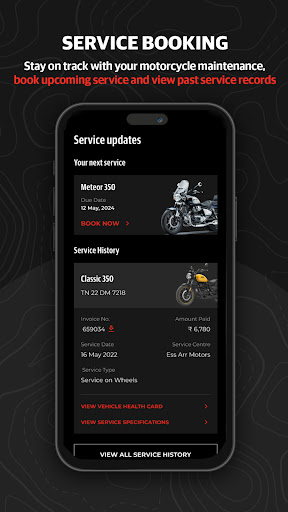
Motorcycle Service Updates
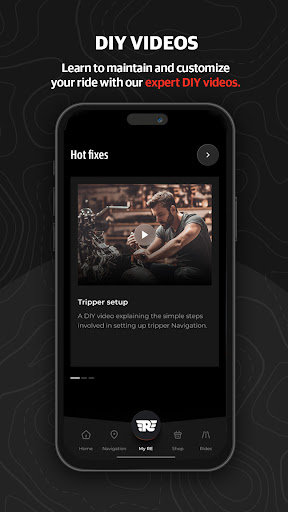
Stay on top of maintenance with scheduled motorcycle services & book upcoming appointments. View your past two-wheeler service records, and maintenance history, view DiY Videos and receive reminders for services, ensuring your motorcycle remains in top condition
MiY (Make It Yours) – Motorcycle Customization.
Want to configure your motorcycle your way? You can now customise your tank color, motorcycle accessories, seats, mirrors, and more, Visualize your customized motorcycle and truly Make It Yours. Effortlessly reserve your dream Royal Enfield with just a few taps. Select your preferred model, choose a store, and complete the booking with integrated payment features – making it simpler than ever to get on the road.
Shop Motorcycle Accessories, Apparel & Riding gear
Browse curated collections and recommendations for official apparel, riding gear, and motorcycle accessories directly from the app. Track orders and receive delivery updates of your purchase.
Orders and Transactions - Track Your Royal Enfield Motorcycle
From factory to garage, track your motorcycle's shipment in real-time and receive live updates on the delivery status. Stay informed every step of the way!
Vehicle Alerts – Motorcycle Health Check
Never miss an update! Receive critical vehicle alerts, motorcycle health check, and in-app notifications. Stay informed about your vehicle's health, even when your app is inactive or the phone is locked.
Vehicle Onboarding Made Easier for Motorcycle Service & Roadside Assistance
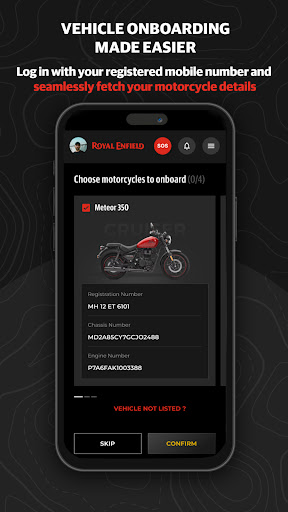
Simply log in with your registered mobile number to auto-fetch your motorcycle details with ease and enjoy instant access to a world of features, including service scheduling, motorcycle roadside assistance, and a lot more!
Motorcycle Trip Summary: Your Ride Journal
From viewing past motorcycle trips & merging journeys to sharing milestones & stories with fellow riders - you can do everything on the Royal Enfield App: Your Ultimate Riding Companion.
Download & discover a world of adventure & pure motorcycling!
Show more

1. Download MEmu installer and finish the setup

2. Start MEmu then open Google Play on the desktop

3. Search Royal Enfield App in Google Play
Install
4. Download and Install Royal Enfield App
5. On install completion click the icon to start

6. Enjoy using Royal Enfield App on PC with MEmu
MEmu Play is the best Android emulator, and 100 million users already enjoy its superb Android app experience. Powered by advanced virtualization technology, it lets you enjoy thousands of Android apps smoothly on your PC—including the most graphics-intensive ones.
Bigger screen with better graphics; Long duration, without limitation of battery or mobile data.
Full Keymapping support for precise control of keyboard and mouse or gamepad.
Multiple game accounts or tasks on single PC at one time with Multi-Instance manager.
Use Royal Enfield App on PC by following steps: