
2GIS World: Map & Navigation
Updated
Current Version
6.25.0.520.12
Offered By

Stop worrying about high battery drain when using 2GIS World: Map & Navigation on your phone. Free yourself from the tiny screen and enjoy the app on a much larger display. From now on, get a full-screen experience of your app with the convenience of a keyboard and mouse. MEmu offers you all the surprising features you’d expect: quick installation and easy setup, intuitive controls, and no more worries about battery life, mobile data, or unexpected calls. The all-new MEmu 9 is the choice for using 2GIS World: Map & Navigation on your computer. With the MEmu multi-instance manager, you can run two or more accounts at the same time. Most importantly, our exclusive emulation engine unlocks your PC’s full potential, delivering smooth and enjoyable performance.
Show more
Enjoy superb experience of using 2GIS World: Map & Navigation on PC with MEMU App Player. It's a powerful free Android emulator which provides you with thousands of android apps for their desktop version. Enjoy connecting with friends and polishing your work with higher efficiency! 2GIS World is a detailed city map with a directory of organizations and a navigator for car drivers and pedestrians.
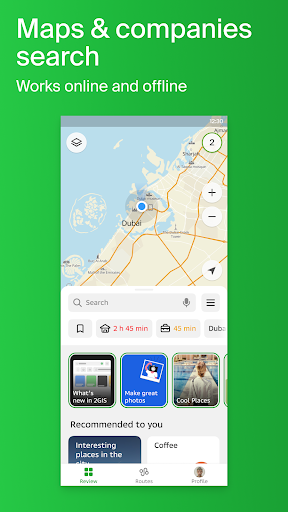
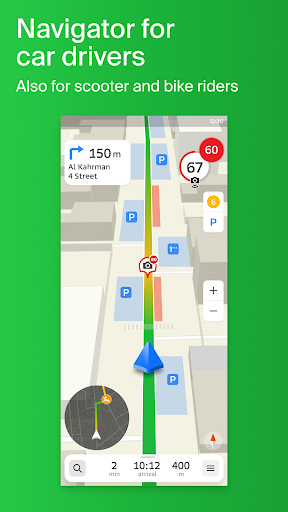
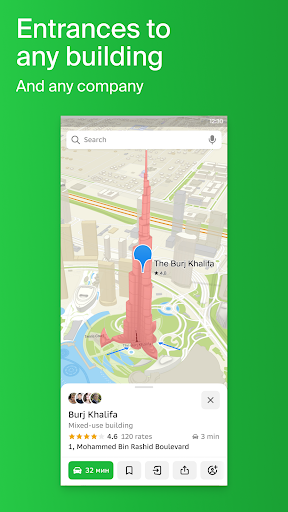

2GIS World is a detailed city map with a directory of organizations and a navigator for car drivers and pedestrians. Works online or offline: all city maps are downloadable for reliable access without the internet.
Use 2GIS World for your daily tasks around the city, or bring it with you to new places:
— Learn addresses, companies and phone numbers, business hours and pricing policies.
— Get directions by car, bus, metro, or follow the navigator on foot.
— Locate entrances to buildings or specific companies.
Addresses, entrances, postal codes of buildings.
Extensive directory of companies. Contacts, business hours, social media links, entrance locations. Reviews and photos of companies by the user community.
Accurate map with all the streets, buildings, district borders, bus stops, metro stations, playgrounds, and everything around the city.
Navigator with real-time traffic jam display and speed camera alerts. Build routes between cities, exclude toll and unpaved roads from your route, drive through several points. Free Android Auto app is also available.
Navigation for trucks, considering individual characteristics of vehicles and cargo.
User comments and road events on the map — stay informed of what's happening on your way.
Timetables and online routes of public transport.
Prefer walking? 2GIS World pedestrian navigator will walk you anywhere. Keep your hands free with voice guidance and background mode.
Travel tips and city guides: check out our curated lists of what to see and try in the city.
Cities of Russia: Moscow, Saint Petersburg, Novosibirsk, Ekaterinburg, Krasnoyarsk, Chelyabinsk, Ufa, Omsk, Kazan, Perm, Nizhny Novgorod, Sheregesh and much more.
Cities of the UAE: Dubai, Abu Dhabi ect.
Cities of Belarus, Kazakhstan, Uzbekistan, Azerbaijan and Kyrgyzstan: Minsk, Pavlodar, Semey, Aktau, Aktobe, Almaty, Nur-Sultan, Bishkek, Karaganda, Kokshetau, Kostanay, Osh, Baku, Tashkent and many more.
Show more

1. Download MEmu installer and finish the setup

2. Start MEmu then open Google Play on the desktop

3. Search 2GIS World: Map & Navigation in Google Play
Install
4. Download and Install 2GIS World: Map & Navigation
5. On install completion click the icon to start

6. Enjoy using 2GIS World: Map & Navigation on PC with MEmu
MEmu Play is the best Android emulator, and 100 million users already enjoy its superb Android app experience. Powered by advanced virtualization technology, it lets you enjoy thousands of Android apps smoothly on your PC—including the most graphics-intensive ones.
Bigger screen with better graphics; Long duration, without limitation of battery or mobile data.
Full Keymapping support for precise control of keyboard and mouse or gamepad.
Multiple game accounts or tasks on single PC at one time with Multi-Instance manager.
Use 2GIS World: Map & Navigation on PC by following steps: