ShortTV - Watch Dramas & Shows
Updated
Current Version
2.26.1
Offered By

Stop worrying about high battery drain when using ShortTV - Watch Dramas & Shows on your phone. Free yourself from the tiny screen and enjoy the app on a much larger display. From now on, get a full-screen experience of your app with the convenience of a keyboard and mouse. MEmu offers you all the surprising features you’d expect: quick installation and easy setup, intuitive controls, and no more worries about battery life, mobile data, or unexpected calls. The all-new MEmu 9 is the choice for using ShortTV - Watch Dramas & Shows on your computer. With the MEmu multi-instance manager, you can run two or more accounts at the same time. Most importantly, our exclusive emulation engine unlocks your PC’s full potential, delivering smooth and enjoyable performance.
Show more
Enjoy superb experience of using ShortTV - Watch Dramas & Shows on PC with MEMU App Player. It's a powerful free Android emulator which provides you with thousands of android apps for their desktop version. Enjoy connecting with friends and polishing your work with higher efficiency! Welcome to ShortMax — a premium streaming platform for your favoriate short dramas, reels and TV videos!


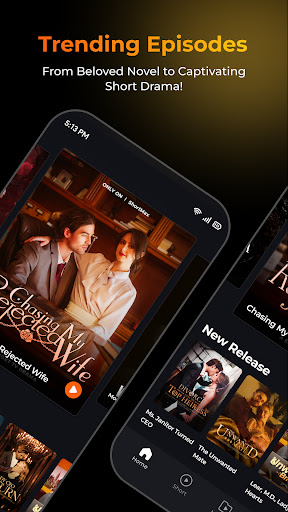

Welcome to ShortMax — a premium streaming platform for your favoriate short dramas, reels and TV videos!
As a leading global platform for bite-sized entertainment, ShortMax is redefining the way you stream. Discover fast-paced, emotionally gripping stories designed to fit perfectly into your everyday life — cinematic drama, powerful storytelling, and unforgettable plot twists, all in short, easy-to-watch episodes.
Enjoy access to 50,000+ trending short dramas and movies in 19 languages, anytime and anywhere. Whether you love sweet Contemporary Romance, CEO secrets, Fated Werewolf Romance, payback stories, or dramatic Rise and Revenge arcs, every episode delivers a shocking twist in just about one minute.
● Why millions choose ShortMax
[Your Short Drama Universe]
- Dive into a massive library of exclusive original short dramas, mini movies, TV series, and trending videos.
- New premium episodes are added every day, so your next obsession is always waiting.
[Global Hits & Multilingual Support]
- Watch carefully selected trending dramas and movies from around the world, including American, Korean, Chinese, and Japanese series.
- Enjoy multilingual subtitles and professional dubbing for a smoother, more immersive experience.
[Every Genre You Love]
- From Contemporary Romance, Werewolf Romance, CEO stories, and Mafia drama to Revenge, Payback, Time Travel, Reborn, Secret Identity, Hidden Marriage, Contract Marriage, and Marriage Before Love — ShortMax brings together the genres viewers love most.
[A Cinematic Viewing Experience]
- Stream in HD with clear sound, adjustable playback speed, and Picture-in-Picture background mode.
- Enjoy an immersive mobile cinema experience wherever you are, whenever you have a minute.
[Offline Downloads & Watch Anywhere]
- Save your favorite episodes and reels directly to your device and watch offline during your commute, lunch break, or travels.
- Keep watching without worrying about mobile data.
[Personalized Watchlist & AI Recommendations]
- Build your own watchlist with one-tap favorites.
- Our smart recommendation engine helps you discover trending originals based on your unique viewing habits.
● Perfect for drama lovers and binge-watchers who want:
- No more long waits for traditional novelas, movies, TV shows, anime, or web novels.
-Quick, exciting entertainment during commutes, lunch breaks, weekends, or spare moments.
-Premium stories without crowded theaters, ticket lines, or unnecessary distractions.
-High-impact plots, emotional twists, and dramatic storylines in less time.
-Smooth switching between Contemporary Romance, Fantasy, Suspense, Thriller, Action, and nostalgic Drama.
-A premium streaming experience with smooth playback and personalized recommendations.
-Global video content, including localized American dramas and popular Asian short series.
-Cinematic storytelling with accurate multilingual subtitles and professional dubbing for viewers worldwide.
-A faster, more immersive alternative to slow-paced web novels and traditional novelas.
● Contact Us
Support & Feedback: shorttv.service@shorttv.live
Official Website: https://www.shorttv.live/
Privacy Policy: https://previewpage.shorttv.live/h5/FULL/30/1713150706
Terms of Service: https://previewpage.shorttv.live/h5/FULL/31/1713150726
Top-Up Agreement: https://previewpage.shorttv.live/h5/FULL/32/1713160308
Download ShortMax - Short Dramas & TV now and start watching thousands of exclusive dramas, movies, and original web series. Your ultimate one-minute entertainment journey starts here!
Show more

1. Download MEmu installer and finish the setup

2. Start MEmu then open Google Play on the desktop

3. Search ShortTV - Watch Dramas & Shows in Google Play
Install
4. Download and Install ShortTV - Watch Dramas & Shows
5. On install completion click the icon to start

6. Enjoy using ShortTV - Watch Dramas & Shows on PC with MEmu
MEmu Play is the best Android emulator, and 100 million users already enjoy its superb Android app experience. Powered by advanced virtualization technology, it lets you enjoy thousands of Android apps smoothly on your PC—including the most graphics-intensive ones.
Bigger screen with better graphics; Long duration, without limitation of battery or mobile data.
Full Keymapping support for precise control of keyboard and mouse or gamepad.
Multiple game accounts or tasks on single PC at one time with Multi-Instance manager.
Use ShortTV - Watch Dramas & Shows on PC by following steps: