
Super App Polri
Updated
Current Version
2.2.3
Offered By

Stop worrying about high battery drain when using Super App Polri on your phone. Free yourself from the tiny screen and enjoy the app on a much larger display. From now on, get a full-screen experience of your app with the convenience of a keyboard and mouse. MEmu offers you all the surprising features you’d expect: quick installation and easy setup, intuitive controls, and no more worries about battery life, mobile data, or unexpected calls. The all-new MEmu 9 is the choice for using Super App Polri on your computer. With the MEmu multi-instance manager, you can run two or more accounts at the same time. Most importantly, our exclusive emulation engine unlocks your PC’s full potential, delivering smooth and enjoyable performance.
Show more
Enjoy superb experience of using Super App Polri on PC with MEMU App Player. It's a powerful free Android emulator which provides you with thousands of android apps for their desktop version. Enjoy connecting with friends and polishing your work with higher efficiency! Halo Sahabat POLRI!
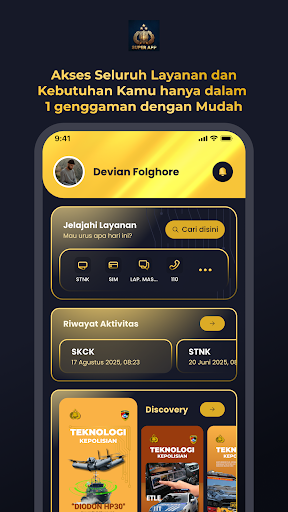
Halo Sahabat POLRI!
Semua Urusan Jadi Super Gampang!
**SuperApp POLRI** adalah pintu gerbang digital Anda untuk semua layanan kepolisian.
Kami hadir untuk memangkas antrean, menghemat waktu, dan memberikan kemudahan layanan publik langsung di ponsel Anda.
Bukan sekadar aplikasi, SuperApp POLRI adalah **pusat layanan digital terpadu** untuk kebutuhan Anda sehari-hari!
---
### 11 Layanan Cepat & Praktis di SuperApp POLRI
1. **Panggilan Darurat 110 **
Akses cepat ke Layanan Panggilan Darurat 110 POLRI saat Anda membutuhkan bantuan segera.
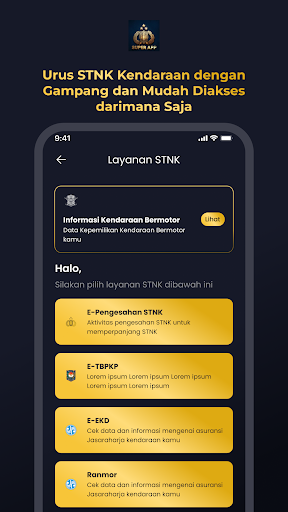
2. **Perpanjangan STNK Online **
Cek data kendaraan dan perpanjang STNK sepenuhnya secara digital, tanpa harus datang ke loket.
3. **Urus SIM Nasional **
Perpanjangan SIM A dan C jadi sangat mudah.—dokumen siap dikirim atau diambil.
4. **SKCK Online (Tanpa Batas Domisili!) **
Pembuatan dan perpanjangan SKCK kini bisa diurus secara online dari mana pun Anda berada di seluruh Indonesia.
Praktis, tanpa harus repot bolak-balik.
5. **Laporan Polisi & Pengaduan Masyarakat **
Buat laporan insiden/pengaduan (didukung DUMAS & PROPAM) dan pantau statusnya secara real-time.
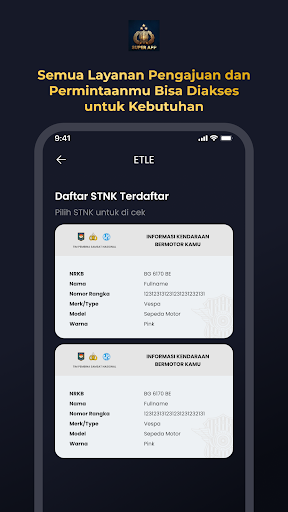
6. **Cek E-Tilang & Konfirmasi ETLE **
Cek daftar E-Tilang dan konfirmasi pelanggaran CCTV (ETLE) kapan saja dan di mana saja.
7. **Pantau Perkembangan Kasus (SP3D) **
Ikuti perkembangan hasil penyidikan kasus yang Anda laporkan secara aman dan terpercaya.
8. **Informasi Kamtibmas Akurat **
Dapatkan info cepat tentang daerah rawan kemacetan, laka lantas, kriminalitas, hingga bencana alam.
9. **Peta Layanan POLRI **
Temukan lokasi kantor polisi dan rumah sakit POLRI terdekat dengan sekali tap.
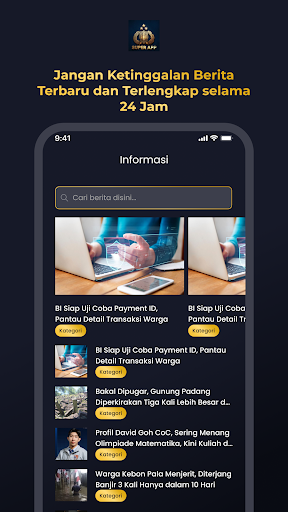
10. **Berita & Klarifikasi Hoax **
Akses berita terkini POLRI dan cek klarifikasi hoax langsung dari sumber resmi.
11. **Kanal Informasi Lainnya **
Akses TV/Radio POLRI, situs resmi, dan info Museum POLRI dalam satu aplikasi.
---
**Tunggu apa lagi?**
Hidupkan kemudahan digital Anda.
Ayo download **SuperApp POLRI** sekarang juga!
Salam hangat,
**Tim SuperApp POLRI**
Show more

1. Download MEmu installer and finish the setup

2. Start MEmu then open Google Play on the desktop

3. Search Super App Polri in Google Play
Install
4. Download and Install Super App Polri
5. On install completion click the icon to start

6. Enjoy using Super App Polri on PC with MEmu
MEmu Play is the best Android emulator, and 100 million users already enjoy its superb Android app experience. Powered by advanced virtualization technology, it lets you enjoy thousands of Android apps smoothly on your PC—including the most graphics-intensive ones.
Bigger screen with better graphics; Long duration, without limitation of battery or mobile data.
Full Keymapping support for precise control of keyboard and mouse or gamepad.
Multiple game accounts or tasks on single PC at one time with Multi-Instance manager.
Use Super App Polri on PC by following steps: