TD Easy Trade
Updated
Current Version
3.2.0
Offered By

Stop worrying about high battery drain when using TD Easy Trade on your phone. Free yourself from the tiny screen and enjoy the app on a much larger display. From now on, get a full-screen experience of your app with the convenience of a keyboard and mouse. MEmu offers you all the surprising features you’d expect: quick installation and easy setup, intuitive controls, and no more worries about battery life, mobile data, or unexpected calls. The all-new MEmu 9 is the choice for using TD Easy Trade on your computer. With the MEmu multi-instance manager, you can run two or more accounts at the same time. Most importantly, our exclusive emulation engine unlocks your PC’s full potential, delivering smooth and enjoyable performance.
Show more
Enjoy superb experience of using TD Easy Trade on PC with MEMU App Player. It's a powerful free Android emulator which provides you with thousands of android apps for their desktop version. Enjoy connecting with friends and polishing your work with higher efficiency! The freedom to invest, your way.

The freedom to invest, your way.
At TD, we believe investing should be simple. Start small, learn fast, and invest your way with TD Easy Trade™.
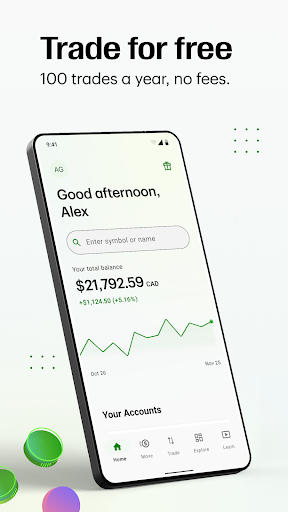
Trade for free
• Your first 100 trades are on us
• No account fees
• No minimum balance
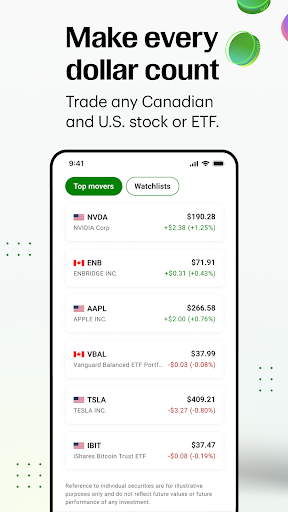
Make every dollar count
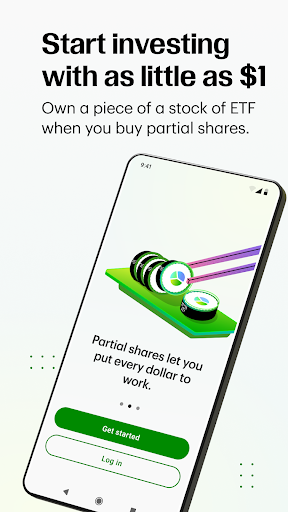
• Start trading with as little as $1.
• Trade any Canadian and U.S. stock or Exchange Traded Fund (ETF).
• Invest by the dollar, not the share with partial shares, and put every dollar to work.
Resources
•Market news and insights - Browse articles that can help you move your portfolio forward.
•Create your own personal Watchlist to spot trends and opportunities.
•Real-time data and charts show how your investments are performing—no guesswork, just clarity.
Talk to a person, not a bot
• 24-hour human support, Monday to Friday
IMPORTANT DISCLOSURES ABOUT THE TD EASY TRADE APP
By clicking "Get", you consent to the installation of the TD Easy Trade app provided by the TD Bank Group and to any future updates/upgrades. You are also acknowledging that you understand that the TD Easy Trade app and any future updates/upgrades will/may perform the function described below. You may withdraw your consent at any time by deleting or uninstalling this app.
The TD Easy Trade app is free to download, however standard wireless carrier message and data rates may apply.
We use your mobile marketing identifier and other technologies to deliver personalized content on our websites and relevant advertising on other websites, unless you change your preferences. To update/manage these preferences on the TD Easy Trade app, use your device's opt-out settings. Open the Settings app on your phone, select Ads and then enable “Opt out of interest-based ads”. To manage these preferences on our websites, use your browser and select Ad Choices & Personalization at the bottom of the www.td.com homepage.
If you require assistance, call 1-866-222-3456, mail TD CASL Office, Toronto Dominion Centre, PO Box 1, Toronto ON, M5K 1A2, or email us at customer.support@td.com.
The TD Bank Group means The Toronto-Dominion Bank and its affiliates, who provide deposit, investment, loan, securities, trust, insurance and other products or services.
Commissions, management fees and expenses all may be associated with investments in exchange-traded funds (ETFs). Please read the prospectus and ETF Fact(s) before investing. ETFs are not guaranteed, their values change frequently and past performance may not be repeated. ETF units are bought and sold at market price on a stock exchange.
TD Asset Management Inc. is the manager of the TD ETFs and receives an annual management fee charged directly to the ETF. Management fees are included in the ETF's management expense ratio. TD Asset Management Inc. is a wholly-owned subsidiary of The Toronto-Dominion Bank.
Reference to individual securities are for illustrative purposes only and do not reflect future values or future performance of any investment
TD Easy Trade™ is a service of TD Direct Investing, a division of TD Waterhouse Canada Inc., a subsidiary of The Toronto-Dominion Bank.
®The TD logo and other trademarks are the property of The Toronto-Dominion Bank or its subsidiaries.
Show more

1. Download MEmu installer and finish the setup

2. Start MEmu then open Google Play on the desktop

3. Search TD Easy Trade in Google Play
Install
4. Download and Install TD Easy Trade
5. On install completion click the icon to start

6. Enjoy using TD Easy Trade on PC with MEmu
MEmu Play is the best Android emulator, and 100 million users already enjoy its superb Android app experience. Powered by advanced virtualization technology, it lets you enjoy thousands of Android apps smoothly on your PC—including the most graphics-intensive ones.
Bigger screen with better graphics; Long duration, without limitation of battery or mobile data.
Full Keymapping support for precise control of keyboard and mouse or gamepad.
Multiple game accounts or tasks on single PC at one time with Multi-Instance manager.
Use TD Easy Trade on PC by following steps: