TV Cast | Ultimate Edition
Updated
Current Version
1.4
Offered By

Stop worrying about high battery drain when using TV Cast | Ultimate Edition on your phone. Free yourself from the tiny screen and enjoy the app on a much larger display. From now on, get a full-screen experience of your app with the convenience of a keyboard and mouse. MEmu offers you all the surprising features you’d expect: quick installation and easy setup, intuitive controls, and no more worries about battery life, mobile data, or unexpected calls. The all-new MEmu 9 is the choice for using TV Cast | Ultimate Edition on your computer. With the MEmu multi-instance manager, you can run two or more accounts at the same time. Most importantly, our exclusive emulation engine unlocks your PC’s full potential, delivering smooth and enjoyable performance.
Show more
Enjoy superb experience of using TV Cast | Ultimate Edition on PC with MEMU App Player. It's a powerful free Android emulator which provides you with thousands of android apps for their desktop version. Enjoy connecting with friends and polishing your work with higher efficiency! Get 9 apps for the price of 2!
Get 9 apps for the price of 2! More than 70% discount!
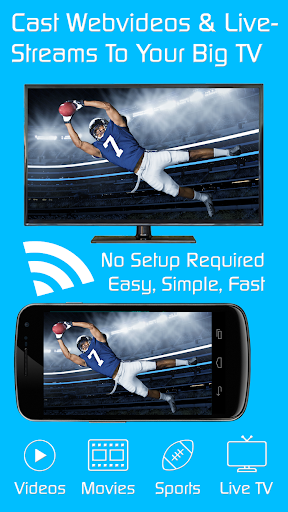
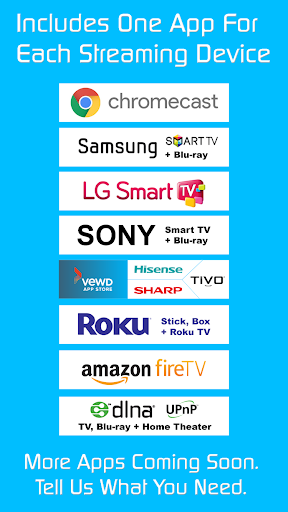
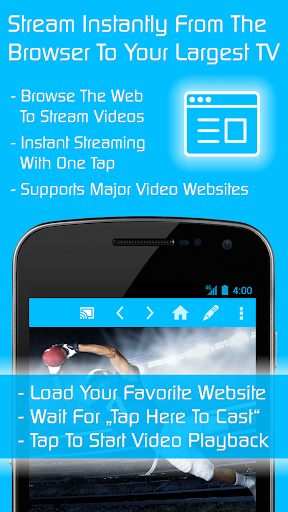
Video & TV Cast is the ultimate streaming browser app (10+ million users) to stream and watch web videos, online movies, livestreams and live tv shows on Chromecast, Samsung TV, LG TV, Sony TV, Hisense TV, Sharp TV, TiVo, Roku, Fire TV, DLNA and Google Cast / Android TV powered devices (TVs, media centers and gaming consoles).
This Ultimate app is a LICENSE KEY that unlocks the Premium Features in all FREE Video & TV Cast app editions on your Android device. After downloading the Ultimate app please also download the app editions of your choice (Chromecast, Samsung TV, LG TV, Sony TV, TiVo, Roku, Fire TV, DLNA or Google Cast). Premium will be unlocked automatically as long as the Ultimate app is installed on your device.
Video & TV Cast | Chromecast
https://play.google.com/store/apps/details?id=de.twokit.castbrowser
Video & TV Cast | Samsung TV
https://play.google.com/store/apps/details?id=de.twokit.video.tv.cast.browser.samsung
Video & TV Cast | LG TV
https://play.google.com/store/apps/details?id=de.twokit.video.tv.cast.browser.lg
Video & TV Cast | Sony TV
https://play.google.com/store/apps/details?id=de.twokit.video.tv.cast.browser.sony
Video & TV Cast | Hisense & Sharp & TiVo & VEWD
https://play.google.com/store/apps/details?id=de.twokit.video.tv.cast.browser.tivo
Video & TV Cast | Roku Remote
https://play.google.com/store/apps/details?id=de.twokit.video.tv.cast.browser.roku
Video & TV Cast | Fire TV
https://play.google.com/store/apps/details?id=de.twokit.video.tv.cast.browser.firetv
Video & TV Cast | DLNA Player
https://play.google.com/store/apps/details?id=de.twokit.video.tv.cast.browser.dlna
(Works with TVs, Blu-ray Players, Media Players and Gaming Consoles of many brands)
Video & TV Cast | Google Cast
https://play.google.com/store/apps/details?id=de.twokit.castbrowsernexusplayer
(Works with TVs and other devices based on Android TV / Chromecast built-in)
>>> PREMIUM FEATURES INCLUDED
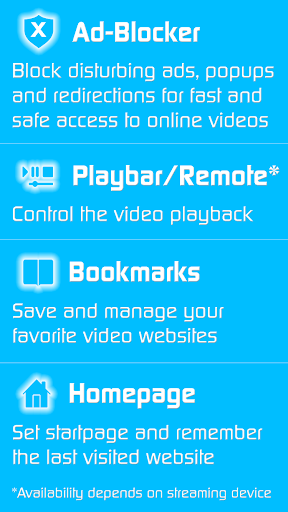
* Ad-Blocker for websites: Blocks all advertisements, popups and redirections caused by websites that you visit
* Playbar / Remote: Enables fast forward + rewind + video scrubbing while browsing (depends on capability of streaming device)
* Change Homepage: Set your personal homepage and enable remembering your last visited website
* Desktop Mode: Cloak your device as a desktop PC (helps detecting videolinks on some websites)
* Unlimited Bookmarks: Save and manage unlimited bookmarks of websites and videos
* No sponsoring advertisements
>>> IMPORTANT NOTES
* AFTER INSTALLING PLEASE OPEN THE ULTIMATE APP on your Android device to unlock the Premium Features. Successful unlock will be confirmed by a message.
* TROUBLESHOOTING:
Please ensure you have internet access and that you have installed the latest versions of the free Video & TV Cast apps and Ultimate app. To fix lost Premium Features after restoring your device, please try:
1) Restart your Android Device
2) Clear the cache of the Ultimate App: Open your Android Settings -> Go to “Apps & notifications” -> “App info” -> Scroll down to the Ultimate App -> Open "Storage" -> Select "Clear Data"
3) Restart your Android Device again
* UNINSTALLING the Ultimate app WILL REVERT ALL APPS TO NON-PREMIUM. The Ultimate app must be installed permanently to keep Premium unlocked.
* SUPPORTED FEATURES: Some features depend on the capability of the specific streaming device and may not be available in all app editions.
* REDFUNDS: Only within 24 hours after purchase. Please submit the Google Purchase ID.
>>> A MESSAGE FROM THE DEVELOPERS
If you like the app, please support us by giving a 5-star rating on Google Play or purchasing one of the addons. Thank you for all your support!
Disclaimer: This app is not affiliated with Google, Samsung, LG, Sony, Hisense, Sharp, TiVo, Roku, DLNA, Amazon or any other trademark mentioned here.
Show more

1. Download MEmu installer and finish the setup

2. Start MEmu then open Google Play on the desktop

3. Search TV Cast | Ultimate Edition in Google Play
Install
4. Download and Install TV Cast | Ultimate Edition
5. On install completion click the icon to start

6. Enjoy using TV Cast | Ultimate Edition on PC with MEmu
MEmu Play is the best Android emulator, and 100 million users already enjoy its superb Android app experience. Powered by advanced virtualization technology, it lets you enjoy thousands of Android apps smoothly on your PC—including the most graphics-intensive ones.
Bigger screen with better graphics; Long duration, without limitation of battery or mobile data.
Full Keymapping support for precise control of keyboard and mouse or gamepad.
Multiple game accounts or tasks on single PC at one time with Multi-Instance manager.
Use TV Cast | Ultimate Edition on PC by following steps: