
VGM TV
Updated
Current Version
6.4.5
Offered By

Stop worrying about high battery drain when using VGM TV on your phone. Free yourself from the tiny screen and enjoy the app on a much larger display. From now on, get a full-screen experience of your app with the convenience of a keyboard and mouse. MEmu offers you all the surprising features you’d expect: quick installation and easy setup, intuitive controls, and no more worries about battery life, mobile data, or unexpected calls. The all-new MEmu 9 is the choice for using VGM TV on your computer. With the MEmu multi-instance manager, you can run two or more accounts at the same time. Most importantly, our exclusive emulation engine unlocks your PC’s full potential, delivering smooth and enjoyable performance.
Show more
Enjoy superb experience of using VGM TV on PC with MEMU App Player. It's a powerful free Android emulator which provides you with thousands of android apps for their desktop version. Enjoy connecting with friends and polishing your work with higher efficiency! Ứng dụng VGM giúp bạn nghe đọc KINH THÁNH, PHÚC ÂM, BÀI GIẢNG KINH THÁNH, NHẠC THÁNH, THÁNH CA, và phát thanh ĐÀI NGUỒN SỐNG.
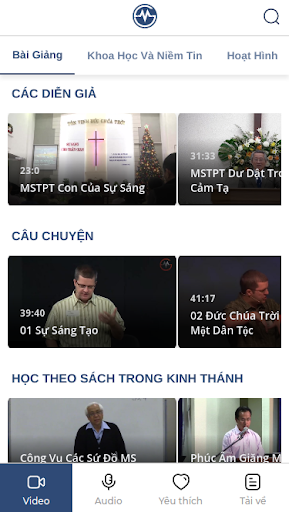
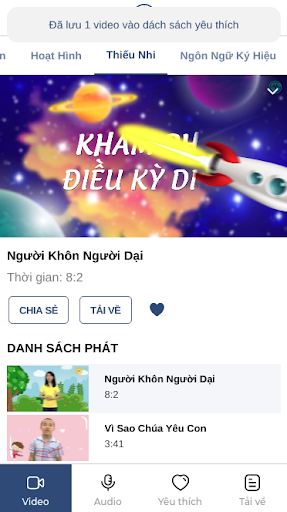
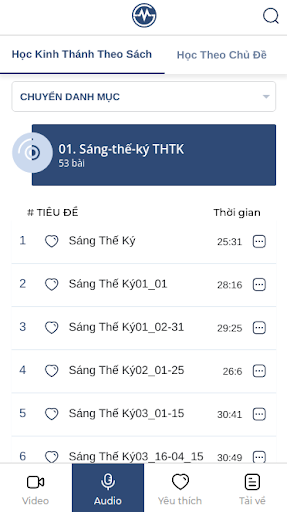
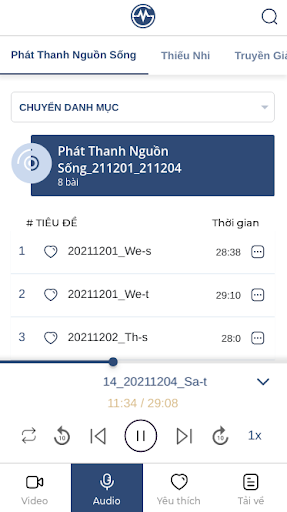
Ứng dụng VGM giúp bạn nghe đọc KINH THÁNH, PHÚC ÂM, BÀI GIẢNG KINH THÁNH, NHẠC THÁNH, THÁNH CA, và phát thanh ĐÀI NGUỒN SỐNG.
--------------------------------
Với mục đích rao truyền Phúc Âm và lẽ thật của KINH THÁNH cho mọi người không phân biệt tôn giáo, hệ phái, trình độ, lứa tuổi, người có niềm tin hay không có niềm tin. Mọi người đều được tự do tiếp cận "lời Chúa hằng ngày", chọn lựa và tìm hiểu vấn đề mình mong muốn trong KINH THÁNH.
VGM là chương trình Phúc Âm phi lợi nhuận. Chương trình cố gắng tận dụng công nghệ kỹ thuật ngày nay để truyền bá Phúc Âm một cách hiệu quả nhất.
Đăng ký tham dự chương trình, bạn sẽ được tự do lựa chọn để lắng nghe các BÀI GIẢNG, những đề tài mình đang quan tâm, những bài NHẠC THÁNH, THÁNH CA, hay thậm chí là các khóa học KINH THÁNH được hệ thống...
Với phương tiện như hiện nay, quý vị có thể tìm hiểu lẽ thật KINH THÁNH ở bất kỳ đâu, bất cứ lúc nào, rất thuận tiện cho bản thân và người chung quanh trong những điều kiện thời gian, sinh hoạt khác nhau. Với chương trình VGM, chúng tôi hy vọng quý vị sẽ càng khám phá ra lẽ thật mầu nhiệm về chính Đức Chúa Trời, kinh nghiệm được sự đổi mới và ý nghĩa của cuộc đời mình trong Chúa.
--------------------------------
Mục lục chính:
- Bài Giảng Theo Diễn Giả.
- Bài Hát Ca Ngợi Chúa (NHAC THANH, THANH CA)
- Giáo Lý.
- Huấn Luyện.
- Học Kinh Thánh Theo Sách (VietBible).
- Học Theo Chủ Đề.
- Kịch.
- Nghe Kinh Thánh (VietBible).
- Nhân Vật.
- Phát Thanh Nguồn Sống.
- Thiếu Nhi (NHẠC THÁNH dành cho Thiếu Nhi).
- Truyền Giảng.
- Đọc Sách (VietBible).
--------------------------------
Website: https://vgm.tv
Facebook: http://facebook.com/vgm.tv
Show more

1. Download MEmu installer and finish the setup

2. Start MEmu then open Google Play on the desktop

3. Search VGM TV in Google Play
Install
4. Download and Install VGM TV
5. On install completion click the icon to start

6. Enjoy using VGM TV on PC with MEmu
MEmu Play is the best Android emulator, and 100 million users already enjoy its superb Android app experience. Powered by advanced virtualization technology, it lets you enjoy thousands of Android apps smoothly on your PC—including the most graphics-intensive ones.
Bigger screen with better graphics; Long duration, without limitation of battery or mobile data.
Full Keymapping support for precise control of keyboard and mouse or gamepad.
Multiple game accounts or tasks on single PC at one time with Multi-Instance manager.
Use VGM TV on PC by following steps:































