VideFlow sports video analysis
Updated
Current Version
1.2
Offered By

Stop worrying about high battery drain when using VideFlow sports video analysis on your phone. Free yourself from the tiny screen and enjoy the app on a much larger display. From now on, get a full-screen experience of your app with the convenience of a keyboard and mouse. MEmu offers you all the surprising features you’d expect: quick installation and easy setup, intuitive controls, and no more worries about battery life, mobile data, or unexpected calls. The all-new MEmu 9 is the choice for using VideFlow sports video analysis on your computer. With the MEmu multi-instance manager, you can run two or more accounts at the same time. Most importantly, our exclusive emulation engine unlocks your PC’s full potential, delivering smooth and enjoyable performance.
Show more
Enjoy superb experience of using VideFlow sports video analysis on PC with MEMU App Player. It's a powerful free Android emulator which provides you with thousands of android apps for their desktop version. Enjoy connecting with friends and polishing your work with higher efficiency! VideFlow is a slow motion player for studying sporting motions.
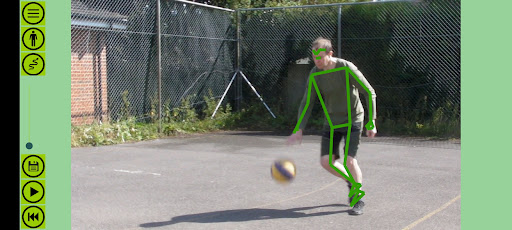
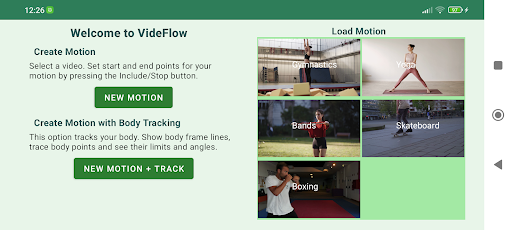
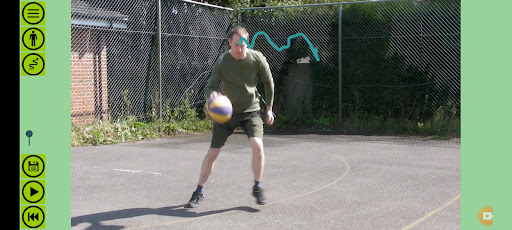
VideFlow is a slow motion player for studying sporting motions. Film yourself and play it frame-by-frame to see the detailed motion. The app is based on a video player with slow down, pause, and fast frame advance. Useful for many sports activities, such as tennis and golf swings, martial arts, gymnastics, jumps in basketball, dance, boxing, yoga, skateboarding, football/soccer and others.
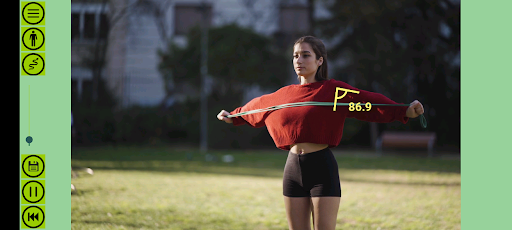
Add visualisations to the video with AI computer vision to see it more clearly. Body mapping tracks your body through the motion. Turn on body frame lines and draw traces of body points. You can also find limits of body points in four directions, show body frame angles and find their maximum/minimum limits.
There are two custom trackers that can follow any object in the video, such as sports equipment. Draw traces of a racquet or ball, or show the height of a skateboard wheel from the ground. Traces and direction limit visualisations are available for the trackers.
Motions can be exported to MP4 video for reference and sharing with friends (watermarked). You may save your motions at different stages and revert back to them later on.
VideFlow runs entirely on your device . There is no need for an internet connection and you can use it anywhere. The main app is free with no adverts. We do not collect any personal data. There is one in-app purchase available to remove the watermark from exported videos.
Technical Notes:
VideFlow is designed for short segments of video, typically from five to thirty seconds.
Video processing uses large amounts of memory, so it's necessary to keep the motions short.
It checks available system resources on startup and if necessary limits the maximum recording time, or reduces the app's internal working resolution.
The body mapping AI pipeline works best on a fast, modern android device. We recommend a CPU speed above 1.4GHz.
The AI tracker works on slower devices, but may not keep up with fast moving objects. For rapid movement you should film at a high frame rate such as 60 frames-per-second or higher. This gives the tracker more frames to work with.
We hope you enjoy using VideFlow. For feedback or technical support email sun-byte@outlook.com
Show more

1. Download MEmu installer and finish the setup

2. Start MEmu then open Google Play on the desktop

3. Search VideFlow sports video analysis in Google Play
Install
4. Download and Install VideFlow sports video analysis
5. On install completion click the icon to start

6. Enjoy using VideFlow sports video analysis on PC with MEmu
MEmu Play is the best Android emulator, and 100 million users already enjoy its superb Android app experience. Powered by advanced virtualization technology, it lets you enjoy thousands of Android apps smoothly on your PC—including the most graphics-intensive ones.
Bigger screen with better graphics; Long duration, without limitation of battery or mobile data.
Full Keymapping support for precise control of keyboard and mouse or gamepad.
Multiple game accounts or tasks on single PC at one time with Multi-Instance manager.
Use VideFlow sports video analysis on PC by following steps:































