
VidyBack:Marketing Video Maker
Updated
Current Version
1.0.0.0
Offered By

Stop worrying about high battery drain when using VidyBack:Marketing Video Maker on your phone. Free yourself from the tiny screen and enjoy the app on a much larger display. From now on, get a full-screen experience of your app with the convenience of a keyboard and mouse. MEmu offers you all the surprising features you’d expect: quick installation and easy setup, intuitive controls, and no more worries about battery life, mobile data, or unexpected calls. The all-new MEmu 9 is the choice for using VidyBack:Marketing Video Maker on your computer. With the MEmu multi-instance manager, you can run two or more accounts at the same time. Most importantly, our exclusive emulation engine unlocks your PC’s full potential, delivering smooth and enjoyable performance.
Show more
Enjoy superb experience of using VidyBack:Marketing Video Maker on PC with MEMU App Player. It's a powerful free Android emulator which provides you with thousands of android apps for their desktop version. Enjoy connecting with friends and polishing your work with higher efficiency! Looking to grow with your store's marketing?
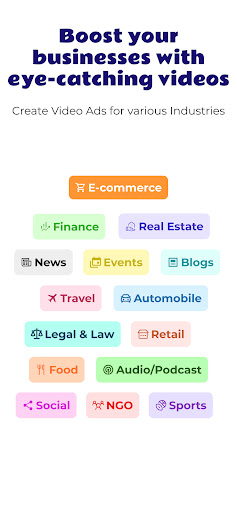
Looking to grow with your store's marketing? See no further than "VidyBack: Marketing Video Maker with Music"! Whether you’re a small business owner, content maker, or digital marketer, "VidyBack" is the ultimate video maker app that simplifies the process of making captivating marketing content.
With "VidyBack," you can easily mix staggering visuals with engaging music and sound impacts to make videos that stand out on social media and other platforms. Our intuitive interface makes it simple to customize formats, add your branding, and create professional-quality videos in minutes.
What You Get With VidyBack Marketing Video Maker with music
1.Easy Integration with Your Platform:
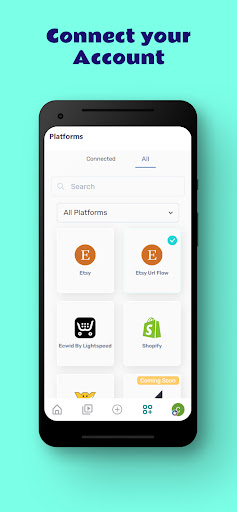
Easily integrate with our platform for smooth connectivity, efficient operations, and quick setup. Enjoy a user-friendly experience and optimized performance.
2.Unlimited Downloads:
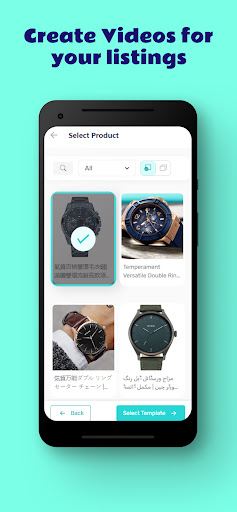
Create unlimited videos using our large, performance-optimized video library for maximum impact and results.
3.Ready Made Templates?
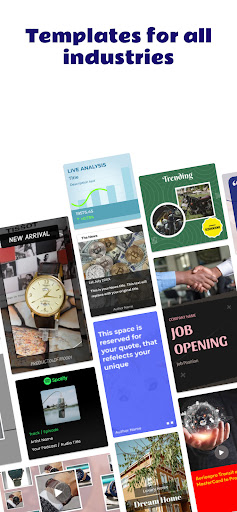
Ready-made templates are pre-designed layouts for documents, presentations, or websites. They provide a quick starting point for various projects, saving time and effort. Customize our unique video collections for every promotion video, tip, and online trend.
4.Fully-Licensed Music :
Add a pre-edited soundtrack to your video using catchy songs from our growing library of fully-licensed premium music tracks.
5. How It Works:
Simple, VidyBack's automation algorithm learns your online data and creates videos based on real time data, variety of videos for all industries. So you can promote the right items at the right time to the right audience and drive growth without any effort.
Professionally crafted templates for creating videos:
Make Ad Videos with Shopify
Wix Video Maker Templates
Shopify Video Maker Templates
Ad Videos Templates
Etsy marketing Templates
Social Media Promotion Templates
Social Media Videos
Drag and Drop Video Templates
Instagram Ads and Stories
Ecwid Video Templates
YouTube Ads Video
Twitter Ads Video
LinkedIn Ads Video
If you encounter bugs or have suggestions for app improvements, please send your feedback to mailto:contact@vidyback.com
Follow Us On :
Facebook : https://www.facebook.com/vidyback
Instagram: https://www.instagram.com/vidyback
Linked in: https://in.linkedin.com/company/vidyback
YouTube: https://www.youtube.com/@vidyback
Twitter: https://twitter.com/vidyback
Show more

1. Download MEmu installer and finish the setup

2. Start MEmu then open Google Play on the desktop

3. Search VidyBack:Marketing Video Maker in Google Play
Install
4. Download and Install VidyBack:Marketing Video Maker
5. On install completion click the icon to start

6. Enjoy using VidyBack:Marketing Video Maker on PC with MEmu
MEmu Play is the best Android emulator, and 100 million users already enjoy its superb Android app experience. Powered by advanced virtualization technology, it lets you enjoy thousands of Android apps smoothly on your PC—including the most graphics-intensive ones.
Bigger screen with better graphics; Long duration, without limitation of battery or mobile data.
Full Keymapping support for precise control of keyboard and mouse or gamepad.
Multiple game accounts or tasks on single PC at one time with Multi-Instance manager.
Use VidyBack:Marketing Video Maker on PC by following steps:































