
Vokey - Voice Screen Lock
Updated
Current Version
1.2.2
Offered By

Stop worrying about high battery drain when using Vokey - Voice Screen Lock on your phone. Free yourself from the tiny screen and enjoy the app on a much larger display. From now on, get a full-screen experience of your app with the convenience of a keyboard and mouse. MEmu offers you all the surprising features you’d expect: quick installation and easy setup, intuitive controls, and no more worries about battery life, mobile data, or unexpected calls. The all-new MEmu 9 is the choice for using Vokey - Voice Screen Lock on your computer. With the MEmu multi-instance manager, you can run two or more accounts at the same time. Most importantly, our exclusive emulation engine unlocks your PC’s full potential, delivering smooth and enjoyable performance.
Show more
Enjoy superb experience of using Vokey - Voice Screen Lock on PC with MEMU App Player. It's a powerful free Android emulator which provides you with thousands of android apps for their desktop version. Enjoy connecting with friends and polishing your work with higher efficiency! Bring hands-free control to your Android with Vokey — a smart voice screen lock that lets you lock, unlock, and find your phone using just your voice or a clap.
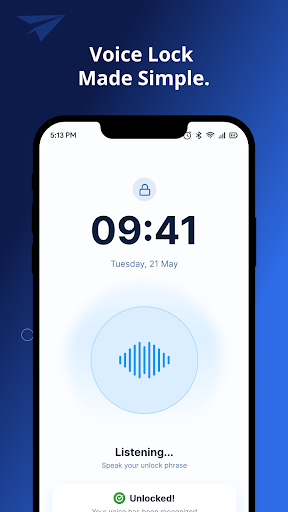
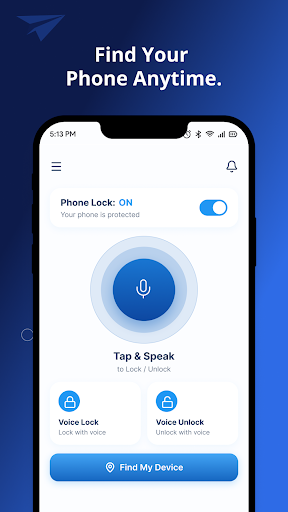
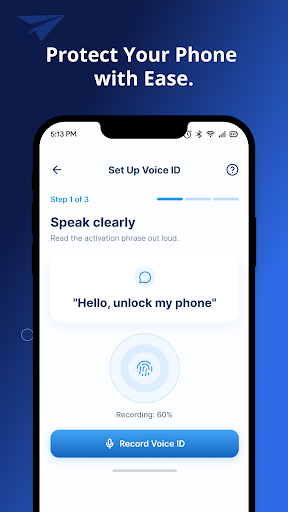
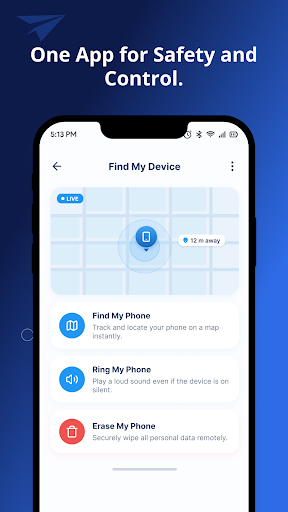
Bring hands-free control to your Android with Vokey — a smart voice screen lock that lets you lock, unlock, and find your phone using just your voice or a clap. Whether your device is lost in the couch cushions, across the room, or buried under a blanket, Vokey makes it easy to ring, flash, and vibrate your phone without touching the screen.
Lock and unlock with your voice
Set up custom voice commands to secure or open your phone without lifting a finger. Vokey listens for the phrases you choose and triggers lock or unlock actions when it recognizes your command. It’s ideal when you’re cooking, driving, working out, or your hands are just busy.
Configure your own lock/unlock phrases
Use natural language that feels right for you
Reduce dependence on constant tapping and swiping
Find your phone instantly
Misplaced your phone nearby? Vokey helps you track it down fast. Use a voice command or clap to make your device ring, flash the screen, and vibrate so it’s easier to spot — even if it’s on silent.
Say a “find phone” phrase to trigger alerts
Loud ringtone, screen flash, and vibration
Works even when your phone is set to silent mode (with required permissions)
Clap to find mode
Can’t speak out loud or don’t want to? Just clap. Vokey detects claps and starts the same “find my phone” alert sequence so you can locate your device discreetly.
Custom voice commands
Make Vokey match how you talk. You’re not limited to fixed keywords — you can set phrases that feel natural to you for locking, unlocking, and locating your phone
Always ready in the background
Vokey is designed for everyday use. Background listening keeps it ready when you need it while being mindful of performance and battery.
Simple onboarding and setup
Runs quietly in the background
Built for common “hands not free” moments
Privacy and security
Vokey uses microphone access only to detect your configured voice commands and claps. Audio processing is focused on recognizing the patterns needed to run the app’s features. For more details on what we collect, how we use it, and your rights, see our Privacy Policy
Show more

1. Download MEmu installer and finish the setup

2. Start MEmu then open Google Play on the desktop

3. Search Vokey - Voice Screen Lock in Google Play
Install
4. Download and Install Vokey - Voice Screen Lock
5. On install completion click the icon to start

6. Enjoy using Vokey - Voice Screen Lock on PC with MEmu
MEmu Play is the best Android emulator, and 100 million users already enjoy its superb Android app experience. Powered by advanced virtualization technology, it lets you enjoy thousands of Android apps smoothly on your PC—including the most graphics-intensive ones.
Bigger screen with better graphics; Long duration, without limitation of battery or mobile data.
Full Keymapping support for precise control of keyboard and mouse or gamepad.
Multiple game accounts or tasks on single PC at one time with Multi-Instance manager.
Use Vokey - Voice Screen Lock on PC by following steps: