Wink: Video Enhancer & Editor
Updated
Current Version
3.20.5
Offered By

Stop worrying about high battery drain when using Wink: Video Enhancer & Editor on your phone. Free yourself from the tiny screen and enjoy the app on a much larger display. From now on, get a full-screen experience of your app with the convenience of a keyboard and mouse. MEmu offers you all the surprising features you’d expect: quick installation and easy setup, intuitive controls, and no more worries about battery life, mobile data, or unexpected calls. The all-new MEmu 9 is the choice for using Wink: Video Enhancer & Editor on your computer. With the MEmu multi-instance manager, you can run two or more accounts at the same time. Most importantly, our exclusive emulation engine unlocks your PC’s full potential, delivering smooth and enjoyable performance.
Show more
Enjoy superb experience of using Wink - Video Enhancing Tool on PC with MEMU App Player. It's a powerful free Android emulator which provides you with thousands of android apps for their desktop version. Enjoy connecting with friends and polishing your work with higher efficiency! Wink is the AI video and photo enhancer that fixes any clip in one tap.
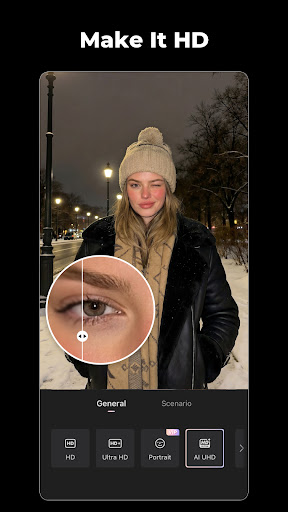
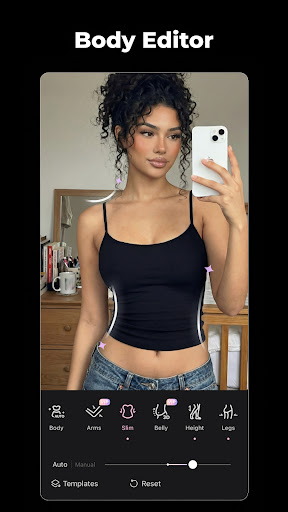
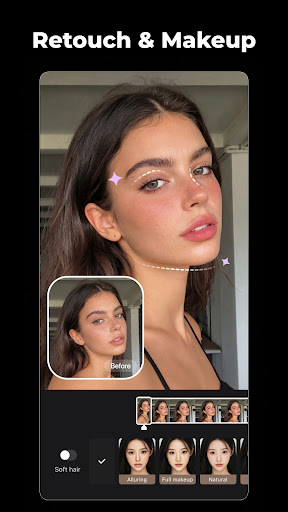
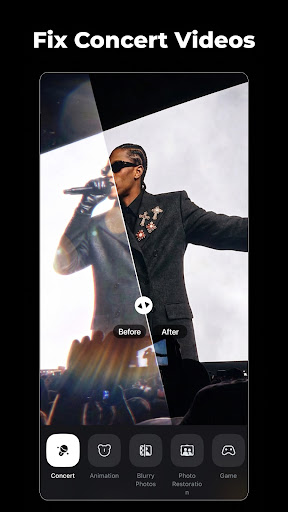
Wink is the AI video and photo enhancer that fixes any clip in one tap. Upscale to 4K HD, restore old videos, unblur photos — old home videos, phone footage, whatever you've got.
[ PERFECT FOR ]
• Restoring old family videos, VHS tapes, and home movies
• Fixing blurry, shaky, or low-quality phone footage
• Upscaling videos for trending short-form video platforms
• Reviving faded photos and damaged memories
• Polishing night-out clips, travel vlogs, and gaming highlights
• Anyone who wants pro-quality video without the editing skills
[ VIDEO & PHOTO ENHANCER ]
• HD Quality Enhancer: Fix blurry, low-quality videos and photos — no editing skills needed
• 4K Super Resolution: Upscale 480p and 720p videos into crisp 4K Ultra HD
• Adjustable Enhancement: Fine-tune the fix strength to keep results natural — no over-processed AI look
• 7 Scene-Specific Models: Dedicated fixes for gaming clips, night-out footage, old photo restoration, and more
• AI Repair Pro: Auto mode detects quality issues and applies the best fix, or switch to Basic to manually tune color, night view, and denoise
• Batch Fix: Enhance multiple videos and photos — save hours of editing
• Unblur Video: Sharpen out-of-focus clips and rebuild lost detail
• Old Video Restore: Bring faded, pixelated, or damaged footage back to life
[ VIDEO RETOUCH ]
• Fill Light: Brighten faces and fix uneven lighting for natural, flattering portraits
• Hair Color Changer: Try new hair colors in seconds — instantly preview before you commit
• Wrinkle & Eye Bag Removal: Soften fine lines and fatigue with natural-looking results
• Teeth Whitening: Get a brighter smile with a single tap
• Skin Retouch: Smooth skin and clear up acne while keeping a natural texture
• Face Enhance & Jawline Refine: Subtle contouring that moves naturally with you
• Body Editor & Shape Adjustment: Refine your ideal look with our background-lock feature
• Makeup Filters: Polished looks that hold up in motion
• Multi-Face Detection: Edit each person in a group video separately
[ CREATIVE EFFECTS ]
• DigiCam Effect: Recreate the viral Y2K digital camera aesthetic
• Live Wallpaper: Turn photos into adorable animated wallpapers
• Auto Subtitles: Generate accurate captions in 10+ languages — perfect for social clips
• Anime, Cartoon & Avatar Styles: Transform any photo into fun artistic looks in seconds
• Trending Effects: New viral styles added every month
[ WHY WINK ]
• Built by Meitu — over 1 billion installs worldwide
• Trusted by millions to restore old memories and create viral content
• Privacy-first: your videos are processed securely and never shared
• New AI models and effects added every month
• Works on any video — old home videos, phone clips, social content
[ WINK VIP ]
Unlock premium features and exclusive effects with Wink VIP.
• Unlimited 4K video enhancement
• All premium AI models and scene-specific fixes
• Exclusive filters and effects
• Watermark-free exports
• Priority processing
[ Subscription Info ]
Subscriptions are billed weekly, monthly, or annually to your Google Play account and auto-renew unless canceled at least 24 hours before the end of the billing period. Manage or cancel anytime in your Google Play subscription settings.
• Terms of Service: https://pro.meitu.com/wink-cut/agreements/common/service-global.html?lang=en
• Privacy Policy: https://pro.meitu.com/wink-cut/agreements/common/policy-global.html?lang=en
Show more

1. Download MEmu installer and finish the setup

2. Start MEmu then open Google Play on the desktop

3. Search Wink: Video Enhancer & Editor in Google Play
Install
4. Download and Install Wink: Video Enhancer & Editor
5. On install completion click the icon to start

6. Enjoy using Wink: Video Enhancer & Editor on PC with MEmu
MEmu Play is the best Android emulator, and 100 million users already enjoy its superb Android app experience. Powered by advanced virtualization technology, it lets you enjoy thousands of Android apps smoothly on your PC—including the most graphics-intensive ones.
Bigger screen with better graphics; Long duration, without limitation of battery or mobile data.
Full Keymapping support for precise control of keyboard and mouse or gamepad.
Multiple game accounts or tasks on single PC at one time with Multi-Instance manager.
Use Wink: Video Enhancer & Editor on PC by following steps: