Wizz Air - Book, Travel & Save
Updated
Current Version
8.1.1
Offered By

Stop worrying about high battery drain when using Wizz Air - Book, Travel & Save on your phone. Free yourself from the tiny screen and enjoy the app on a much larger display. From now on, get a full-screen experience of your app with the convenience of a keyboard and mouse. MEmu offers you all the surprising features you’d expect: quick installation and easy setup, intuitive controls, and no more worries about battery life, mobile data, or unexpected calls. The all-new MEmu 9 is the choice for using Wizz Air - Book, Travel & Save on your computer. With the MEmu multi-instance manager, you can run two or more accounts at the same time. Most importantly, our exclusive emulation engine unlocks your PC’s full potential, delivering smooth and enjoyable performance.
Show more
Enjoy superb experience of using Wizz Air - Book, Travel & Save on PC with MEMU App Player. It's a powerful free Android emulator which provides you with thousands of android apps for their desktop version. Enjoy connecting with friends and polishing your work with higher efficiency! SIMPLY SEARCH AND BOOK .
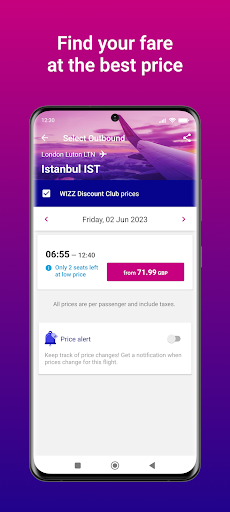
SIMPLY SEARCH AND BOOK
What could be better than low-cost flight deals? Select from 200+ destinations, choose your ideal travel date and get set for cheap flights the easy way with the WIZZ Air flight deal and travel app.
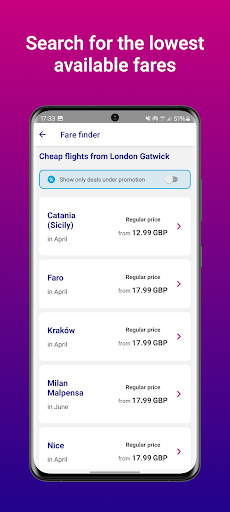
FARE FINDER:
Search for the lowest available fare for your journey and book your ticket at the best price.
ORGANISE YOUR ENTIRE HOLIDAY
- Get flight deals via push notifications
- Scan your documents for a faster booking and check-in process
- Check in with your confirmation details and say goodbye to printing*
- Check out your flight schedule and track your plane in real-time
- Share flight searches with friends and family or send travel companions their boarding pass
- Save your ticket to your Apple Wallet plus all your important travel documents to the app
- Use the in-app boarding card – either online or offline!
Fly to the most popular destinations across Europe, from Bucharest, Budapest, Krakow, Tirana and Vienna, to Lisbon, Rome, Naples, Milan, Malaga, Madrid and Athens. Check out our low cost flights to the Middle East and places like Abu Dhabi, Alexandria, Amman, Muscat and Tel Aviv.
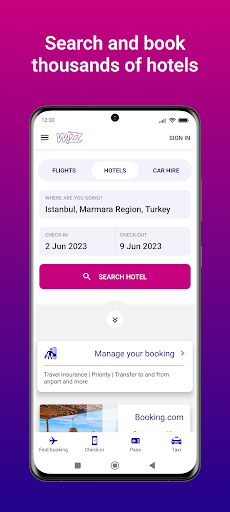
HOTELS
Reserve your hotel with Booking.com and get 5% of your booking value back as a WIZZ credit.
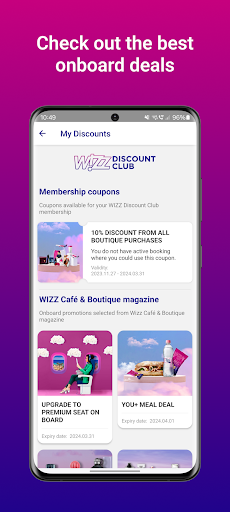
WIZZ DISCOUNT CLUB
Sign up to a WIZZ Discount Club membership and get discounted flight fares.
AIRPORT TRANSFER:
Book a ride to and from the airport with our airport transfer service.
USE THE APP TO BUY AIRPORT EXTRAS LIKE…
- Fast Track boarding and Lounge access
- Car rental with Rentalcars.com where you can receive a 5% of your booking back as WIZZ credit value
- Bus transfers at cheap prices from the airport to the centre of your destination city
WIZZ MAGAZINE
Stay entertained on board by downloading the WIZZ in-flight magazine before you board.
ADD SERVICES
Want to add more luggage or change your reserved seat? No worries, you can add many travel-related services through the app.
Follow WIZZ on social media for all of the latest news, offers and competitions
Facebook @wizzair
Instagram @wizzair
Twitter @wizzair
Available in almost 20 languages
Arabic, Bosnian, Bulgarian, Dutch, English, French, German, Hungarian, Italian, Lithuanian, Macedonian, Norwegian, Polish, Romanian, Russian, Serbian, Spanish, Swedish, Ukrainian
*Only at airports with permitted access.
Show more

1. Download MEmu installer and finish the setup

2. Start MEmu then open Google Play on the desktop

3. Search Wizz Air - Book, Travel & Save in Google Play
Install
4. Download and Install Wizz Air - Book, Travel & Save
5. On install completion click the icon to start

6. Enjoy using Wizz Air - Book, Travel & Save on PC with MEmu
MEmu Play is the best Android emulator, and 100 million users already enjoy its superb Android app experience. Powered by advanced virtualization technology, it lets you enjoy thousands of Android apps smoothly on your PC—including the most graphics-intensive ones.
Bigger screen with better graphics; Long duration, without limitation of battery or mobile data.
Full Keymapping support for precise control of keyboard and mouse or gamepad.
Multiple game accounts or tasks on single PC at one time with Multi-Instance manager.
Use Wizz Air - Book, Travel & Save on PC by following steps: