Grand Theft Auto: Vice City
Diupdate
Versi Saat Ini
1.1
Ditawarkan Oleh

Dengan sepenuh kebulatan hati Anda dalam memainkan Grand Theft Auto: Vice City, tangan Anda tak seharusnya hanya terbatas pada layar kecil handphone Anda.Bermainlah layaknya seorang profesional dan dapatkan kendali penuh dalam permainan Anda dengan papan ketik dan tetikus.MEmu menawarkan seluruh hal yang Anda harapkan.Unduh dan mainkan Grand Theft Auto: Vice City pada PC. Bermainlah selama yang Anda inginkan, tanpa keterbatasan dari baterai, data seluler dan panggilan yang mengganggu.MEmu 9 baru merupakan pilihan terbaik untuk memainkan Grand Theft Auto: Vice City pada PC. Dipersiapkan bersama teknologi ahli kami, sistem pemetaan kunci preset yang canggih menjadikan Grand Theft Auto: Vice City sebagai permainan PC sejati.Manajer banyak hal dari MEmu memungkinkan Anda untuk memainkan 2 atau banyak akun pada perangkat yang sama.Dan yang terpenting, mesin emulasi eksklusif kami bisa melepaskan potensi penuh PC Anda, membuat segalanya berjalan lancar.
Tampilkan Lebih banyak
Unduh Grand Theft Auto: Vice City di PC dengan Emulator Android MEmu. Nikmati permainan pada layar yang besar. Welcome back to GTA Vice City Game.

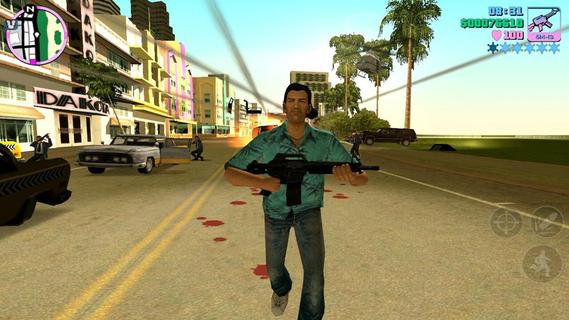
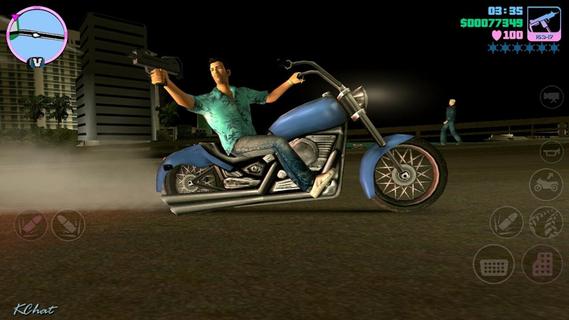
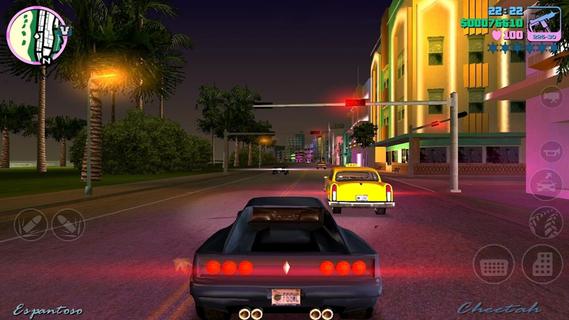
Welcome back to GTA Vice City Game. Welcome back to the Grand Theft Auto: Vice City 1980s.From the decade of big hair, excess and pastel suits comes a story of one man's rise to the top of the criminal pile. Vice City, a huge urban sprawl ranging from the beach to the swamps and the glitz to the ghetto, was one of the most varied, complete and alive digital cities ever created. Combining open-world gameplay with a character driven narrative, you arrive in a town brimming with delights and degradation and given the opportunity to take it over as you choose.To celebrate its 10 year anniversary, Rockstar Games brings Grand Theft Auto: Vice City to mobile devices with high-resolution graphics, updated controls and a host of new features including:• Beautifully updated graphics, character models and lighting effects• New, precisely tailored firing and targeting options• Custom controls with a fully customizable layout• Massive campaign with countless hours of gameplay• Compatible with the MoGa Wireless Game Controller and select USB gamepads• Integrated with Immersion tactile effects • Tailor your visual experience with adjustable graphic settingsLanguages Supported: English, French, Italian, German, Spanish, Korean, Russian, and Japanese.Grand Theft Auto: Vice City is now available on:Android Phones: Motorola Atrix, Motorola Atrix HD, Motorola Atrix 4G, Motorola Photon, HTC Rezound, HTC One X, HTC One X+, Samsung Galaxy Nexus, Samsung Galaxy Note, Samsung Galaxy Note 2, Samsung Galaxy R, Samsung Epic 4G, Samsung Galaxy S2, Samsung Galaxy S3, Google Nexus 4, Sony Xperia Play, Sony Xperia Sola, Sony Xperia S / P / T & TL, Sony Walkman Z Series Media PlayerAndroid Tablets: Acer Iconia, Asus Eee Pad Transformer Prime, Asus Transformer Pad TF300T, Asus Transformer Pad Infinity 700, Motorola Xoom, Samsung Galaxy Tab 7.0 / 7.7 / 8.9 & 10.1, Samsung Galaxy Note 10.1, Sony Tablet S, Sony Tablet P, Sony Xperia Tablet S, Toshiba Thrive, Toshiba Regza, Google Nexus 7, Google Nexus 10, Fujitsu Stylistic 10.1Grand Theft Auto: Vice City was developed and tested only on these devices. If your device is not listed, please check support.rockstargames.com for any updates to this listFor optimal performance, we recommend re-booting your device after downloading and closing other applications when playing Grand Theft Auto: Vice City.Download GTA Voice City Biggest Release of Rockstar Games Free Version Now and Enjoy Your Time.
Tampilkan Lebih banyak

1. Unduh dan instal MEmu APP

2. Menjalankan MEmu lalu buka Google Play di halaman

3. Cari Grand Theft Auto: Vice City di Google Play
Install
4. Unduh dan instal Grand Theft Auto: Vice City
5. Setelah insatl APP selesai,klik ikon untuk mulai

6. Nikmati bermain Grand Theft Auto: Vice City di PC dengan MEmu
MEmu App Player adalah emulator Android gratis terbaik dan 50 Juta orang sudah menikmati pengalaman luar biasa dalam bermain gim Android. Teknologi virtualisasi MEmu memberi kekuasaan untuk memainkan ribuan gim Android dengan lancar di PC anda, bahkan gim dengan grafis yang paling tinggi.
Layar lebih besar dengan grafis yang lebih baik; durasi panjang, tanpa batasan baterai atau data seluler.
Didukung penuh oleh Pemetaan tombol yang lengkap untuk keakuratan kontrol keyboard dan mouse maupun gamepad.
Membuka beberapa akun game atau tugas di waktu yang sama hanya pada satu PC, dengan Multi-Instance manager.
Play Grand Theft Auto: Vice City on PC by following steps: