Grand Theft Auto: Vice City
Atualizada
Versão atual
1.1
Oferecido por

Com toda a sua paixão por jogar Grand Theft Auto: Vice City, não deixe os polegares te atrapalharem em uma pequena tela do seu celular. Jogue como um profissional e tenha controle total do seu jogo com teclado e mouse. O MEmu oferece todas as coisas que você está esperando. Baixe e jogue Grand Theft Auto: Vice City no PC. Jogue o tempo que quiser, sem mais limitações de bateria, dados móveis e aquelas ligações enquanto estiver jogando. O novíssimo MEmu 9 é a melhor escolha de jogar Grand Theft Auto: Vice City no PC. Com grandes novidades no sistema de mapeamento que faz Grand Theft Auto: Vice City um jogo de PC real. Nossa equipe melhorou o gerenciamento de várias instâncias do Android, reduzindo tempo de reprodução de 2 ou mais contas no mesmo dispositivo. O mais importante, nosso mecanimos de emulação exclusivo pode liberar todo o potencial do seu PC sem travamentos, rodando tudo liso. Nós nos preocupamos não apenas com você joga, mas com todo o processo de desfrutar de 100% do seu jogo favorito.
Mostre mais
Download do Grand Theft Auto: Vice City no PC com MEmu Android Emulador: Divirta-se jogando na tela grande. Welcome back to GTA Vice City Game.

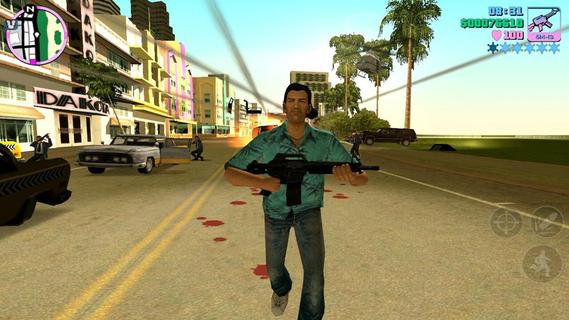
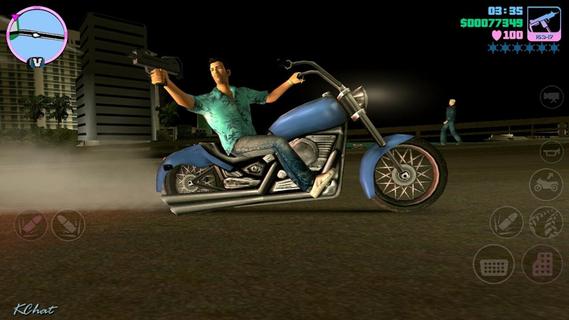
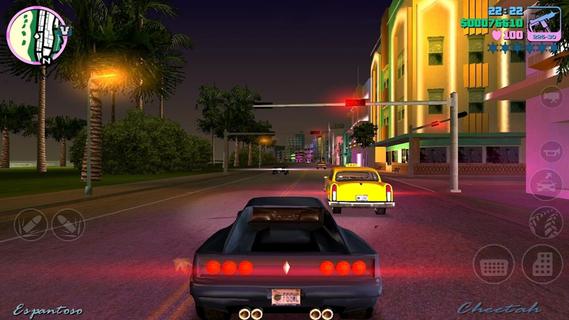
Welcome back to GTA Vice City Game. Welcome back to the Grand Theft Auto: Vice City 1980s.From the decade of big hair, excess and pastel suits comes a story of one man's rise to the top of the criminal pile. Vice City, a huge urban sprawl ranging from the beach to the swamps and the glitz to the ghetto, was one of the most varied, complete and alive digital cities ever created. Combining open-world gameplay with a character driven narrative, you arrive in a town brimming with delights and degradation and given the opportunity to take it over as you choose.To celebrate its 10 year anniversary, Rockstar Games brings Grand Theft Auto: Vice City to mobile devices with high-resolution graphics, updated controls and a host of new features including:⢠Beautifully updated graphics, character models and lighting effects⢠New, precisely tailored firing and targeting options⢠Custom controls with a fully customizable layout⢠Massive campaign with countless hours of gameplay⢠Compatible with the MoGa Wireless Game Controller and select USB gamepads⢠Integrated with Immersion tactile effects ⢠Tailor your visual experience with adjustable graphic settingsLanguages Supported: English, French, Italian, German, Spanish, Korean, Russian, and Japanese.Grand Theft Auto: Vice City is now available on:Android Phones: Motorola Atrix, Motorola Atrix HD, Motorola Atrix 4G, Motorola Photon, HTC Rezound, HTC One X, HTC One X+, Samsung Galaxy Nexus, Samsung Galaxy Note, Samsung Galaxy Note 2, Samsung Galaxy R, Samsung Epic 4G, Samsung Galaxy S2, Samsung Galaxy S3, Google Nexus 4, Sony Xperia Play, Sony Xperia Sola, Sony Xperia S / P / T & TL, Sony Walkman Z Series Media PlayerAndroid Tablets: Acer Iconia, Asus Eee Pad Transformer Prime, Asus Transformer Pad TF300T, Asus Transformer Pad Infinity 700, Motorola Xoom, Samsung Galaxy Tab 7.0 / 7.7 / 8.9 & 10.1, Samsung Galaxy Note 10.1, Sony Tablet S, Sony Tablet P, Sony Xperia Tablet S, Toshiba Thrive, Toshiba Regza, Google Nexus 7, Google Nexus 10, Fujitsu Stylistic 10.1Grand Theft Auto: Vice City was developed and tested only on these devices. If your device is not listed, please check support.rockstargames.com for any updates to this listFor optimal performance, we recommend re-booting your device after downloading and closing other applications when playing Grand Theft Auto: Vice City.Download GTA Voice City Biggest Release of Rockstar Games Free Version Now and Enjoy Your Time.
Mostre mais

1. Faça o download do instalador do MEmu e conclua a instalação

2. Inicie o MEmu e depois abra o Google Play na página inicial

3. Pesquise Grand Theft Auto: Vice City no Google Play
Install
4. Baixe e Instale Grand Theft Auto: Vice City
5. Na conclusão da instalação, clique no ícone para iniciar

6. Divirta-se jogando Grand Theft Auto: Vice City no PC com MEmu
O MEmu App Player é o melhor emulador de Android grátis e 50 milhões de pessoas já desfrutam de sua excelente experiência de jogos no Android. A tecnologia de virtualização do MEmu permite que você jogue milhares de jogos do Android sem problemas no seu PC, mesmo os com gráficos mais intensivos.
Tela maior com gráficos melhores; Longa duração e sem limitação de bateria ou dados móveis.
Suporte completo ao Mapaeamento de Teclas para controle preciso do teclado e mouse ou gamepad.
Várias contas de jogos ou tarefas em um único PC de uma só vez com o Gerenciador de várias instâncias.
Play Grand Theft Auto: Vice City on PC by following steps: