Grand Theft Auto: Vice City
更新日
現在のバージョン
1.1
提供元

スマホ不要!プロ選手のようにキーボードとマウスで操作しよう。MEmuエミュはあなたにすべての期待を与える。電池が切れてしまうとか画面が小さいとかの問題を心配する必要がなくて、存分Grand Theft Auto: Vice Cityを楽しんでください。新しいMEmuエミュ7はPCでGrand Theft Auto: Vice Cityをプレイするのに最適!完璧なキーマッピングシステムにより、まるでパソコンゲームみたい。マルチインスタンスで複数のゲームやアプリを同時に実行!唯一無二な仮想化エンジンがパソコンの可能性を最大限になる。遊べるだけでなく、より楽しめる!
もっと見る
Grand Theft Auto: Vice CityをPCでダウンロード!大画面でより楽しむ。電源が落ちてしまうとか通信料が足りないとかの問題を心配する必要がなく、PCの大画面でより快適にゲームを楽しましょう! Welcome back to GTA Vice City Game.

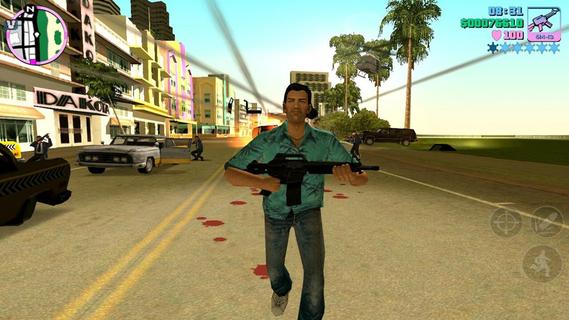
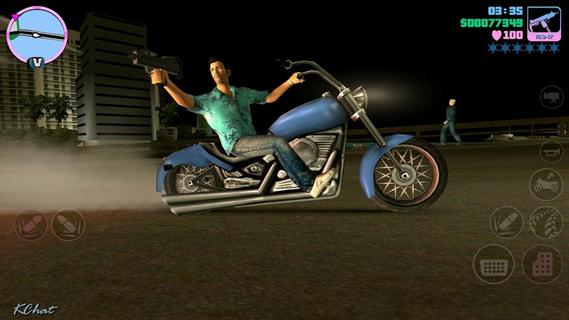
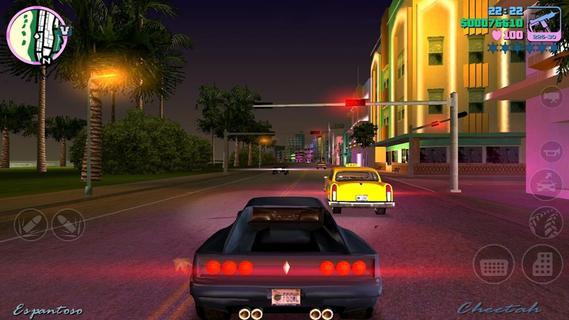
Welcome back to GTA Vice City Game. Welcome back to the Grand Theft Auto: Vice City 1980s.From the decade of big hair, excess and pastel suits comes a story of one man's rise to the top of the criminal pile. Vice City, a huge urban sprawl ranging from the beach to the swamps and the glitz to the ghetto, was one of the most varied, complete and alive digital cities ever created. Combining open-world gameplay with a character driven narrative, you arrive in a town brimming with delights and degradation and given the opportunity to take it over as you choose.To celebrate its 10 year anniversary, Rockstar Games brings Grand Theft Auto: Vice City to mobile devices with high-resolution graphics, updated controls and a host of new features including:• Beautifully updated graphics, character models and lighting effects• New, precisely tailored firing and targeting options• Custom controls with a fully customizable layout• Massive campaign with countless hours of gameplay• Compatible with the MoGa Wireless Game Controller and select USB gamepads• Integrated with Immersion tactile effects • Tailor your visual experience with adjustable graphic settingsLanguages Supported: English, French, Italian, German, Spanish, Korean, Russian, and Japanese.Grand Theft Auto: Vice City is now available on:Android Phones: Motorola Atrix, Motorola Atrix HD, Motorola Atrix 4G, Motorola Photon, HTC Rezound, HTC One X, HTC One X+, Samsung Galaxy Nexus, Samsung Galaxy Note, Samsung Galaxy Note 2, Samsung Galaxy R, Samsung Epic 4G, Samsung Galaxy S2, Samsung Galaxy S3, Google Nexus 4, Sony Xperia Play, Sony Xperia Sola, Sony Xperia S / P / T & TL, Sony Walkman Z Series Media PlayerAndroid Tablets: Acer Iconia, Asus Eee Pad Transformer Prime, Asus Transformer Pad TF300T, Asus Transformer Pad Infinity 700, Motorola Xoom, Samsung Galaxy Tab 7.0 / 7.7 / 8.9 & 10.1, Samsung Galaxy Note 10.1, Sony Tablet S, Sony Tablet P, Sony Xperia Tablet S, Toshiba Thrive, Toshiba Regza, Google Nexus 7, Google Nexus 10, Fujitsu Stylistic 10.1Grand Theft Auto: Vice City was developed and tested only on these devices. If your device is not listed, please check support.rockstargames.com for any updates to this listFor optimal performance, we recommend re-booting your device after downloading and closing other applications when playing Grand Theft Auto: Vice City.Download GTA Voice City Biggest Release of Rockstar Games Free Version Now and Enjoy Your Time.
もっと見る

1. MEmuインストーラーをダウンロードしてセットアップを完了する

2. MEmuを起動し、デスクトップでのPlayストアを開く

3. PlayストアでGrand Theft Auto: Vice Cityを検索する
Install
4. Grand Theft Auto: Vice Cityをダウンロードしてインストールする
5. インストールが完了したら、アイコンをクリックしてスタート

6. MEmuを使用してPCでGrand Theft Auto: Vice Cityを楽しむ
MEmu App Playerは最高の無料で提供されるAndroidエミュレータで、5,000万人がすでに優れたAndroidゲーム体験を楽しんでいます。 MEmuの仮想化技術は、あなたのPCで何千ものAndroidゲームを快適にプレイすることを可能にします。
大画面でより精細;無限の待機、電池とドラフィックの極限を超え
キーボード・マウス・コントローラーを全力でサポート、より快適
マルチインスタンスで複数のゲームを同時に実行
Play Grand Theft Auto: Vice City on PC by following steps: