Hold on! Lord!
Aggiornata
Versione corrente
Offerta da

Vista tutta la passione dimostrata nel giocare a Hold on! Lord!, le tue mani non dovrebbero essere limitate al minuscolo schermo di un telefono. Gioca come un professionista e ottieni il pieno controllo del gioco con tastiera e mouse. MEmu ti offre tutto ciò che ti aspetti. Scarica e gioca a Hold on! Lord! su PC. Gioca quanto vuoi, niente più limitazioni di batteria, dati mobili e chiamate inquietanti. Il nuovissimo MEmu 9 è la scelta migliore per giocare a Hold on! Lord! su PC. Realizzato sulla base della nostra esperienza, lo squisito sistema di mappatura dei tasti preimpostati rende Hold on! Lord! un vero e proprio gioco per PC. MEmu è un gestore multi-instanza che permette di giocare con 2 o più account sullo stesso dispositivo. E la cosa più importante, il nostro esclusivo motore di emulazione può liberare tutto il potenziale del tuo PC, rendendo tutto fluido.
Mostra altro
Scarica Hold on! Lord! su PC con MEmu Android Emulator. Divertiti giocando sul grande schermo. Defend Your Domain.
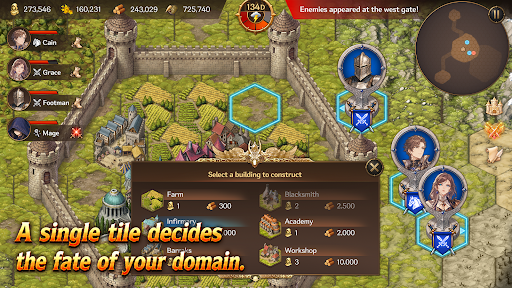
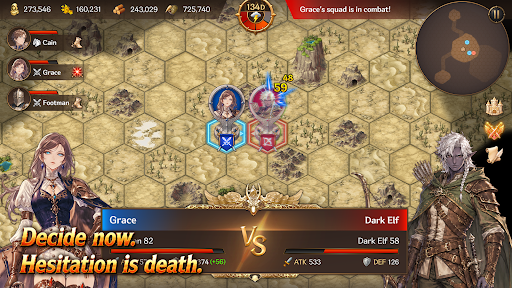
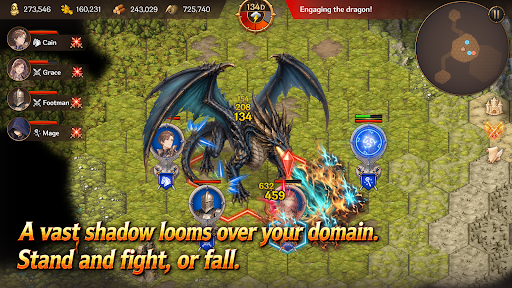
Defend Your Domain
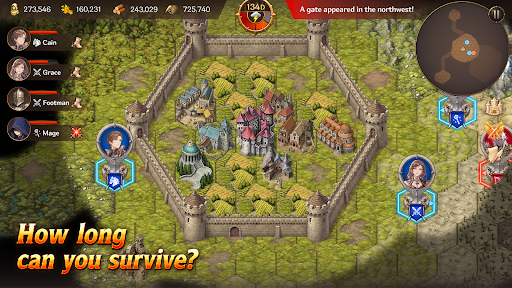
Hold on, My Lord! is a mobile survival strategy game that combines territory management, real-time strategy, and defense gameplay. Become a fallen lord, rebuild your domain, and survive against the monsters pouring out from mysterious Gates.
Strategy Defense
Endless waves of monsters emerge from mysterious Gates beyond your walls.
Organize squads with infantry, archers, cavalry, and mages, then defend your walls and gates against the enemy advance.
Defense alone will not be enough to survive. Sometimes, you must march beyond the walls, destroy the Gates, and eliminate the source of the threat.
Territory Management
Build structures such as farms, barracks, workshops, infirmaries, and walls on limited tiles.
Produce food and materials, assign citizens, and manage your domain efficiently.
Citizens are more than just numbers. They become workers, soldiers, and healers — the most vital resource responsible for the survival of your domain.
Heroes and Squads
Summon Heroes with unique abilities and assign them to your squads.
Your combat strategy changes depending on each Hero’s abilities and the composition of your units.
How you use powerful Heroes and squads can turn the tide of battle.
Gates and Artifacts
Gates are more than simple monster portals.
They are the central mystery connecting ruins, field bosses, and powerful Artifacts.
Explore ruins to obtain mighty Artifacts capable of turning the battle in your favor.
But the moment you claim an Artifact, an even greater danger may begin to hunt you down.
Field Bosses
Fail to stop the omens, and a massive field boss will appear.
Each boss has unique appearance conditions and powerful skills that can completely change the battlefield.
Defeat bosses and claim powerful rewards.
Key Features
A mobile strategy game combining territory management, RTS, and defense
Strategic building and resource management using limited tiles
Survival-focused management of citizens, soldiers, and healers
Real-time battles with infantry, archers, cavalry, and mages
Diverse strategies through Hero summoning and squad formation
Deep content connected through Gates, ruins, Artifacts, and field bosses
Replayable gameplay with Story Mode and Endless Mode
Your Choices Decide the Fate
Will you reinforce your walls or march beyond them?
Will you produce more food or train more soldiers?
Will you destroy the Gates or prepare for an even greater threat?
Now, defend the final domain of a fallen lord.
Mostra altro

1. Scarica il programma di installazione di MEmu e completa l'installazione

2. Avvia il Memu e apri il Google Play sulla homepage

3. Cerca Hold on! Lord! in Google Play
Install
4. Scarica e installa Hold on! Lord!
5. Al termine dell'installazione, fai clic sull'icona per avviar

6. Divertiti giocando a Hold on! Lord! su PC con MEmu
MEmu App Player è il miglior emulatore Android gratuito, utilizzato da 50 milioni di persone per ottenere un'esperienza di gioco Android superba. La tecnilogia di virtualizzazione MEmu ti permette di giocare a migliaia di giochi Android con semplicità sul tuo computer, anche i giochi con la grafica più esigente.
Schermo più grande con una grafica migliore; Lunga durata, senza limitazione di batteria o dati mobili.
Supporto completo per mappa di tastiera per un controllo preciso di tastiera e mouse o gamepad.
Multipli account di gioco o attività su un singolo PC contemporaneamente con il gestore di multi istanza.
Play Hold on! Lord! on PC by following steps: