Hold on! Lord!
Zaktualizowano
Aktualna wersja
Sprzedawca

Przy całej swojej pasji do grania w Hold on! Lord!, twoje ręce nie powinny być ograniczone na małym ekranie telefonu. Graj jak zawodowiec i uzyskaj pełną kontrolę nad grą za pomocą klawiatury i myszy. MEmu oferuje ci wszystko, czego oczekujesz. Pobierz i graj Hold on! Lord! na PC. Graj tak długo, jak chcesz, bez ograniczeń baterii, danych komórkowych i niepokojących połączeń. Zupełnie nowy MEmu 9 to najlepszy wybór do grania w Hold on! Lord! na PC. Przygotowany dzięki naszej wiedzy, znakomity, wstępnie ustawiony system mapowania klawiszy sprawia, że Hold on! Lord! jest prawdziwą grą na PC. Zakodowany naszą absorpcją, menedżer wielu instancji umożliwia granie na 2 lub więcej kontach na tym samym urządzeniu. A co najważniejsze, nasz emulator może uwolnić pełny potencjał twojego komputera, sprawić, że wszystko będzie płynne. Dbamy nie tylko o to, jak grasz, ale także o cały proces czerpania radości z grania.
Pokaż więcej
Ciesz się wspaniałym doświadczeniem podczas grania w Hold on! Lord! na komputerze z aplikacją MEMU App Player. Jest to potężny darmowy emulator Androida pozwalający grać w tysiące gier na Androida. Defend Your Domain.
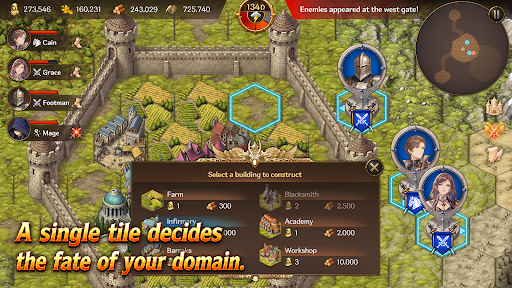
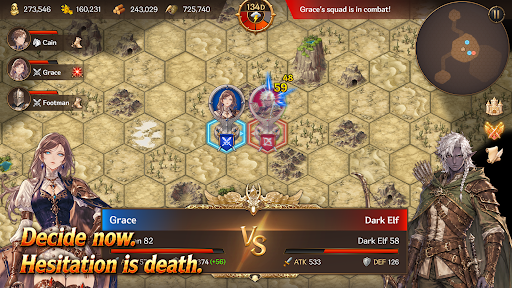
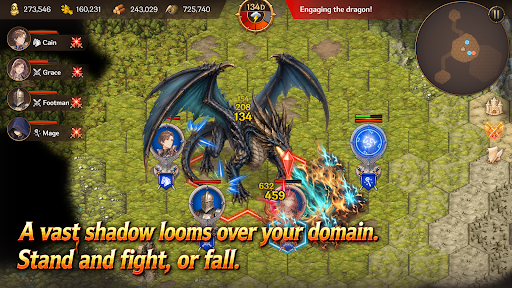
Defend Your Domain
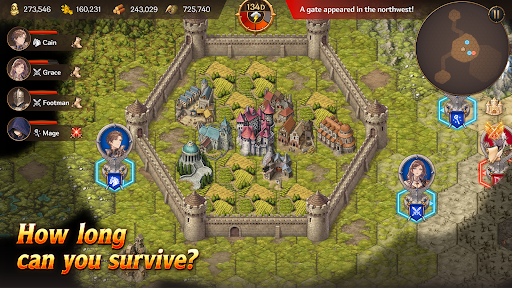
Hold on, My Lord! is a mobile survival strategy game that combines territory management, real-time strategy, and defense gameplay. Become a fallen lord, rebuild your domain, and survive against the monsters pouring out from mysterious Gates.
Strategy Defense
Endless waves of monsters emerge from mysterious Gates beyond your walls.
Organize squads with infantry, archers, cavalry, and mages, then defend your walls and gates against the enemy advance.
Defense alone will not be enough to survive. Sometimes, you must march beyond the walls, destroy the Gates, and eliminate the source of the threat.
Territory Management
Build structures such as farms, barracks, workshops, infirmaries, and walls on limited tiles.
Produce food and materials, assign citizens, and manage your domain efficiently.
Citizens are more than just numbers. They become workers, soldiers, and healers — the most vital resource responsible for the survival of your domain.
Heroes and Squads
Summon Heroes with unique abilities and assign them to your squads.
Your combat strategy changes depending on each Hero’s abilities and the composition of your units.
How you use powerful Heroes and squads can turn the tide of battle.
Gates and Artifacts
Gates are more than simple monster portals.
They are the central mystery connecting ruins, field bosses, and powerful Artifacts.
Explore ruins to obtain mighty Artifacts capable of turning the battle in your favor.
But the moment you claim an Artifact, an even greater danger may begin to hunt you down.
Field Bosses
Fail to stop the omens, and a massive field boss will appear.
Each boss has unique appearance conditions and powerful skills that can completely change the battlefield.
Defeat bosses and claim powerful rewards.
Key Features
A mobile strategy game combining territory management, RTS, and defense
Strategic building and resource management using limited tiles
Survival-focused management of citizens, soldiers, and healers
Real-time battles with infantry, archers, cavalry, and mages
Diverse strategies through Hero summoning and squad formation
Deep content connected through Gates, ruins, Artifacts, and field bosses
Replayable gameplay with Story Mode and Endless Mode
Your Choices Decide the Fate
Will you reinforce your walls or march beyond them?
Will you produce more food or train more soldiers?
Will you destroy the Gates or prepare for an even greater threat?
Now, defend the final domain of a fallen lord.
Pokaż więcej

1. Pobierz instalator MEmu i zakończ instalację

2. Uruchom MEmu, a następnie otwórz Google Play na pulpicie

3. Wyszukaj Hold on! Lord! w Google Play
Install
4. Pobierz i zainstaluj Hold on! Lord!
5. Po zakończeniu instalacji kliknij ikonę, aby rozpocząć

6. Ciesz się grą Hold on! Lord! na PC z MEmu
MEmu Play to najlepszy emulator Androida, a 100 milionów ludzi już korzysta z jego i dosta doskonałe wrażenia z gier na Androida. Technologia wirtualizacji MEmu umożliwia płynne granie w tysiące gier Androida na komputerze, nawet tych najbardziej wymagających grafiki.
Większy ekran z lepszą grafiką; Długi czas, bez ograniczeń baterii lub danych mobilnych.
Pełna obsługa mapowania klawiszy dla precyzyjnego sterowania klawiaturą i myszą lub gamepadem.
Wiele kont gier lub zadań na jednym komputerze jednocześnie z menedżerem wielu instancji.
Play Hold on! Lord! on PC by following steps: