Hold on! Lord!
อัปเดตเมื่อ
เวอร์ชันปัจจุบัน
ให้บริการโดย

เวลาคุณเล่น Hold on! Lord!, คุณอาจรู้สึกว่ามือคุณอาจบังจอแล้วทำให้ไม่ได้เล่นแบบเต็มที่. เล่นแบบไร้ขีดจำกัดด้วยเม้าส์และคีย์บอร์ด. MEmu มีตัวเลือกหลายอย่างให้คุณใช้งานเกมที่คุณเล่นแบบที่คุณต้องการ. ดาวน์โหลดและเล่น Hold on! Lord! บน PC. เล่นนานแค่ไหนก็ได้, ไม่ต้องชาร์จแบตเตอรี่, หรือเจอคนโทรเข้ามาระหว่างเล่น. MEmu 9 เป็นตัวเลือกสำหรับการเล่น Hold on! Lord! บน PC. ทางทีมงานเราได้ปรับแต่งเกม, ปรับให้เล่นเกมบางเกมได้เหมือนเล่น Hold on! Lord! เป็นเกม PC เช่นเล็งด้วยเม้าส์หรือใช้คีย์บอร์ด. ระบบของเรายังทำให้คุณสามารถเปิดเล่นได้มากกว่า 2 เกมพร้อมๆกันในคอมของคุณ. และที่สำคัญที่สุด, ระบบโปรแกรมของเราสามารถทำให้คุณใช้ระบบของ PC ทำให้เกมลื่นเหมือนกับใช้โทรศัพท์รุ่นล่าสุด. เราไม่ได้ดูแลเรื่องการเล่นเกม, แต่เราดูแลถึงความสนุกสนานที่คุณได้จากการเล่นด้วย.
แสดงเพิ่มเติม
ดาวน์โหลด Hold on! Lord! บน PC ด้วย MEmu Android Emulator สนุกกับการเล่นบนหน้าจอขนาดใหญ่ Defend Your Domain.
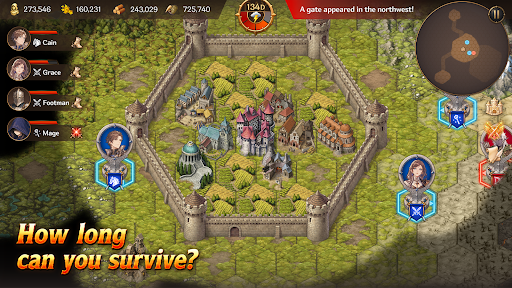
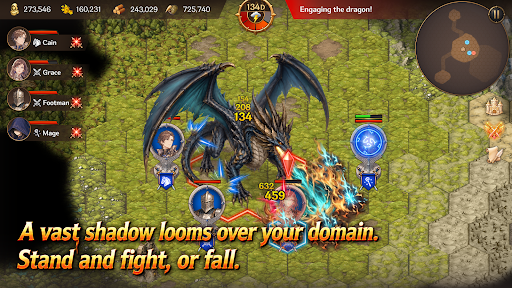
Defend Your Domain
Hold on, My Lord! is a mobile survival strategy game that combines territory management, real-time strategy, and defense gameplay. Become a fallen lord, rebuild your domain, and survive against the monsters pouring out from mysterious Gates.
Strategy Defense
Endless waves of monsters emerge from mysterious Gates beyond your walls.
Organize squads with infantry, archers, cavalry, and mages, then defend your walls and gates against the enemy advance.
Defense alone will not be enough to survive. Sometimes, you must march beyond the walls, destroy the Gates, and eliminate the source of the threat.
Territory Management
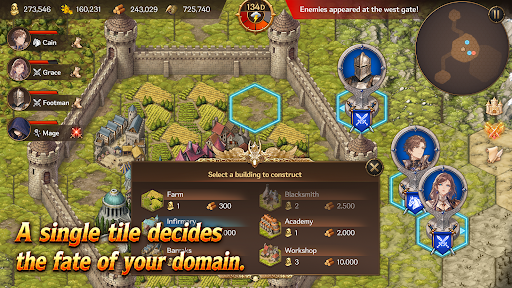
Build structures such as farms, barracks, workshops, infirmaries, and walls on limited tiles.
Produce food and materials, assign citizens, and manage your domain efficiently.
Citizens are more than just numbers. They become workers, soldiers, and healers — the most vital resource responsible for the survival of your domain.
Heroes and Squads
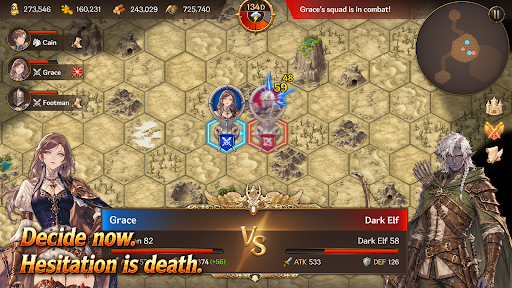
Summon Heroes with unique abilities and assign them to your squads.
Your combat strategy changes depending on each Hero’s abilities and the composition of your units.
How you use powerful Heroes and squads can turn the tide of battle.
Gates and Artifacts
Gates are more than simple monster portals.
They are the central mystery connecting ruins, field bosses, and powerful Artifacts.
Explore ruins to obtain mighty Artifacts capable of turning the battle in your favor.
But the moment you claim an Artifact, an even greater danger may begin to hunt you down.
Field Bosses
Fail to stop the omens, and a massive field boss will appear.
Each boss has unique appearance conditions and powerful skills that can completely change the battlefield.
Defeat bosses and claim powerful rewards.
Key Features
A mobile strategy game combining territory management, RTS, and defense
Strategic building and resource management using limited tiles
Survival-focused management of citizens, soldiers, and healers
Real-time battles with infantry, archers, cavalry, and mages
Diverse strategies through Hero summoning and squad formation
Deep content connected through Gates, ruins, Artifacts, and field bosses
Replayable gameplay with Story Mode and Endless Mode
Your Choices Decide the Fate
Will you reinforce your walls or march beyond them?
Will you produce more food or train more soldiers?
Will you destroy the Gates or prepare for an even greater threat?
Now, defend the final domain of a fallen lord.
แสดงเพิ่มเติม

1. ดาวน์โหลดตัวติดตั้ง MEmu และสิ้นสุดการติดตั้ง

2. เริ่ม MEmu จากนั้นเปิด Google Play บนหน้าแรก

3. ค้นหา Hold on! Lord! ใน Google Play
Install
4. ดาวน์โหลดและติดตั้ง Hold on! Lord!
5. เมื่อติดตั้งเสร็จให้คลิกที่ไอคอนเพื่อเริ่มใช้งาน

6. สนุกกับการเล่น Hold on! Lord! บนพีซีด้วย MEmu
MEmu App Player เป็นอีมูเลเตอร์ Android ที่ดีที่สุดและผู้คนกว่า 50 ล้านคนเพลิดเพลินไปกับประสบการณ์การเล่นเกม Android ที่ยอดเยี่ยม เทคโนโลยีการจำลองเสมือนของ MEmu ช่วยให้คุณเล่นเกม Android หลายพันเกมได้อย่างราบรื่นบนพีซีของคุณแม้แต่เกมที่ต้องใช้กราฟิกมากที่สุด
จอใหญ่และกราฟฟิกสวยกว่า; เล่นได้นาน, ไม่ต้องใช้แบตเตอรี่โทรศัพท์หรือเน็ตโทรศัพท์.
ระบบปรับแต่งปุ่มคีย์บอร์ดและเม้าส์ตามที่คุณเลือก
เล่นมากกว่าหนึ่งเกมบน PC ในเวลาเดียวกันด้วยระบบหลายจอหรือ Multi-Instance manager.
Play Hold on! Lord! on PC by following steps: