
MELTY BLOOD: TWI-LUMINA
Aggiornata
Versione corrente
Offerta da

Vista tutta la passione dimostrata nel giocare a MELTY BLOOD: TWI-LUMINA, le tue mani non dovrebbero essere limitate al minuscolo schermo di un telefono. Gioca come un professionista e ottieni il pieno controllo del gioco con tastiera e mouse. MEmu ti offre tutto ciò che ti aspetti. Scarica e gioca a MELTY BLOOD: TWI-LUMINA su PC. Gioca quanto vuoi, niente più limitazioni di batteria, dati mobili e chiamate inquietanti. Il nuovissimo MEmu 9 è la scelta migliore per giocare a MELTY BLOOD: TWI-LUMINA su PC. Realizzato sulla base della nostra esperienza, lo squisito sistema di mappatura dei tasti preimpostati rende MELTY BLOOD: TWI-LUMINA un vero e proprio gioco per PC. MEmu è un gestore multi-instanza che permette di giocare con 2 o più account sullo stesso dispositivo. E la cosa più importante, il nostro esclusivo motore di emulazione può liberare tutto il potenziale del tuo PC, rendendo tutto fluido.
Mostra altro
Scarica MELTY BLOOD: TWI-LUMINA su PC con MEmu Android Emulator. Divertiti giocando sul grande schermo. The latest entry in the best-selling MELTY BLOOD series from TYPE-MOON, set in the world of Tsukihime.
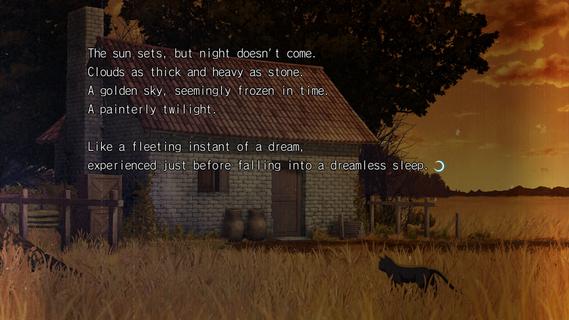

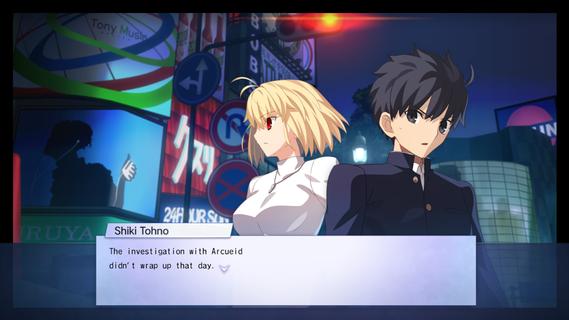
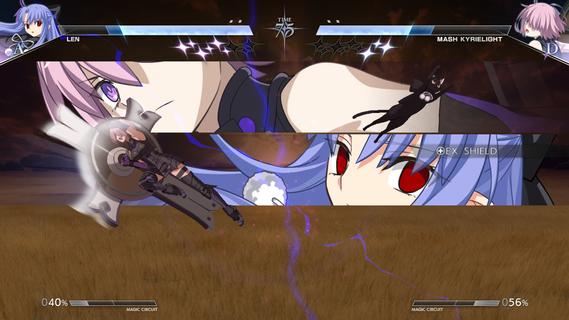
The latest entry in the best-selling MELTY BLOOD series from TYPE-MOON, set in the world of Tsukihime. With refined battle mechanics and new characters joining the fray, the moonlit mania enters the next stage.The cast of MELTY BLOOD: TYPE LUMINA enjoys an upgrade, plus a main story and new characters such as Len have been added! Not only that, the legendary Kinoko Nasu has woven a new tale centered around Shiki Tohno. Navigate Souya City as you progress through battles against various characters in the main story.As the newest installment in the series, this title builds on the classic 2D fighting feel while overhauling its systems on a large scale. Whether it's combo routing, defensive counters, or resource management, everything flows more smoothly and carries greater depth, allowing both veterans and newcomers to find their own combat rhythm. At the same time, the addition of multiple new characters injects fresh blood into the competitive landscape, with each fighter boasting a unique move set and fighting style.Beyond the battles themselves, this game also introduces a complete main story mode for the first time. Players will follow Shiki Tohno's perspective and embark on a brand-new adventure through Souya City. Along the way, you'll encounter a wide variety of characters, and every battle is more than just a contest of victory or defeatâit drives the story forward. The arrival of new characters such as Len also adds more suspense and emotion to this journey.For players who love the world of Tsukihime, this is not merely a fighting game, but a chance to return to a world both familiar and strange. Whether you're a longtime fan of the series or a newcomer to MELTY BLOOD, you'll find something to enjoy in this title.
Mostra altro

1. Scarica il programma di installazione di MEmu e completa l'installazione

2. Avvia il Memu e apri il Google Play sulla homepage

3. Cerca MELTY BLOOD: TWI-LUMINA in Google Play
Install
4. Scarica e installa MELTY BLOOD: TWI-LUMINA
5. Al termine dell'installazione, fai clic sull'icona per avviar

6. Divertiti giocando a MELTY BLOOD: TWI-LUMINA su PC con MEmu
MEmu App Player è il miglior emulatore Android gratuito, utilizzato da 50 milioni di persone per ottenere un'esperienza di gioco Android superba. La tecnilogia di virtualizzazione MEmu ti permette di giocare a migliaia di giochi Android con semplicità sul tuo computer, anche i giochi con la grafica più esigente.
Schermo più grande con una grafica migliore; Lunga durata, senza limitazione di batteria o dati mobili.
Supporto completo per mappa di tastiera per un controllo preciso di tastiera e mouse o gamepad.
Multipli account di gioco o attività su un singolo PC contemporaneamente con il gestore di multi istanza.
Play MELTY BLOOD: TWI-LUMINA on PC by following steps: