
MELTY BLOOD: TWI-LUMINA
อัปเดตเมื่อ
เวอร์ชันปัจจุบัน
ให้บริการโดย

เวลาคุณเล่น MELTY BLOOD: TWI-LUMINA, คุณอาจรู้สึกว่ามือคุณอาจบังจอแล้วทำให้ไม่ได้เล่นแบบเต็มที่. เล่นแบบไร้ขีดจำกัดด้วยเม้าส์และคีย์บอร์ด. MEmu มีตัวเลือกหลายอย่างให้คุณใช้งานเกมที่คุณเล่นแบบที่คุณต้องการ. ดาวน์โหลดและเล่น MELTY BLOOD: TWI-LUMINA บน PC. เล่นนานแค่ไหนก็ได้, ไม่ต้องชาร์จแบตเตอรี่, หรือเจอคนโทรเข้ามาระหว่างเล่น. MEmu 9 เป็นตัวเลือกสำหรับการเล่น MELTY BLOOD: TWI-LUMINA บน PC. ทางทีมงานเราได้ปรับแต่งเกม, ปรับให้เล่นเกมบางเกมได้เหมือนเล่น MELTY BLOOD: TWI-LUMINA เป็นเกม PC เช่นเล็งด้วยเม้าส์หรือใช้คีย์บอร์ด. ระบบของเรายังทำให้คุณสามารถเปิดเล่นได้มากกว่า 2 เกมพร้อมๆกันในคอมของคุณ. และที่สำคัญที่สุด, ระบบโปรแกรมของเราสามารถทำให้คุณใช้ระบบของ PC ทำให้เกมลื่นเหมือนกับใช้โทรศัพท์รุ่นล่าสุด. เราไม่ได้ดูแลเรื่องการเล่นเกม, แต่เราดูแลถึงความสนุกสนานที่คุณได้จากการเล่นด้วย.
แสดงเพิ่มเติม
ดาวน์โหลด MELTY BLOOD: TWI-LUMINA บน PC ด้วย MEmu Android Emulator สนุกกับการเล่นบนหน้าจอขนาดใหญ่ The latest entry in the best-selling MELTY BLOOD series from TYPE-MOON, set in the world of Tsukihime.
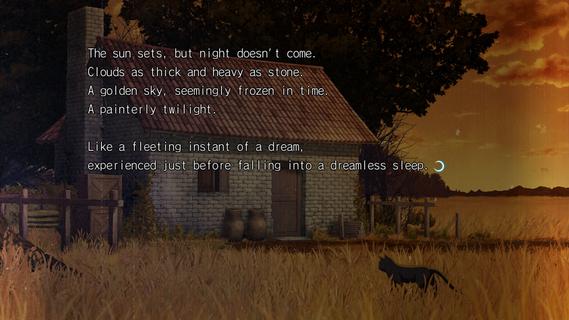

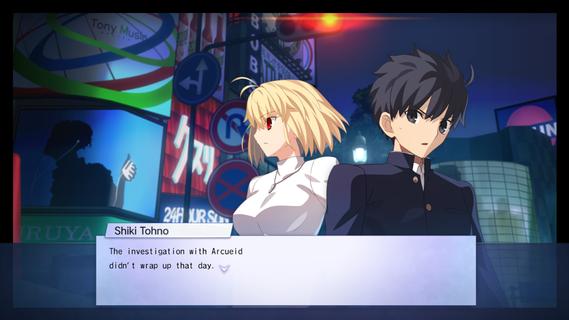
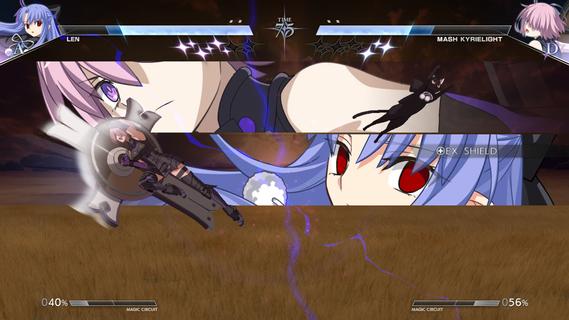
The latest entry in the best-selling MELTY BLOOD series from TYPE-MOON, set in the world of Tsukihime. With refined battle mechanics and new characters joining the fray, the moonlit mania enters the next stage.The cast of MELTY BLOOD: TYPE LUMINA enjoys an upgrade, plus a main story and new characters such as Len have been added! Not only that, the legendary Kinoko Nasu has woven a new tale centered around Shiki Tohno. Navigate Souya City as you progress through battles against various characters in the main story.As the newest installment in the series, this title builds on the classic 2D fighting feel while overhauling its systems on a large scale. Whether it's combo routing, defensive counters, or resource management, everything flows more smoothly and carries greater depth, allowing both veterans and newcomers to find their own combat rhythm. At the same time, the addition of multiple new characters injects fresh blood into the competitive landscape, with each fighter boasting a unique move set and fighting style.Beyond the battles themselves, this game also introduces a complete main story mode for the first time. Players will follow Shiki Tohno's perspective and embark on a brand-new adventure through Souya City. Along the way, you'll encounter a wide variety of characters, and every battle is more than just a contest of victory or defeatâit drives the story forward. The arrival of new characters such as Len also adds more suspense and emotion to this journey.For players who love the world of Tsukihime, this is not merely a fighting game, but a chance to return to a world both familiar and strange. Whether you're a longtime fan of the series or a newcomer to MELTY BLOOD, you'll find something to enjoy in this title.
แสดงเพิ่มเติม

1. ดาวน์โหลดตัวติดตั้ง MEmu และสิ้นสุดการติดตั้ง

2. เริ่ม MEmu จากนั้นเปิด Google Play บนหน้าแรก

3. ค้นหา MELTY BLOOD: TWI-LUMINA ใน Google Play
Install
4. ดาวน์โหลดและติดตั้ง MELTY BLOOD: TWI-LUMINA
5. เมื่อติดตั้งเสร็จให้คลิกที่ไอคอนเพื่อเริ่มใช้งาน

6. สนุกกับการเล่น MELTY BLOOD: TWI-LUMINA บนพีซีด้วย MEmu
MEmu App Player เป็นอีมูเลเตอร์ Android ที่ดีที่สุดและผู้คนกว่า 50 ล้านคนเพลิดเพลินไปกับประสบการณ์การเล่นเกม Android ที่ยอดเยี่ยม เทคโนโลยีการจำลองเสมือนของ MEmu ช่วยให้คุณเล่นเกม Android หลายพันเกมได้อย่างราบรื่นบนพีซีของคุณแม้แต่เกมที่ต้องใช้กราฟิกมากที่สุด
จอใหญ่และกราฟฟิกสวยกว่า; เล่นได้นาน, ไม่ต้องใช้แบตเตอรี่โทรศัพท์หรือเน็ตโทรศัพท์.
ระบบปรับแต่งปุ่มคีย์บอร์ดและเม้าส์ตามที่คุณเลือก
เล่นมากกว่าหนึ่งเกมบน PC ในเวลาเดียวกันด้วยระบบหลายจอหรือ Multi-Instance manager.
Play MELTY BLOOD: TWI-LUMINA on PC by following steps:


























![[ไกด์เกม] CookieRun Classic แนะนำ 5 คุกกี้น่าปั้น น่าลงทุน ที่มือใหม่ห้ามพลาด! (เล่นบน PC ผ่าน MEmu ให้ลื่นสุด ๆ) PC](https://www.memuplay.com/blog/wp-content/uploads/2026/08/579c01ab-a953-45b3-8115-9b6279b7d6f9.png)