Well Played Soccer
Aggiornata
Versione corrente
0.87.0
Offerta da

Vista tutta la passione dimostrata nel giocare a Well Played Soccer, le tue mani non dovrebbero essere limitate al minuscolo schermo di un telefono. Gioca come un professionista e ottieni il pieno controllo del gioco con tastiera e mouse. MEmu ti offre tutto ciò che ti aspetti. Scarica e gioca a Well Played Soccer su PC. Gioca quanto vuoi, niente più limitazioni di batteria, dati mobili e chiamate inquietanti. Il nuovissimo MEmu 9 è la scelta migliore per giocare a Well Played Soccer su PC. Realizzato sulla base della nostra esperienza, lo squisito sistema di mappatura dei tasti preimpostati rende Well Played Soccer un vero e proprio gioco per PC. MEmu è un gestore multi-instanza che permette di giocare con 2 o più account sullo stesso dispositivo. E la cosa più importante, il nostro esclusivo motore di emulazione può liberare tutto il potenziale del tuo PC, rendendo tutto fluido.
Mostra altro
Scarica Well Played Soccer su PC con MEmu Android Emulator. Divertiti giocando sul grande schermo. Game available in Early Access.
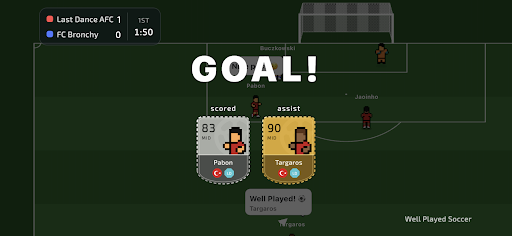
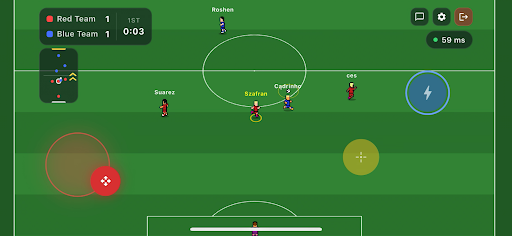
Game available in Early Access.
Join the football revolution. It's a completely new take on the beautiful game.
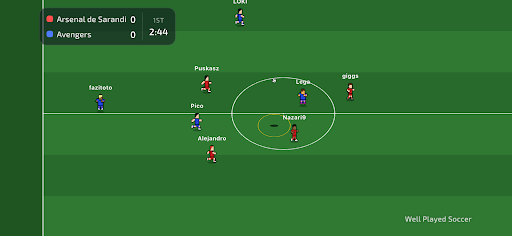
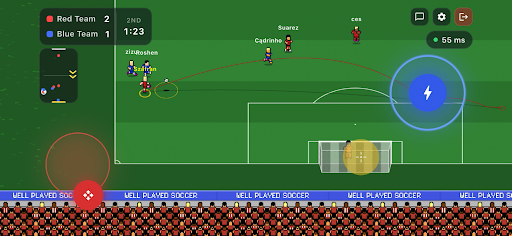
You control only your own player, join a team, and compete 3v3, 4v4 or 5v5 against real opponents on the other side.
Well Played Soccer is a 2.5D cooperative football multiplayer. The gameplay is fast-paced and demands sharp skill - but to reach the top, you'll need to form a team or join an existing one. Divide responsibilities on the pitch, sharpen your teamwork - that's the recipe for success.
Compete for ranking points against other teams and become the #1 team in the world!
Control One Player - You control just one footballer on the pitch. Every move matters.
Teamwork Wins Matches - Pass, move, support your teammates and create chances together.
True Multiplayer - Play online matches with real players - no bots, no scripts.
Retro Football Feel - Easy to learn, fast and engaging gameplay.
Play Together - Join matches, cooperate with others and build real teamwork.
Smart AI Goalkeepers - Goalkeepers are AI-controlled to keep matches balanced and fast.
The game is currently in Early Access. Short periods of downtime may occur. Gameplay mechanics may be subject to changes as the developers continuously gather and analyse community feedback.
Mostra altro

1. Scarica il programma di installazione di MEmu e completa l'installazione

2. Avvia il Memu e apri il Google Play sulla homepage

3. Cerca Well Played Soccer in Google Play
Install
4. Scarica e installa Well Played Soccer
5. Al termine dell'installazione, fai clic sull'icona per avviar

6. Divertiti giocando a Well Played Soccer su PC con MEmu
MEmu App Player è il miglior emulatore Android gratuito, utilizzato da 50 milioni di persone per ottenere un'esperienza di gioco Android superba. La tecnilogia di virtualizzazione MEmu ti permette di giocare a migliaia di giochi Android con semplicità sul tuo computer, anche i giochi con la grafica più esigente.
Schermo più grande con una grafica migliore; Lunga durata, senza limitazione di batteria o dati mobili.
Supporto completo per mappa di tastiera per un controllo preciso di tastiera e mouse o gamepad.
Multipli account di gioco o attività su un singolo PC contemporaneamente con il gestore di multi istanza.
Play Well Played Soccer on PC by following steps: