Well Played Soccer
Diupdate
Versi Saat Ini
0.87.0
Ditawarkan Oleh

Dengan sepenuh kebulatan hati Anda dalam memainkan Well Played Soccer, tangan Anda tak seharusnya hanya terbatas pada layar kecil handphone Anda.Bermainlah layaknya seorang profesional dan dapatkan kendali penuh dalam permainan Anda dengan papan ketik dan tetikus.MEmu menawarkan seluruh hal yang Anda harapkan.Unduh dan mainkan Well Played Soccer pada PC. Bermainlah selama yang Anda inginkan, tanpa keterbatasan dari baterai, data seluler dan panggilan yang mengganggu.MEmu 9 baru merupakan pilihan terbaik untuk memainkan Well Played Soccer pada PC. Dipersiapkan bersama teknologi ahli kami, sistem pemetaan kunci preset yang canggih menjadikan Well Played Soccer sebagai permainan PC sejati.Manajer banyak hal dari MEmu memungkinkan Anda untuk memainkan 2 atau banyak akun pada perangkat yang sama.Dan yang terpenting, mesin emulasi eksklusif kami bisa melepaskan potensi penuh PC Anda, membuat segalanya berjalan lancar.
Tampilkan Lebih banyak
Unduh Well Played Soccer di PC dengan Emulator Android MEmu. Nikmati permainan pada layar yang besar. Game available in Early Access.
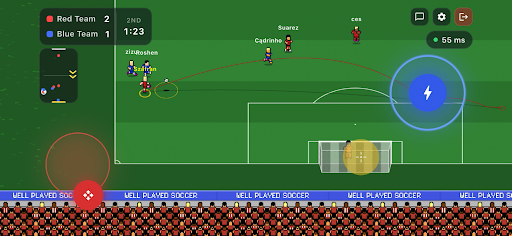
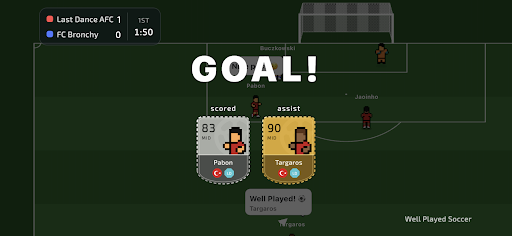
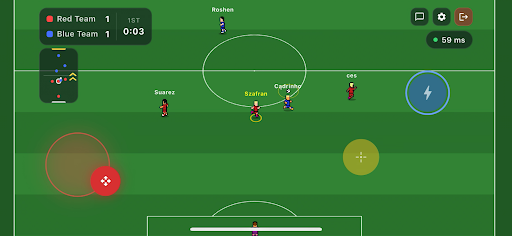
Game available in Early Access.
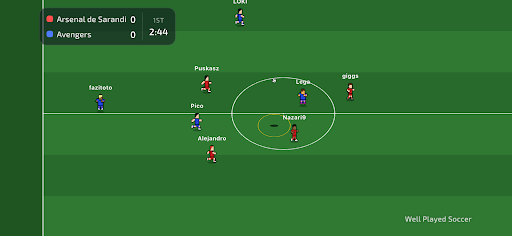
Join the football revolution. It's a completely new take on the beautiful game.
You control only your own player, join a team, and compete 3v3, 4v4 or 5v5 against real opponents on the other side.
Well Played Soccer is a 2.5D cooperative football multiplayer. The gameplay is fast-paced and demands sharp skill - but to reach the top, you'll need to form a team or join an existing one. Divide responsibilities on the pitch, sharpen your teamwork - that's the recipe for success.
Compete for ranking points against other teams and become the #1 team in the world!
Control One Player - You control just one footballer on the pitch. Every move matters.
Teamwork Wins Matches - Pass, move, support your teammates and create chances together.
True Multiplayer - Play online matches with real players - no bots, no scripts.
Retro Football Feel - Easy to learn, fast and engaging gameplay.
Play Together - Join matches, cooperate with others and build real teamwork.
Smart AI Goalkeepers - Goalkeepers are AI-controlled to keep matches balanced and fast.
The game is currently in Early Access. Short periods of downtime may occur. Gameplay mechanics may be subject to changes as the developers continuously gather and analyse community feedback.
Tampilkan Lebih banyak

1. Unduh dan instal MEmu APP

2. Menjalankan MEmu lalu buka Google Play di halaman

3. Cari Well Played Soccer di Google Play
Install
4. Unduh dan instal Well Played Soccer
5. Setelah insatl APP selesai,klik ikon untuk mulai

6. Nikmati bermain Well Played Soccer di PC dengan MEmu
MEmu App Player adalah emulator Android gratis terbaik dan 50 Juta orang sudah menikmati pengalaman luar biasa dalam bermain gim Android. Teknologi virtualisasi MEmu memberi kekuasaan untuk memainkan ribuan gim Android dengan lancar di PC anda, bahkan gim dengan grafis yang paling tinggi.
Layar lebih besar dengan grafis yang lebih baik; durasi panjang, tanpa batasan baterai atau data seluler.
Didukung penuh oleh Pemetaan tombol yang lengkap untuk keakuratan kontrol keyboard dan mouse maupun gamepad.
Membuka beberapa akun game atau tugas di waktu yang sama hanya pada satu PC, dengan Multi-Instance manager.
Play Well Played Soccer on PC by following steps: