
Well Played Soccer
Aktualisiert
Aktuelle Version
0.87.0
Angeboten von

Bei all Ihrer Leidenschaft für das Spielen von Well Played Soccer sollten Ihre Hände nicht auf einen winzigen Bildschirm Ihres Telefons beschränkt sein. Spielen Sie wie ein Profi und übernehmen Sie die volle Kontrolle über Ihr Spiel mit Tastatur und Maus. MEmu bietet Ihnen all die Dinge, die Sie erwarten. Laden Sie Well Played Soccer herunter und spielen Sie es auf dem PC. Spielen Sie so lange, wie Sie wollen, ohne Grenzwerte für Akku, mobile Daten und störende Anrufe. Das brandneue MEmu 9 ist die beste Wahl, um Well Played Soccer auf dem PC zu spielen. Das exquisite voreingestellte Tastaturbelegungssystem, das mit unserem Fachwissen vorbereitet wurde, macht Well Played Soccer zu einem echten PC-Spiel. Der MEmu Multi-Instanz-Manager ermöglicht das Spielen von 2 oder mehr Konten auf demselben Gerät. Und das Wichtigste: Unsere exklusive Emulations-Engine kann das volle Potenzial Ihres PCs freisetzen und für reibungslose Abläufe sorgen.
Mehr anzeigen
Laden Sie Play Well Played Soccer auf dem PC mit MEmu Android Emulator. Viel Spaß beim Spielen auf großmundieren. Game available in Early Access.
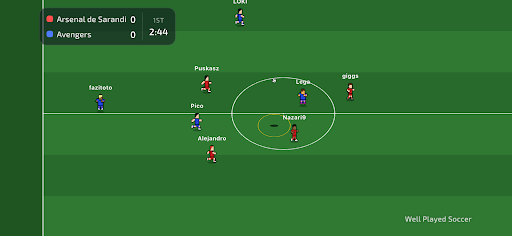
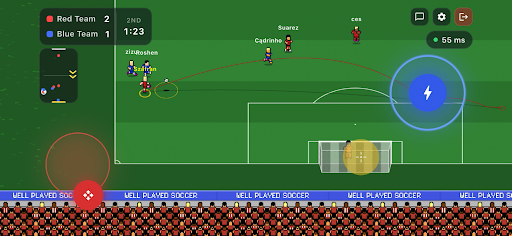
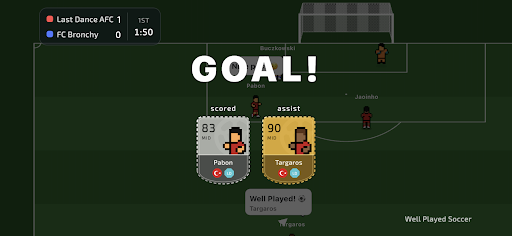
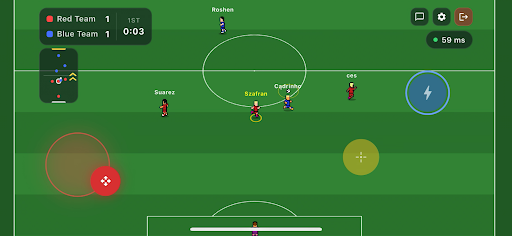
Game available in Early Access.
Join the football revolution. It's a completely new take on the beautiful game.
You control only your own player, join a team, and compete 3v3, 4v4 or 5v5 against real opponents on the other side.
Well Played Soccer is a 2.5D cooperative football multiplayer. The gameplay is fast-paced and demands sharp skill - but to reach the top, you'll need to form a team or join an existing one. Divide responsibilities on the pitch, sharpen your teamwork - that's the recipe for success.
Compete for ranking points against other teams and become the #1 team in the world!
Control One Player - You control just one footballer on the pitch. Every move matters.
Teamwork Wins Matches - Pass, move, support your teammates and create chances together.
True Multiplayer - Play online matches with real players - no bots, no scripts.
Retro Football Feel - Easy to learn, fast and engaging gameplay.
Play Together - Join matches, cooperate with others and build real teamwork.
Smart AI Goalkeepers - Goalkeepers are AI-controlled to keep matches balanced and fast.
The game is currently in Early Access. Short periods of downtime may occur. Gameplay mechanics may be subject to changes as the developers continuously gather and analyse community feedback.
Mehr anzeigen

1. Laden das MEmu-Installationsprogramm herunter und beenden die Installation

2. MEmu starten und Google Play auf der Homepage öffnen

3. Suchen Well Played Soccer in Google Play
Install
4. Herunterladen und Installieren Well Played Soccer
5. Klicken nach Abschluss der Installation auf das Symbol, um es zu starten

6. Viel Spaß beim Spielen von Well Played Soccer auf dem PC mit MEmu
MEmu App Player ist der beste kostenlose Android-Emulator und 50 Millionen Menschen genießen bereits seine hervorragende Android-Gaming-Erfahrung. Mit der MEmu-Virtualisierungstechnologie können Sie Tausende von Android-Spielen problemlos auf Ihrem PC spielen, selbst bei grafikintensiven Spielen.
BGrößeres Bild mit besserer Grafik; Keine unterbrechungen, keine sorgen um Akku
Komplette Tastenbelegung unterstützt mit Maus und Tastatur oder Controller
Mit dem „Multi-Instance-Manager“ können Sie mehrere Spielkonten oder Spiele gleichzeitig auf einem PC ausführen.
Play Well Played Soccer on PC by following steps: